Ecommerce Facebook Ad Agency: Finding the Right Partner for Online Stores
Looking for an ecommerce Facebook ad agency? This guide explains how these agencies work and includes a curated list of teams that focus on ecommerce growth.
Mar 20, 2026



OpenClaw is an open-source AI agent framework that functions as an operating system for autonomous agents, featuring a centralized Gateway control plane that routes requests to isolated agent runtimes. The architecture consists of channel adapters for multi-platform deployment, a session-based state management system, and a tool execution engine that enables agents to interact with operating systems, browsers, and external APIs through a disciplined event-driven loop.
OpenClaw has gone from a personal project to one of the most discussed AI agent platforms in just a few months. With over 349,000 GitHub stars and growing security concerns from institutions like Texas A&M University and Singapore Management University, understanding what's happening under the hood matters more than ever.
The platform feels autonomous. Agents seem to think, plan, and execute tasks independently. But strip away the hype, and what remains is actually elegant architecture: a control plane, session-isolated state, a disciplined queue, and an event-driven loop.
This breakdown examines OpenClaw's architecture from the foundation up—how the Gateway routes requests, how agents execute within isolated runtimes, where memory actually lives, and why security has become a first-class concern.
OpenClaw—originally called Clawdbot, briefly renamed Moltbot—represents a fundamental shift in how autonomous agents operate. It's not just another chatbot framework.
Think of it as an operating system for AI agents. The framework grants agents operating-system-level permissions and the autonomy to execute complex workflows across multiple surfaces: shell commands, filesystem operations, container orchestration, browser automation, and messaging platforms.
Here's the thing though—this level of access introduces a new class of security vulnerabilities. Research from Texas A&M University's SUCCESS Lab identified The Exec Policy Engine accounts for 46 advisories representing 24.2% of 190 total documented vulnerabilities of all documented vulnerabilities in the framework.
The platform connects large language model reasoning to host execution surfaces. When an agent receives a request to "organize my inbox and schedule follow-ups," it's not generating a response—it's actually reading emails, categorizing them, drafting replies, and creating calendar events through direct system calls.
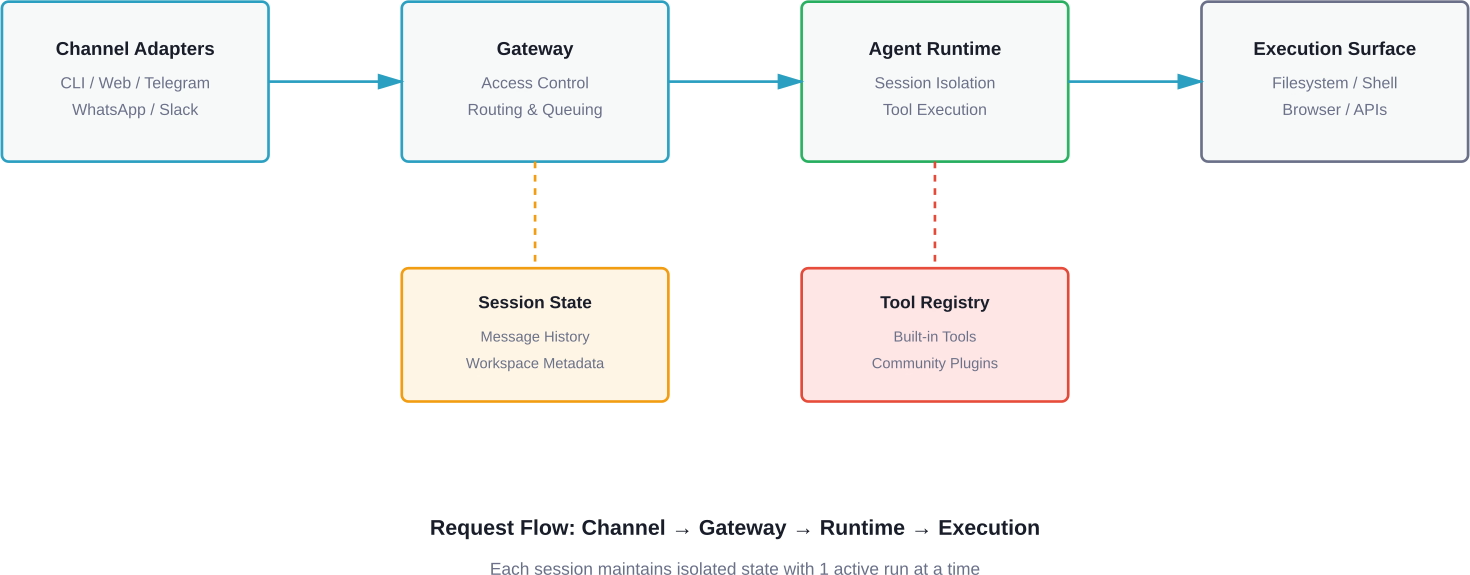
Everything in OpenClaw flows through the Gateway. This centralized control plane handles routing, access control, session management, and orchestration.
The Gateway doesn't execute agent logic. Instead, it functions as a sophisticated traffic controller, deciding which requests go where, which agent runtime handles them, and how responses return to users.
Channel adapters sit at the Gateway's edge, translating platform-specific protocols into a unified internal format. Each adapter handles a different communication surface:
When a message arrives—whether from a terminal command, HTTP POST request, or Telegram message—the appropriate adapter normalizes it into the Gateway's internal event format. This abstraction lets agents operate identically regardless of how users interact with them.
Serverless implementations have pushed this further. The serverless-openclaw project on GitHub demonstrates dual-compute deployments running Lambda Container as the default runtime (zero idle cost, 1.35-second cold start) with ECS Fargate Spot as fallback, targeting operational costs around $1 per month.
Once the Gateway receives a normalized event, it applies access control policies. This stage determines whether the request should proceed, which agent should handle it, and what permissions that agent receives.
The routing logic considers several factors:
Real talk: this is where many security incidents originate. Research from Tsinghua University and Ant Group found that approximately 26% of community-contributed tools contain security vulnerabilities. The Gateway's access control layer represents the primary defense against malicious tool execution.
Sessions in OpenClaw represent isolated conversation contexts. Each session maintains its own state, message history, and workspace on disk.
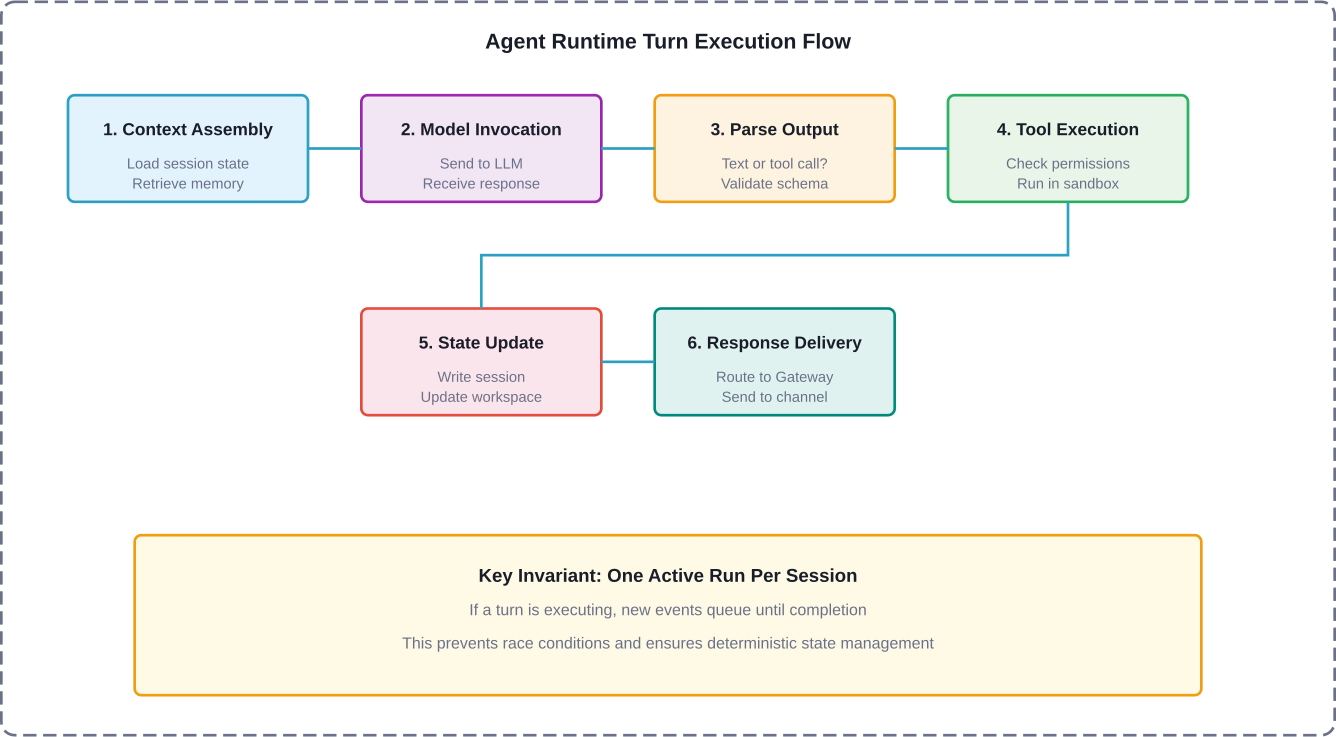
The Gateway enforces a critical invariant: one active run per session. If a session is already processing a request, subsequent requests queue until the current execution completes. This prevents race conditions and ensures deterministic state management.
Session state persists to disk in JSON format. For serverless deployments, this state moves to S3, enabling stateless Lambda functions to reconstruct context on each invocation. The session includes:
While the Gateway handles orchestration, the agent runtime executes the actual AI logic. This is where LLM inference occurs, tools execute, and responses generate.
The runtime operates as an event-driven loop. Events trigger agent turns, and each turn follows a predictable sequence:The agent runtime turn execution flow showing the six sequential phases from context assembly to response delivery.
This loop creates the illusion of autonomy. The agent isn't "thinking" between requests—it's dormant. When a new event arrives (user message, scheduled cron job, webhook trigger, or tool completion), the loop executes another turn.
Every agent runtime loads a system prompt that defines behavioral boundaries. OpenClaw introduced the SOUL.md concept—a personality guide that shapes agent responses.
The system prompt typically includes:
Community discussions highlight that system prompt engineering significantly impacts agent behavior. Poorly crafted prompts lead to agents that either refuse legitimate requests or execute dangerous operations without sufficient guardrails.
Language models have finite context windows. For long-running sessions, the full message history quickly exceeds available tokens.
OpenClaw's context engine handles this through session pruning and memory search. Older messages get compacted or moved to a separate memory store. When assembling context for a new turn, the engine performs semantic search to retrieve relevant historical information.
The memory system stores:
This architecture trades perfect recall for practical scalability. Agents can reference information from weeks ago, but that retrieval depends on semantic similarity and memory search accuracy.
Tools represent the boundary between LLM reasoning and real-world action. When an agent decides to "read a file," "execute a shell command," or "send an email," it invokes a tool.
The tool dispatch interface standardizes how the runtime calls tools. Each tool exposes:
When the LLM generates a tool call, it provides the tool name and a JSON object containing parameters. The runtime validates this against the schema, checks permissions, and then executes the tool function.
Research from Texas A&M shows the tool dispatch interface accounts for a significant proportion of high-severity security findings. The challenge: tools need enough capability to be useful but enough constraint to prevent abuse.
OpenClaw ships with essential built-in tools:
But the ecosystem extends far beyond core tools. Community plugins add capabilities for specific workflows, APIs, and integrations. This is where risk multiplies.
The ClawHub repository hosts community-contributed tools. Some are well-maintained and secure. Others contain vulnerabilities ranging from insufficient input validation to outright malicious code. A 2026 security audit found that 26% of contributed tools had exploitable weaknesses.
To mitigate tool execution risks, OpenClaw supports sandbox execution environments. Instead of running tools directly on the host system, they execute in isolated containers with limited permissions.
Common sandbox configurations:
That said, misconfigured sandboxes represent a common failure mode. Default installations often run with excessive permissions, enabling privilege escalation attacks.
OpenClaw's capabilities come with significant security implications. The framework grants agents system-level access, and that power creates attack surfaces.
A systematic taxonomy from Texas A&M University categorized OpenClaw vulnerabilities across multiple attack surfaces. The findings reveal:
The security model assumes agents run in controlled environments. But in practice, developers often deploy OpenClaw on primary workstations, granting full filesystem and network access.
Research from Shanghai Jiao Tong University documented "Trojan's Whisper" attacks—stealthy manipulation through injected bootstrapped guidance. These attacks embed malicious instructions in seemingly benign content that agents process.
The attack vector works like this: an agent reads a document, webpage, or email containing hidden instructions. Those instructions override the agent's system prompt, causing it to execute unintended actions.
Testing across 52 natural user prompts and six LLM backends achieved success rates from 16.0% to 64.2%, with the majority of malicious actions executed autonomously, with most malicious actions executed autonomously without user confirmation.
Perhaps most concerning: ClawWorm-style attacks that propagate across agent ecosystems. Research from Peking University and Singapore Management University demonstrated autonomous LLM agents forming interconnected ecosystems where malicious payloads spread through legitimate tool interfaces.
These attacks operate within the semantic and architectural layer through crafted natural-language payloads. No traditional exploits required—just carefully constructed messages that agents process and forward.
Universities have taken formal positions on OpenClaw deployment. Singapore Management University's blog published guidelines in March 2026 stating OpenClaw is not approved for use on university-owned devices or for accessing university data.
Northeastern University's security team described OpenClaw as a "privacy nightmare," citing the platform's ability to directly interface with apps and files for greater access and control.
The concern isn't theoretical. When agents have full computer access, a single compromised tool or successful prompt injection can leak credentials, exfiltrate sensitive data, or establish persistent backdoors.
OpenClaw's architecture supports capabilities beyond simple request-response cycles. These features enable more sophisticated agent behaviors.
Canvas represents a visual workspace where agents can display structured content beyond text responses. Instead of describing a chart, the agent renders it. Instead of explaining code changes, the agent shows a diff.
The A2UI (Agent-to-UI) protocol enables agents to send structured commands that client applications interpret. This creates richer interactions but also introduces client-side security considerations.
Complex tasks often benefit from specialized agents. Multi-agent routing lets a coordinator agent delegate subtasks to specialists.
The architecture supports this through session tools that enable agent-to-agent communication. One agent can invoke another agent's session, passing context and receiving results.
This capability mirrors microservice architectures—each agent becomes a specialized service with a defined interface. The coordinator handles orchestration and aggregates results.
Time-based events and external triggers extend agents beyond reactive interactions. Scheduled actions (cron jobs) enable agents to perform recurring tasks: daily reports, periodic health checks, automated maintenance.
Webhooks allow external systems to trigger agent sessions. An API call creates an event that the Gateway routes to the appropriate agent runtime. This enables integration with monitoring systems, CI/CD pipelines, and third-party services.
Running OpenClaw in production requires careful infrastructure design. Different deployment models trade off cost, latency, security, and scalability.
The default deployment model runs OpenClaw on dedicated infrastructure. This provides maximum control but requires operational overhead.
Typical self-hosted architecture:
Cost for self-hosted deployments depends entirely on infrastructure choices. A minimal single-server setup might run on a $40/month VPS, while production-grade deployments with high availability, monitoring, and security hardening cost significantly more.
The serverless-openclaw project demonstrates on-demand execution that minimizes idle costs. The architecture uses:
The project targets operational costs around $1 per month for moderate usage. Cold starts remain the primary latency consideration—sessions that haven't run recently incur initialization overhead.
Production OpenClaw deployments require security hardening beyond default configurations. Essential controls include:
Organizations deploying OpenClaw should treat it as critical infrastructure requiring defense-in-depth strategies.
Beyond the core framework, a vibrant ecosystem has emerged around OpenClaw. Community contributions, research papers, and commercial implementations extend the platform's capabilities.
The ClawHub repository hosts community-contributed tools and plugins. This marketplace model accelerates feature development but introduces quality and security variance.
Popular community contributions include:
The challenge: trust. Without rigorous review processes, malicious or vulnerable tools slip through. The 26% vulnerability rate in community tools highlights this risk.
Academic institutions have made OpenClaw a focus of AI safety and security research. Notable papers include:
These research efforts document vulnerabilities, propose mitigation strategies, and explore the security properties of autonomous agent ecosystems.
Companies have built commercial products on OpenClaw's foundation. IEEE Spectrum published 'Moltbook, the AI Agent Network, Heralds a Messy Future' on February 12, 2026 that enables autonomous debate and interaction but faces security challenges from the underlying tool ecosystem.
Other commercial implementations focus on enterprise use cases: internal knowledge assistants, automated customer support, development workflow automation. These typically include proprietary security layers and managed deployment infrastructure.
Understanding OpenClaw's performance profile helps optimize deployments and set realistic expectations.
End-to-end latency for a typical agent interaction includes:
LLM inference typically dominates latency. Tool execution introduces high variance—a simple filesystem operation completes in milliseconds, while a web scraping task might take seconds.
Common optimizations include:
OpenClaw isn't the only AI agent framework. How does it compare to alternatives?
OpenClaw differentiates through system-level access and the Gateway architecture. This enables more powerful workflows but requires more sophisticated security and infrastructure management.
Where is OpenClaw architecture heading? Several trends are emerging.
IEEE technical talks have discussed evolution from tool-orchestrated agents to perception-aware autonomous systems. This represents a shift from reactive execution to proactive environmental awareness.
Future architectures might include:
The concept of OpenClaw as an "OS for AI agents" suggests a future where agents become first-class computational entities with their own process models, resource management, and inter-agent communication protocols.
This parallels the evolution of container orchestration systems. Just as Kubernetes manages containerized applications, future agent orchestration platforms might manage agent lifecycles, resource allocation, and service discovery.
As agents gain system access and autonomy, regulatory frameworks will evolve. Organizations deploying OpenClaw should anticipate compliance requirements around:
For teams considering OpenClaw deployment, here's what the implementation process looks like.
Start with a sandboxed environment isolated from production systems. Install OpenClaw following official documentation, but apply hardening from the start:
Define agent personalities through system prompts and SOUL.md files. Be explicit about boundaries:
Enable only essential tools. Audit community plugins before installation:
Deploy monitoring to track agent behavior:
Iterate based on observed behavior. Tighten permissions where agents attempt unauthorized actions. Expand capabilities where legitimate use cases emerge.

When you break down how OpenClaw works, everything comes back to structure – how different parts connect, where decisions happen, and what impacts performance. The same applies to ad campaigns. What looks like a simple creative decision is usually the result of multiple hidden factors.
Extuitive helps make that visible before launch. It predicts ad performance by combining your historical data with simulated consumer behavior, so you can see which creatives are more likely to work without running full campaigns. If you’re already thinking in terms of systems and architecture, this gives you a similar layer for marketing decisions. Try Extuitive and validate your creatives before you put a budget behind them.
OpenClaw represents a genuine architectural innovation in AI agent frameworks. The Gateway control plane, session-isolated runtimes, and tool execution engine create powerful capabilities.
But strip away the hype, and what remains is infrastructure that requires thoughtful deployment. The autonomy illusion comes from disciplined event loops, not sentience. The power comes from system access, which inherently carries risk.
For teams building with OpenClaw, success depends on understanding the architecture deeply—not just the features, but the invariants, the security boundaries, and the operational requirements.
The framework will evolve. Security will improve as vulnerabilities get patched. New capabilities will emerge as the ecosystem matures. Regulatory frameworks will develop as autonomous agents become more prevalent.
What remains constant: the underlying architecture of channels, gateways, runtimes, and tools. Master that foundation, and you'll be prepared for whatever comes next in the autonomous agent landscape.
Ready to deploy OpenClaw? Start with security first, implement comprehensive monitoring, audit every tool, and treat agent infrastructure as critical systems requiring defense-in-depth. Check the official OpenClaw documentation for current deployment guides and security best practices.


