Best AI Tools That Make Running an Ecommerce Store Easier in 2026
Explore how AI tools help online stores with content creation, image editing, customer support, and marketing tasks to save time and improve daily operations.
Jan 8, 2026



Google doesn't offer a built-in toggle to disable AI Overviews, but several workarounds exist. Users can add '&udm=14' to the search URL, install browser extensions that filter AI results, append 'web' to queries, or switch to alternative search engines. These methods range from simple URL modifications to complete search engine alternatives.
Google's AI Overviews have become a persistent presence in search results. These AI-generated summaries appear at the top of search pages, powered by Google's Gemini language model, pulling together information from multiple sources into a single snapshot.
But here's the thing—not everyone wants them. Some users find these AI summaries disruptive, preferring traditional organic search results. Others question their accuracy or simply want more control over their search experience.
The frustrating part? Google hasn't provided a native off switch. According to multiple Google Support Community threads, there's no official setting to disable AI Overviews permanently. The feature rolls out automatically when Google's systems determine generative AI might be "especially helpful" for a query.
That said, workarounds exist. And they're surprisingly effective.
The simplest way to bypass AI Overviews involves a URL modification. Adding a specific parameter to Google's search URL removes the AI-generated content entirely.
After performing any Google search, look at the URL in your browser's address bar. It'll look something like this: https://www.google.com/search?q=your+search+term
Add &udm=14 to the end: https://www.google.com/search?q=your+search+term&udm=14
The AI Overview disappears. What remains are traditional blue links—the classic Google search experience from before generative AI integration.
This parameter works consistently as of April 2026, according to multiple community discussions on Reddit and support forums.
The downside? It's not persistent. Each new search requires manually adding the parameter again, unless you bookmark a modified search URL or use a browser extension that automates the process.

Several browser extensions now filter out AI Overviews automatically. These tools modify search results in real-time, removing not just AI summaries but often other elements like ads and discussion panels.
One popular option is "Bye Bye, Google AI" for Chrome, which has approximately 100,000 users according to the Chrome Web Store listing. The extension filters Google search results to hide AI Overviews, ads, discussions, or videos based on user preferences.
Users choose which elements to block through a simple settings panel. The extension works passively in the background—no manual URL editing required for each search.
Opera users have reported similar functionality through third-party extensions, though native Opera solutions remain limited. According to Opera forums, some users have successfully adapted Chrome extensions for Opera's Chromium-based browser.
The main advantage here is persistence. Install once, configure preferences, and AI Overviews stay hidden across all future searches. No repeated manual intervention.
A simpler alternative involves adding a specific word to search queries. According to Wired reporting from 2026, typing "–ai" at the end of your search query can suppress AI Overviews.
Instead of searching for "best restaurants in Seattle," search for "best restaurants in Seattle –ai."
The results? Mixed. This workaround's effectiveness may vary by query type. Google's systems determine when to show AI Overviews based on query complexity and intent, and query modifiers don't guarantee suppression.
User reports on Reddit suggest variable results with this method. Some users report success, others see no difference.
Worth trying for quick searches, but not dependable as a long-term solution.
The most drastic option—and arguably the most reliable—is abandoning Google for alternative search engines that don't employ AI summaries.
Several competitors have positioned themselves as "AI-free" alternatives. DuckDuckGo, Bing (when AI features are disabled), and specialized search engines provide traditional link-based results without generative AI interference.
Setting a different default search engine takes minutes:
The trade-off involves giving up Google's search index and ranking algorithms, which many consider superior for certain query types. For users who prioritize traditional search results over cutting-edge features, the swap makes sense.
Mobile users face additional challenges. The URL parameter method works on mobile browsers, but manual URL editing on small screens proves cumbersome.
Browser extensions have limited availability on mobile platforms. Chrome for Android supports some extensions, but the selection is restricted compared to desktop. While iOS Safari does not support Chrome (.crx) extensions directly, it has its own robust ecosystem of native Safari Web Extensions available via the App Store that can modify Google search results.
For iPhone and Android users, the most practical options become:
Mobile workarounds generally require more manual intervention than desktop solutions. The mobile web browsing experience offers fewer customization options overall.
Google's official support documentation doesn't explain why no native disable option exists. However, the company's gradual rollout strategy suggests AI Overviews represent a strategic product direction rather than an optional feature.
Google Search is "gradually making AI Overviews available to more users, in more languages and regions," according to official help documentation. The feature appears when Google's systems determine generative AI would be "especially helpful" for specific queries.
From a product perspective, offering an easy toggle would allow users to opt out en masse, undermining adoption metrics and reducing the feedback data needed to improve the AI system. By making AI Overviews the default—with no simple off switch—Google ensures widespread exposure and data collection.
The official stance acknowledges that "AI responses may include mistakes" and points users toward learning about generative AI limitations. But no official documentation mentions disabling the feature entirely.
Google's AI Overviews represent the company's vision for search's future. But that vision doesn't align with everyone's preferences or needs.
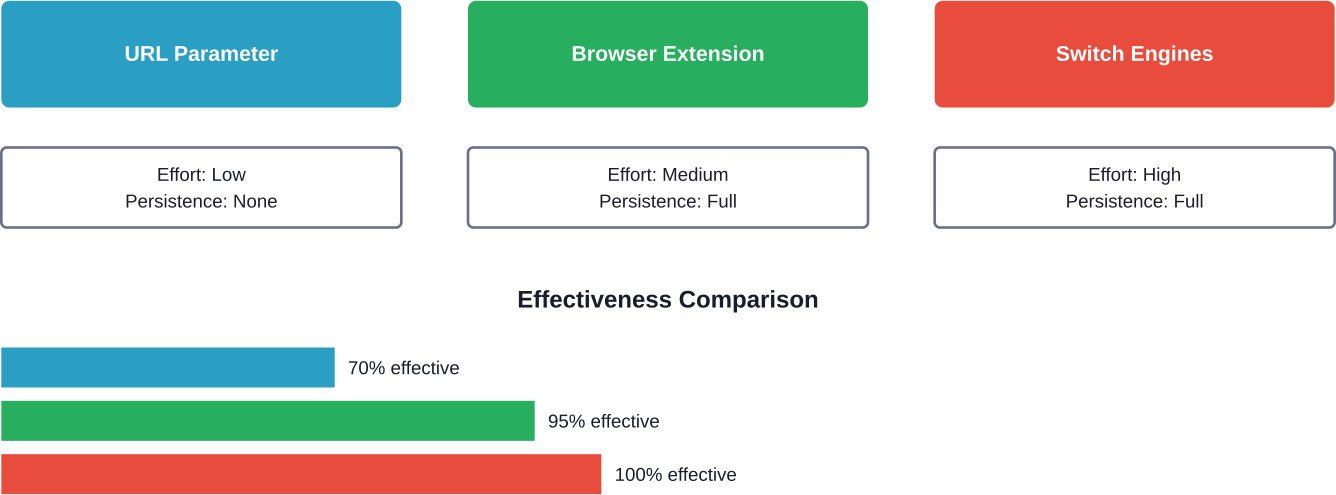
The good news? Effective workarounds exist. Whether through URL parameters, browser extensions, or switching search engines entirely, users can reclaim a traditional search experience.
The &udm=14 method works immediately and requires zero installation. Browser extensions provide set-and-forget convenience. Alternative search engines offer complete freedom from Google's AI experimentation.
Choose the approach that matches your technical comfort level and how much control you want. Test multiple methods to find what works best for your search habits.
And if none of these solutions satisfy? Keep an eye on Google's official support channels. User feedback does influence product development, even if slowly. Enough demand for an official toggle might eventually shift Google's position.
Until then, these workarounds deliver what Google won't: choice.


