Best AI Tools for Digital Marketing That Actually Make a Difference
Explore the best AI tools for digital marketing, from ad optimization to content and analytics, and find what actually works in real campaigns.
Apr 13, 2026



Getting into SMS marketing sounds easy – just send a text and wait, right? But making it work inside Shopify takes a little more planning. You’re dealing with real people, their phones, and expectations around timing, privacy, and tone. This guide walks through how to actually get it running inside Shopify, without overcomplicating the process or wasting your message budget. Whether you’re just curious or ready to start texting your customers, we’ll break it down in plain terms.
Before setting anything up, it helps to understand the role SMS plays in a marketing mix.
Email is great for long-form content, product launches, and storytelling. But inboxes are crowded, and not everyone checks their email daily. SMS, on the other hand, gets read. Fast. People usually see a text within minutes.
That makes it ideal for time-sensitive promotions, flash sales, and personal reminders. For behavior-based flows like cart reminders, you’ll need third-party SMS apps.
SMS is not just another email. It’s short, direct, and personal. You’re showing up in the same app as someone’s friends and family, so it has to feel relevant and respectful.
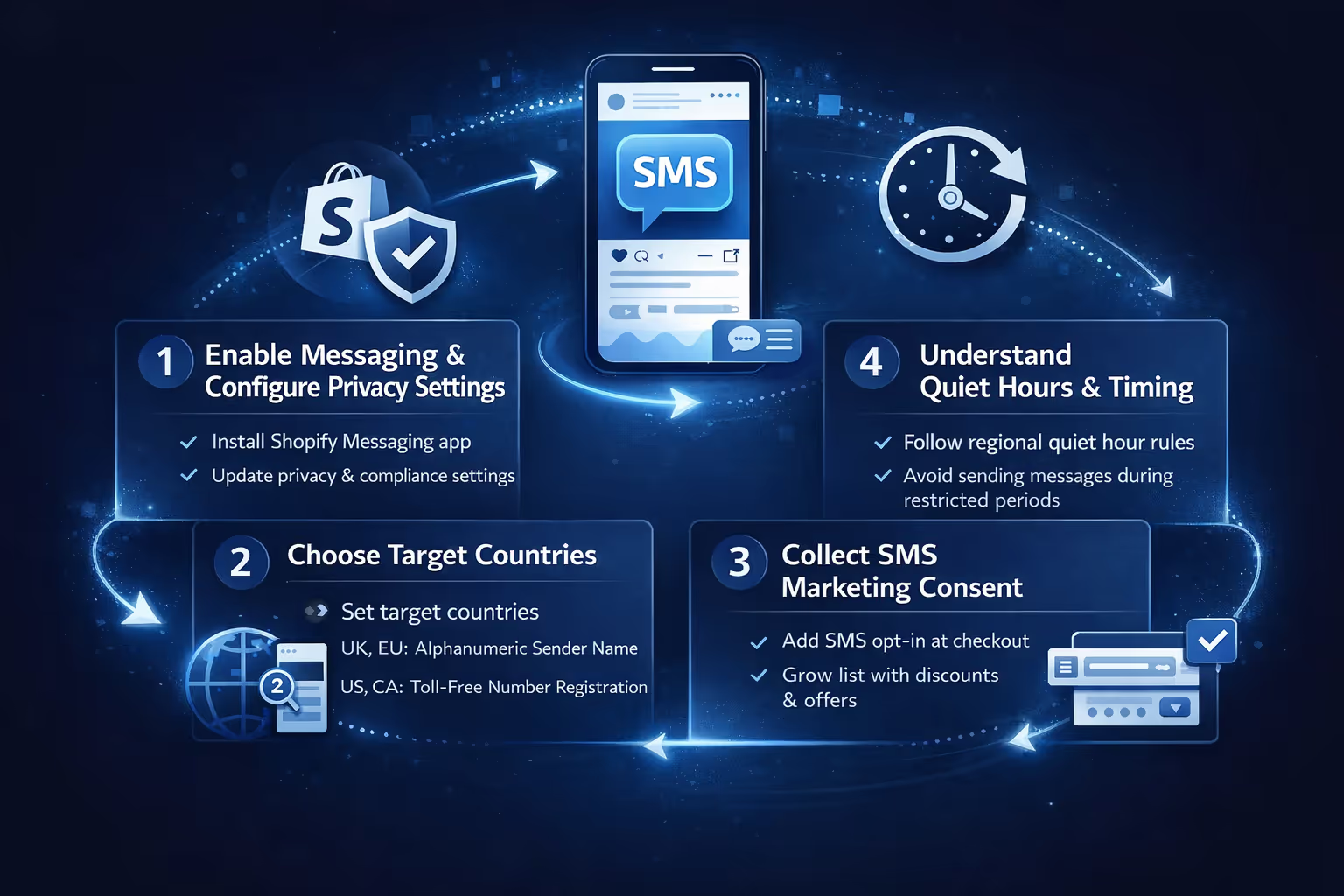
Before you start writing messages or scheduling campaigns, there are a few foundational steps every Shopify store needs to go through. These aren’t optional or “nice to have” items. They’re the basics that make sure your SMS marketing actually works, stays compliant, and doesn’t run into delivery issues later. Once these pieces are in place, creating campaigns becomes straightforward.
To use SMS inside Shopify, you need the Shopify Messaging app. It’s free to install and works on all paid Shopify plans (Basic and up).
Here’s how to get started:
Once that’s done, you can start setting up your marketing preferences and sender details.
SMS laws vary depending on the country, so Shopify requires you to set your target countries before you launch a campaign. This affects how your sender info is configured.
Here’s how it breaks down:
To do this:
If your toll-free application gets rejected, Shopify will show an alert and send you an email with the reason. Common issues include using a generic email (like Gmail), submitting placeholder business info, or listing “Admin” as the contact name.
Double-check that everything in your Shopify store matches your registration form (legal name, contact email, business address, etc.) before resubmitting.
This part is non-negotiable. You cannot legally send marketing texts without consent.
Shopify helps with this by letting you collect SMS opt-in at checkout. When customers enter their phone number, they’ll see a checkbox that asks for permission to receive texts. You can also add popups, landing pages, or email flows to encourage SMS sign-ups.
Some ways to grow your SMS list:
Just make sure it’s clear that by opting in, people are agreeing to receive marketing messages. And always give them a way to unsubscribe later.
Shopify enforces quiet hours to help stores stay compliant with regional marketing laws. These are time windows when promotional SMS messages shouldn’t be sent, usually late at night and early in the morning.
Quiet hours vary by country and, in some cases, by state or province. Here’s how it generally breaks down:
In most states, marketing texts can only be sent between 8 AM and 9 PM local time. A few states are more strict, for example, in Texas, you can’t send promotional messages before noon on Sundays.
These regions generally follow an 8 PM to 8 AM quiet hour window. That means any messages scheduled during that time will be delayed until it’s legal to deliver them.
If you’re sending texts to other countries, double-check local regulations first. SMS marketing laws vary widely, and it’s better to confirm than assume.
Messages scheduled during quiet hours are automatically delayed and retried after the restricted period ends. To reduce the risk of late delivery, Shopify also applies a one-hour buffer before quiet hours begin.

Once you’ve collected some subscribers and set up your sender info, you’re ready to launch your first campaign.
Here’s how:
That’s it. Shopify will add your store name and an unsubscribe link automatically to each message.
SMS isn’t like email. Every character counts, literally.
If you go over, your message will be split into two or more segments, and you’ll be charged for each. Even though it appears as one message to the customer, Shopify tracks and bills for each split.
Tips to stay under the limit:
Shopify Messaging isn’t just for one-time blasts. You can segment your audience based on behavior, location, purchase history, or sign-up date to send more relevant messages without overwhelming your entire list.
While Shopify Messaging doesn’t support automated flows triggered by customer actions like abandoned carts or welcome messages, you can use third-party SMS apps if you need those features. Within Shopify Messaging itself, segmentation helps improve engagement by targeting the right group at the right moment.
To keep your unsubscribe rates low and engagement high, follow these core best practices:
And remember: SMS is not for long-winded announcements. One clear call-to-action per message is the way to go.

Once your Shopify SMS setup is in place, the next question is often “Who exactly should I send this to?” That’s where predictive tools come in. At Extuitive, we help Shopify brands forecast how their messaging and ad creatives will actually perform before they go live. Instead of guessing which audience segment will respond, or testing blindly, we use AI models trained on real campaign data to predict outcomes with speed and accuracy.
For brands that rely on tight timing, like flash sales, limited drops, or SMS-only offers, knowing which version of a message is likely to convert can save both time and budget. We don’t just show click-through rates in a dashboard after the fact. We let you simulate real-world engagement before you hit send. That means fewer wasted sends, better returns, and smarter use of your SMS channel.
If you're already running ads or SMS campaigns through Shopify, layering in performance prediction can give you a clearer edge. The same way you wouldn’t launch an ad without knowing your target, you shouldn’t send a bulk SMS without knowing how that message is likely to land. That’s the gap we help close.
Here’s a quick checklist to help you write better texts:
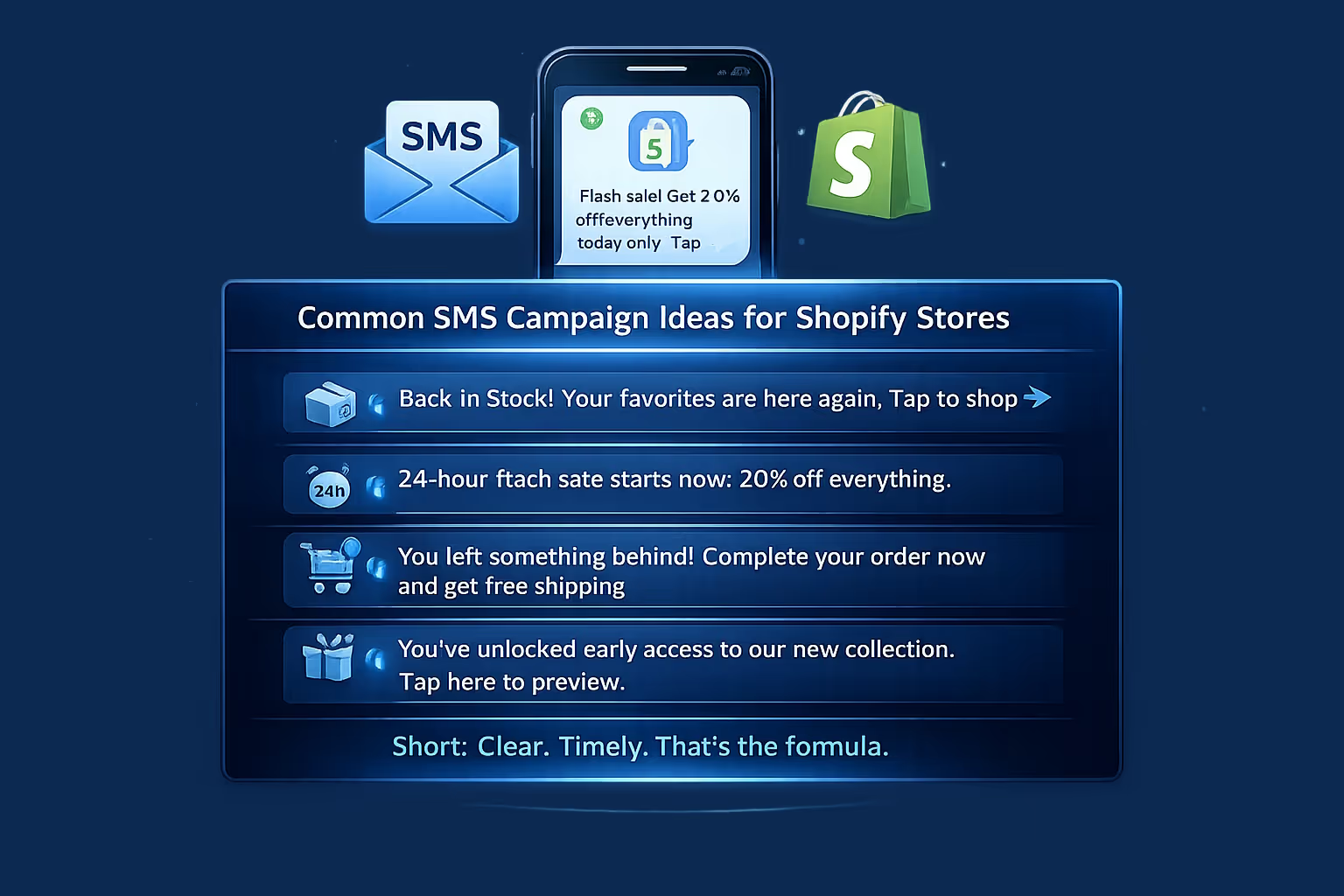
If you’re not sure what to send, here are some SMS campaign ideas that tend to work well:
Short. Clear. Timely. That’s the formula.
Setting up SMS marketing on Shopify isn’t complicated, but it does require attention to detail. You need consent, timing, legal compliance, and a good sense of how your customers actually want to hear from you.
But once it’s set up, SMS becomes one of the most direct and responsive tools in your ecommerce toolbox. You don’t need to overuse it to make it work. A few well-timed messages a month can drive serious engagement, recover lost sales, and keep your brand top of mind.
It’s not about blasting texts. It’s about making each one count.


