How Many Employees Does Shopify Have? A Closer Look at the Team Behind the Platform
Shopify employs thousands of people worldwide. Here’s what that number means and how the company is structured today.
Mar 16, 2026



Grammarly is an AI-powered writing assistant that uses machine learning, natural language processing, and deep learning to analyze and improve text. While Grammarly itself is AI technology, using it to edit human-written content doesn't make that content AI-generated—it's an editing tool, not a content creation tool. However, Grammarly's newer generative AI features can trigger AI detectors if used extensively.
The question "does Grammarly count as AI?" has sparked heated debates across college campuses, writing communities, and workplaces. Students wonder if using it constitutes cheating. Content creators worry their work might get flagged by AI detectors. Writers question whether they need to disclose Grammarly usage.
Here's the thing though—the answer isn't as simple as yes or no.
Grammarly operates in a complicated space between traditional spell-checkers and full-blown AI content generators like ChatGPT. Understanding this distinction matters more than ever as AI detection tools become commonplace in education and publishing.
According to Grammarly's official website, their products are "powered by an advanced system that combines rules, patterns, and artificial intelligence techniques like machine learning, deep learning, and natural language processing."
So yes, Grammarly is AI.
But that doesn't tell the whole story. Grammarly uses AI technology in fundamentally different ways depending on which features are being used.
Grammarly's core functionality relies on several AI technologies working together:
These systems analyze text as it's written, comparing it against millions of writing samples to identify errors, suggest improvements, and flag potential issues. The technology has been refined over Grammarly's operation over more than a decade.
The AI doesn't create content from scratch. Instead, it evaluates existing text and offers suggestions—a critical distinction that shapes how Grammarly should be categorized.
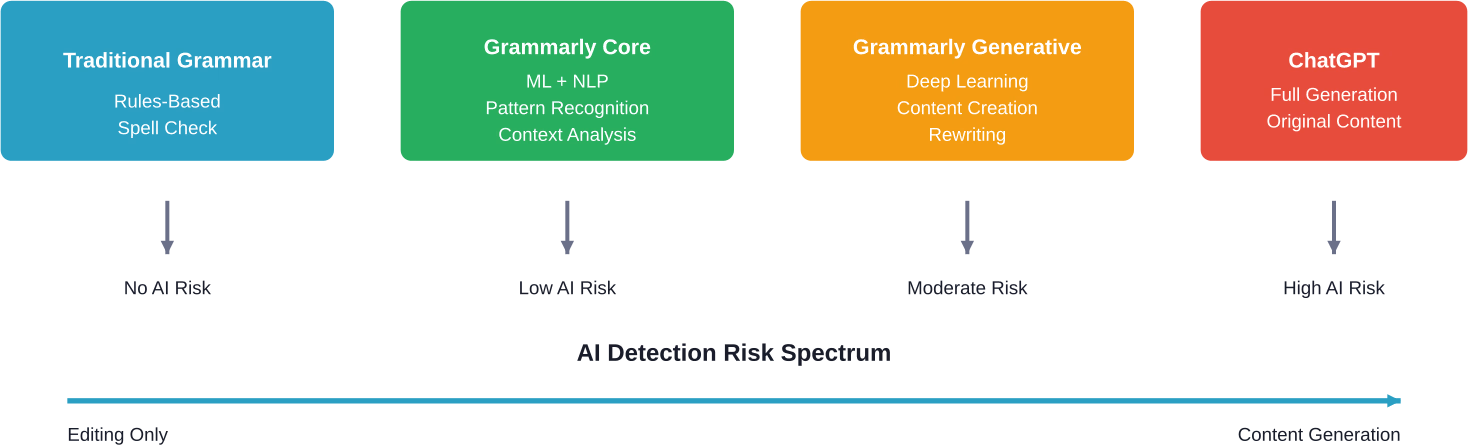
This is where things get complicated. Grammarly offers multiple feature sets, and they don't all use AI in the same way.
The core Grammarly experience—spelling corrections, grammar fixes, punctuation adjustments—uses AI to detect errors but doesn't generate new content. These features analyze what's already written and suggest mechanical corrections.
Think of it like an extremely sophisticated spell-checker. Sure, it uses machine learning. But it's not creating anything new.
Grammarly's tone detector and clarity suggestions use more advanced AI to analyze how text might be perceived. These features might suggest rephrasing sentences for better flow or impact.
Here's where the line starts to blur. When Grammarly suggests rewording a sentence, and a writer accepts that suggestion, who authored that phrasing? The answer depends on how substantially the sentence changed.
Grammarly has introduced generative AI capabilities that can compose text, rewrite entire paragraphs, or expand ideas. These features work more like ChatGPT—they create new content rather than just editing existing text.
According to Grammarly's official materials, these features help writers "turn thoughts into impact" using specialized AI agents. The company offers these capabilities as part of its AI-powered writing assistance.
Using these generative features absolutely counts as AI-assisted writing. There's no ambiguity here.
The million-dollar question for students and content creators.
Community discussions and testing reported by AI detection companies reveal a nuanced picture. Basic Grammarly editing—fixing spelling, grammar, and punctuation—rarely triggers AI detection tools. The text patterns don't match AI-generated content because the underlying writing is still human.
But wait.
Grammarly-edited text can sometimes show subtle patterns that AI detectors recognize. Here's why:
Testing by AI detection services shows mixed results. When writers use only basic grammar and spelling corrections, AI detectors typically don't flag the content. When writers accept extensive rewording suggestions or use generative features, detection rates increase significantly.
Some students have reported their work being flagged as AI-generated despite only using Grammarly for basic editing. These false positives create real problems in academic settings.
AI detectors aren't perfect. They can misidentify well-edited human writing as AI-generated, especially when that writing follows conventional patterns and demonstrates consistent quality.
This creates a frustrating catch-22: write too well, and risk being accused of using AI. Write with errors, and face grade penalties for poor writing quality.
Universities have struggled to establish clear policies on Grammarly usage. The technology doesn't fit neatly into existing academic integrity frameworks.
Most institutions draw distinctions based on feature usage:
The challenge? Grammarly doesn't make these distinctions obvious to users. Features blend together in the interface, making it easy for students to cross from acceptable editing into prohibited territory without realizing it.
Grammarly offers an AI Detection API that helps organizations "evaluate the authenticity of written content by estimating the likelihood it was generated by AI tools."
Interestingly, Grammarly both provides AI writing assistance and sells AI detection services. This dual position has raised eyebrows in academic communities.
Grammarly recommends that users "follow industry and institutional guidelines" and "properly cite AI-generated content just as you would any other source," emphasizing responsible use and transparency.
For professional writers and content creators, the Grammarly question involves different stakes.
Search engines haven't explicitly penalized AI-edited content. Google's stance focuses on content quality and helpfulness rather than the tools used to create it. Using Grammarly to polish human-written content shouldn't impact search rankings.
That said, content that relies heavily on AI generation—whether from Grammarly or other tools—often lacks the depth, originality, and authentic voice that performs well in search results.
Real talk: Grammarly's basic editing improves content quality. Better grammar and clearer writing enhance user experience, which search engines reward. The problem emerges when generative features replace original thinking and research.
Grammarly offers "Authorship" features that help categorize text origins and offer source insights, allowing writers to demonstrate their writing process and authenticity.
The feature's existence highlights a fundamental tension: if Grammarly is just an editing tool, why do users need to prove they wrote the content? The answer reflects the reality that Grammarly's capabilities have expanded beyond simple editing into territory where authorship becomes genuinely ambiguous.
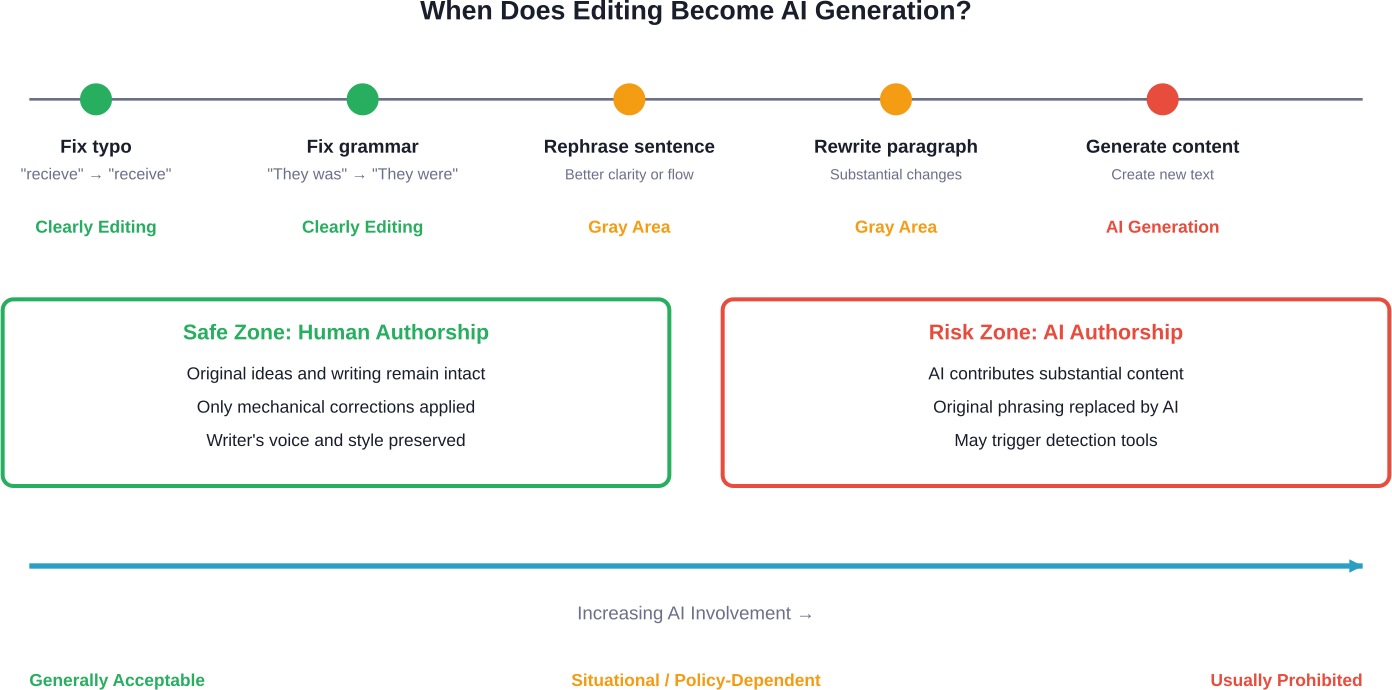
AI detectors generally distinguish between editing tools and generation tools, though the line blurs when editing becomes extensive.
ChatGPT creates content from prompts. The entire text is AI-generated, displaying characteristic patterns: consistent structure, certain vocabulary preferences, and predictable transitions. These patterns are what AI detectors look for.
Grammarly's basic functions don't create these patterns because they don't generate text—they modify existing human writing. The underlying structure, vocabulary choices, and transitions remain human-created.
However, Grammarly's generative features work similarly to ChatGPT. They produce original text based on prompts or context, creating the same detectable patterns.
The distinction comes down to this: did AI create the content, or did it just polish human-created content?
Most ethical frameworks for AI use in writing draw the line at authorship. Tools that help writers communicate their own ideas more effectively fall on one side; tools that generate ideas and content fall on the other.
By this standard:
The problem is that Grammarly's interface doesn't make these distinctions clear. Features exist on a continuum, and the app encourages using all available tools without highlighting which ones cross into problematic territory.
Many experts advocate for transparency rather than prohibition. If AI tools assist with writing, disclose that assistance. This approach acknowledges that AI is becoming ubiquitous while maintaining accountability for how it's used.
Grammarly's official guidance recommends that users "follow industry and institutional guidelines" and "properly cite AI-generated content just as you would any other source."
For students, professionals, and writers wondering how to use Grammarly without crossing ethical or policy boundaries, here are practical guidelines:
The Grammarly question reflects broader tensions around AI's role in creative and professional work.
As AI capabilities expand, the distinction between assistance and authorship will become increasingly important. Tools will continue developing features that blur these lines, putting the burden on users to navigate ethical boundaries.
Grammarly's evolution illustrates this trajectory. The company started with spell-checking and grammar correction—clearly assistive tools. Over its operation spanning more than a decade, it has progressively added more sophisticated AI features, culminating in generative capabilities that can produce original content.
This progression isn't unique to Grammarly. Virtually all writing tools are incorporating AI, creating an ecosystem where purely human writing becomes increasingly rare.
The future likely involves three tiers of writing:
Understanding which category work falls into—and being transparent about it—will become essential professional practice.
Yes, Grammarly is AI technology. That's not debatable.
But using Grammarly doesn't automatically make content AI-generated. The distinction depends entirely on which features are used and how extensively.
Basic editing features—grammar, spelling, punctuation—represent acceptable use of AI as an assistive tool. These corrections don't change authorship or create content; they polish what's already written.
Advanced editing features—tone adjustments, clarity rewrites—occupy a gray area. Moderate use for improvement is generally acceptable; extensive use that substantially changes content raises authorship questions.
Generative features—content composition, paragraph creation—clearly constitute AI-generated content. Using these features means AI authored that text, regardless of whether it was based on human prompts.
The bottom line? Grammarly exists on a spectrum from simple tool to content creator. Where it falls depends on how it's used. Writers bear responsibility for understanding that spectrum and using the tool appropriately for their context.
As AI becomes more integrated into writing workflows, this kind of nuanced understanding becomes essential. Not all AI use is the same. Not all editing crosses into generation. Success in this new landscape requires distinguishing between assistance and authorship—and being transparent about which side of that line any particular work falls on.
Need help navigating AI tools in academic or professional writing? Check your institution's policies, ask supervisors or instructors for guidance, and when in doubt, err on the side of transparency. The technology will keep evolving, but honest communication about how it's used remains the foundation of ethical practice.


