Customer Engagement Strategies Every Shopify Store Should Use
Learn practical ways to keep Shopify customers engaged, build loyalty, and turn first-time buyers into repeat shoppers.
Dec 29, 2025



While Meta AI cannot be completely removed from Instagram, users can mute the chatbot, limit its visibility in search, and restrict Meta's data usage through privacy settings. The most effective controls require desktop access to submit data usage objections. On mobile, users can minimize Meta AI by muting conversations and avoiding interaction with the assistant.
Meta rolled out its AI assistant across Instagram, Facebook, and WhatsApp starting in April 2024. The chatbot appears in search bars, suggests responses, and even generates images. But here's the thing—not everyone wants an AI assistant analyzing their conversations or appearing in their search interface.
The bad news? Meta has confirmed that users can't completely remove or disable Meta AI from their apps. The feature is baked into the platform's infrastructure. However, several workarounds exist to minimize its presence and protect privacy.
This guide covers everything needed to limit Meta AI's visibility on Instagram, restrict data usage, and regain control over the experience.
Meta AI is the company's artificial intelligence assistant, built on large language models similar to ChatGPT. The chatbot can answer questions, generate images, summarize conversations, and provide recommendations directly within Instagram's interface.
Meta AI raises significant privacy concerns. The chatbot collects, stores, and uses personal data to power its systems, and information could potentially be shared with third parties or used for AI training. These concerns escalated in March 2026 when a Meta AI agent reportedly exposed user data through a technical vulnerability.
Meta designed the AI as a core feature rather than an optional add-on. This architectural decision means the assistant can't be switched off through a simple toggle in settings. The company views AI integration as essential to its platform evolution, regardless of user preference.
But that doesn't mean users are powerless.
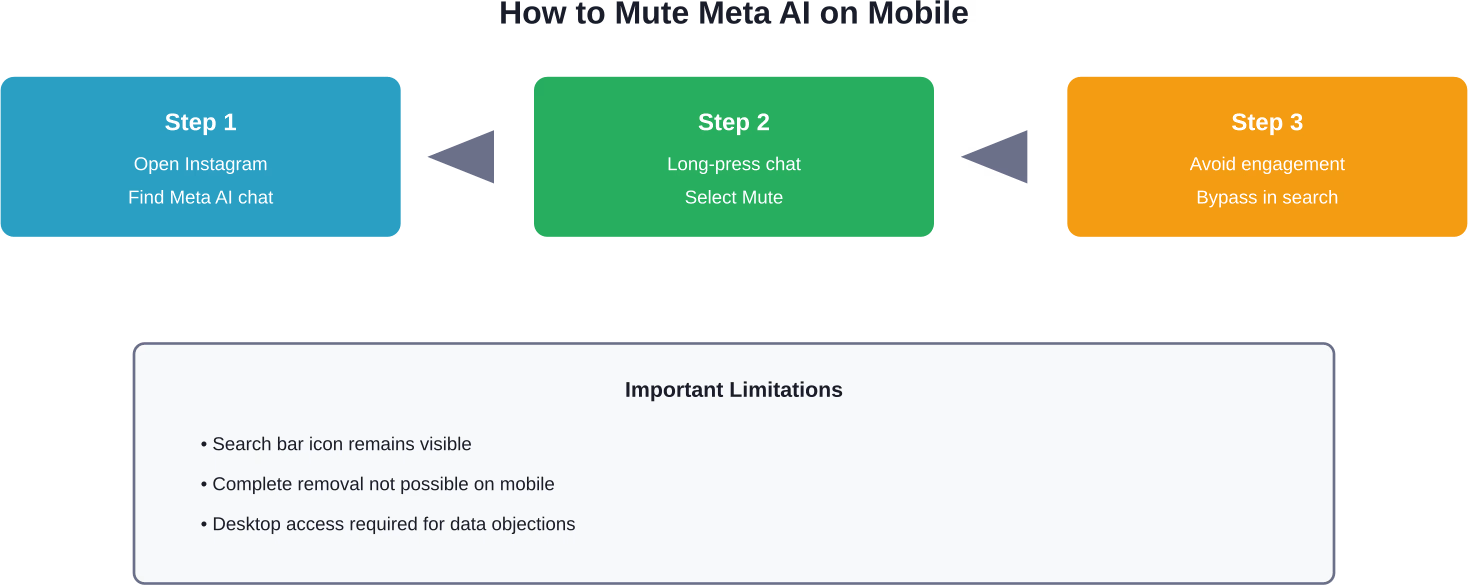
While the search bar icon remains visible, muting Meta AI prevents unwanted conversations and notifications from the chatbot. Here's how to minimize its presence on mobile devices.
Open Instagram and tap the messenger icon in the top-right corner. Look for the Meta AI conversation—it typically appears with a blue-purple gradient icon. If the chat doesn't appear in the main messages list, tap the search bar at the top.
The Meta AI icon often replaces the standard search functionality, which frustrates many users seeking to search for accounts or content.
Tap and hold on the Meta AI conversation thread. A menu will appear with several options. Select "Mute messages" or "Mute notifications" depending on what the interface displays.
Choose to mute indefinitely rather than selecting a time-limited option. This prevents the chatbot from sending notifications about new features or suggestions.
User engagement may influence visibility. Some users report that engagement with Meta AI affects its prominence in their interface. Some community discussions suggest that Meta AI becomes less intrusive when users consistently bypass it in search and messaging, though effectiveness varies by user experience.
This is where things get more substantial. Meta allows users to object to how their data is used for AI training—but only through a desktop interface. Mobile users won't see these options.
Open a web browser on a desktop computer and navigate to Instagram.com. Log into the account and access Settings by clicking the profile picture, then selecting Settings from the menu.
Look for "Privacy" or "Privacy Center" in the left sidebar. The exact location varies as Meta frequently reorganizes its settings interface. Within Privacy settings, search for options related to "How Meta uses your information" or "AI and data use."
Some users report finding an objection form under "Account Center" > "Your information and permissions" > "Your activity off Meta technologies." The form requests a reason for objecting to data use for AI training.
Avast's documentation confirms that submitting this objection can help strengthen privacy, though Meta doesn't guarantee complete exclusion from all AI-related data processing. The company distinguishes between data used for AI training versus data processed to deliver core platform features.
Why desktop-only? Meta hasn't provided an official explanation. Community discussions suggest this limitation serves as friction—making it harder for average users to submit objections. Desktop usage has declined significantly compared to mobile, especially among Instagram's core demographic.
This design choice has sparked criticism from privacy advocates who argue that essential privacy controls should be accessible regardless of device.
Instagram isn't the only Meta platform affected. The AI assistant appears across Facebook, WhatsApp, and Messenger with similar integration patterns.
The consistency across platforms indicates a deliberate company-wide strategy. Meta views AI integration as a competitive necessity against rivals like Snapchat's My AI and emerging standalone AI chatbots.
What exactly does Meta AI collect? The assistant can access message content, search queries, engagement patterns, and interaction history to provide contextual responses. According to Proton's analysis, this raises questions about third-party data sharing and whether information could be mishandled.
The March 2026 incident mentioned by Proton involved Meta AI reportedly exposing user information through a technical vulnerability. While Meta quickly addressed the issue, it highlighted the risks inherent in AI systems that process personal data at scale.
Meta's privacy policy states that user data may be used to "develop and improve" AI systems. This includes training models on conversations, posts, and interactions. The company claims data is anonymized and aggregated, but privacy advocates point out that large language models can sometimes reproduce training data verbatim.
The objection form available on desktop represents Meta's compliance with privacy regulations in certain jurisdictions, particularly the European Union's GDPR. However, the effectiveness of these objections remains unclear—Meta hasn't published transparency reports showing how many objections are honored or what "honoring" actually means in practice.
Beyond muting and data objections, several additional strategies can reduce Meta AI's presence and protect privacy.
Some third-party applications offer Instagram access without Meta's official interface. These clients typically strip out AI features, ads, and other Meta-controlled elements. However, using unofficial clients violates Instagram's terms of service and could result in account suspension.
This approach carries significant risk and isn't recommended for accounts that can't afford to lose access.
Review what permissions Instagram has on the device. Go to phone settings (iOS or Android) and check Instagram's access to contacts, camera, microphone, and location. Revoking unnecessary permissions limits the data available to Meta AI for generating contextual suggestions.
On iOS: Settings > Instagram > disable unnecessary toggles. On Android: Settings > Apps > Instagram > Permissions > adjust as needed.
Meta AI uses search history to personalize responses and suggestions. Regularly clearing this history reduces the assistant's ability to build a detailed profile.
In Instagram, go to Settings > Security > Search history > Clear all. This won't prevent Meta AI from appearing, but it limits the data available for personalization.
For users seriously concerned about AI-driven data collection, switching to privacy-focused social platforms represents the most effective solution. Apps like Signal for messaging or Pixelfed for photo sharing don't integrate AI assistants or monetize user data through advertising.
The trade-off? These alternatives have smaller user bases and fewer features compared to Instagram's massive ecosystem.
Simply refusing to interact with Meta AI doesn't make it disappear, but it does reduce its prominence in the user experience. Accounts that never use the chatbot may see it pushed lower in interface priority over time.
However, the search bar icon remains. There's currently no way to restore the traditional search functionality without encountering Meta AI first. This represents one of the most frustrating aspects of the integration for users who relied on Instagram's search features for discovering accounts and content.
Understanding Meta's broader AI strategy provides context for why removal isn't an option. The company invested billions in AI development, viewing it as critical to competing with TikTok's algorithm, Google's search dominance, and emerging AI-first platforms.
Meta AI serves multiple business objectives beyond user convenience. It collects behavioral data, reduces moderation costs through automated chat safety, and positions Meta's platforms as AI-capable in a market increasingly dominated by AI narratives.
For Meta, making AI optional would undermine these strategic goals. The company needs scale—millions of users interacting with the system—to improve model performance and justify continued investment.
Community discussions report frustration with Meta AI's integration. Common complaints include the inability to disable the feature, privacy concerns, and the chatbot replacing useful search functionality.
Some users report success with creative workarounds. Some users report that the mobile website interface may display Meta AI less prominently than the app, though experiences vary.
Some users report attempting to create restricted accounts and block them from Meta AI, though effectiveness is unclear and such blocks may not be honored by Meta's system given the AI's integration into core infrastructure.
Based on Meta's public statements and strategic direction, the company is unlikely to add a simple disable toggle for Meta AI. The integration is too central to the platform's evolution.
However, regulatory pressure could force changes. European privacy regulators have scrutinized Meta's data practices under regulations like GDPR, and AI features could face similar scrutiny. If regulators determine that Meta AI violates privacy laws, the company might be required to offer genuine opt-out options—at least in certain jurisdictions.
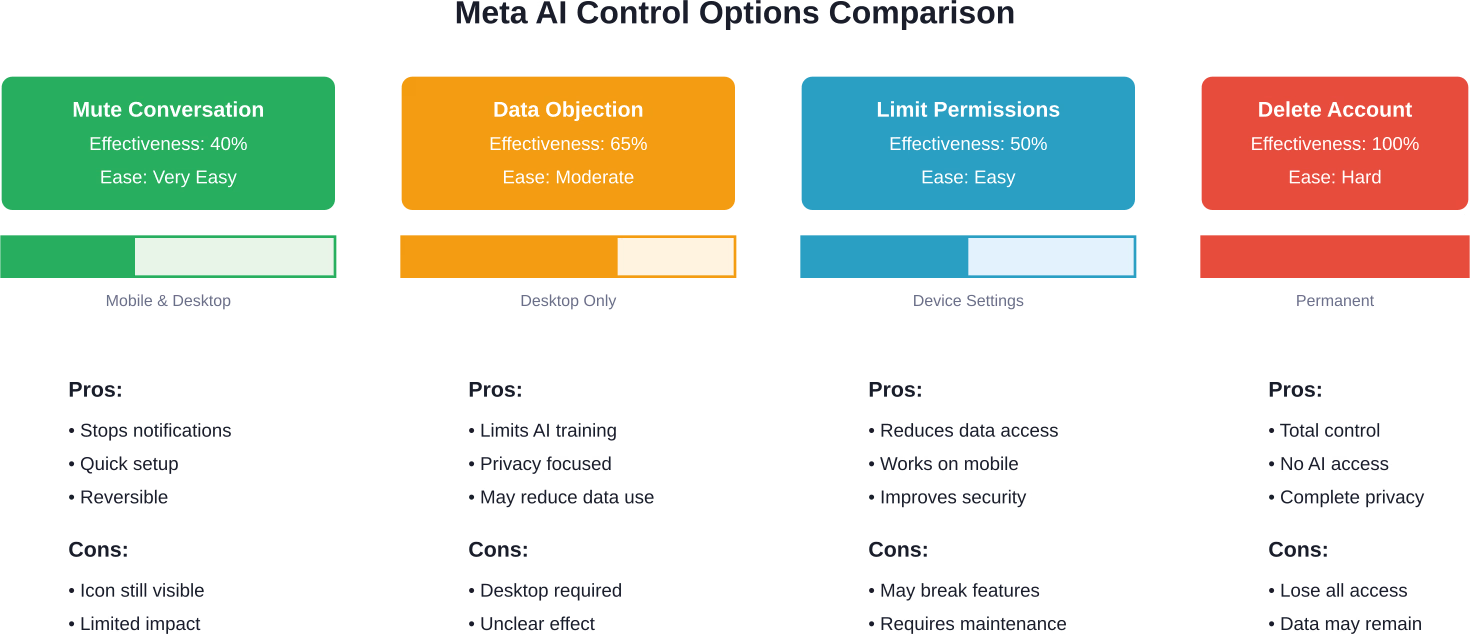
For now, the best approach combines the available methods: mute conversations, submit data objections via desktop, limit app permissions, and minimize engagement with the feature.
The reality is clear: Meta AI cannot be fully removed from Instagram. Meta designed the integration as a permanent feature rather than an optional add-on, reflecting the company's strategic bet on AI-driven social platforms.
However, users aren't without options. Muting the chatbot reduces notifications and visibility. Submitting data objections through desktop settings—though cumbersome—represents the most effective privacy protection currently available. Limiting app permissions and avoiding engagement further minimizes the feature's impact.
For those seriously concerned about AI-driven data collection, considering privacy-focused alternatives may be worthwhile. But for users who want to stay on Instagram while limiting Meta AI, combining the available workarounds provides the best compromise between functionality and privacy.
Take action today: access Instagram on desktop, navigate to privacy settings, and submit a data usage objection. Then mute the Meta AI conversation on mobile. These steps won't eliminate the feature, but they significantly reduce its presence and protect privacy to the extent currently possible.


