Shopify SEO Strategies That Still Work
Proven Shopify SEO strategies covering keyword research, on-page optimization, technical fixes, and link building for sustainable organic growth in 2026.
Mar 24, 2026



OpenClaw security best practices center on three pillars: isolating the Gateway with authentication and network controls, hardening sandbox execution with rootless Docker and filesystem restrictions, and auditing ClawHub skills before installation. Recent CVE disclosures and the January 2026 ClawHavoc campaign demonstrate that prompt injection, malicious skills, and exposed default ports are active threats requiring immediate mitigation.
OpenClaw has moved from developer experiment to production infrastructure in record time. By early 2026, the project had accumulated 60,000 GitHub stars in 72 hours, according to analysis published by the UNU Campus Computing Centre. That explosive growth brought OpenClaw into enterprises—and put it squarely in attackers' crosshairs.
The ClawHavoc campaign in January 2026 proved this wasn't a theoretical risk. Snyk research documented 1,184 malicious skills distributed across multiple platforms, with 5 of the top 7 most-downloaded skills carrying payloads. CISA's Vulnerability Summary for the Week of February 2, 2026 (Document ID SB26-040) included SQL injection vulnerabilities in Fikir Odalari AdminPando, not OpenClaw. Security advisories document that similar vulnerabilities in other platforms allowed unauthenticated attackers to bypass authentication and gain administrative access.
Real talk: self-hosted AI agents execute code with durable credentials and process untrusted input. This creates dual supply chain risk where skills and external instructions converge in the same runtime. As these systems enter enterprises, governance and runtime isolation become critical.
This guide maps real threats to concrete hardening controls, so teams can deploy OpenClaw safely in production.
Before hardening anything, teams need to understand where OpenClaw can be compromised. The architecture consists of four primary attack surfaces.
The Gateway authenticates callers to OpenClaw APIs and routes messages to agents. According to the official OpenClaw documentation, common misconfigurations treat this boundary as "needs per-message signatures on every frame" when it actually performs "authenticates callers to gateway APIs."
Exposed default ports remain one of the most common initial access vectors. The Gateway typically binds to port 3000, and without proper firewall rules or authentication, attackers can reach internal APIs directly.
Security advisories document that username and password parameters can be vulnerable to SQL injection in authentication systems, potentially allowing complete authentication bypass and granting full administrative access, including the ability to manipulate public-facing website content through HTML/DOM injection.
OpenClaw agents execute tools and skills inside containers. This is where code actually runs—and where most runtime exploits occur.
CVE-2026-27007, disclosed by the National Vulnerability Database, revealed that normalizeForHash in src/agents/sandbox/config-hash.ts recursively sorted arrays containing only primitive values. This made order-sensitive sandbox configuration arrays hash to the same value even when order changed. The hash determines whether existing sandbox containers should be recreated, so order-only config changes—like moving a dangerous permission to the front—were silently ignored.
The sandbox is also where filesystem and network access must be restricted. Without proper isolation, a compromised skill can read SSH keys, credentials, and environment variables from the host.
Skills are executable packages installed from ClawHub and other registries. They carry full trust once installed, which makes them a prime supply chain target.
Snyk research scanned 3,984 skills in February 2026 and found 1,467 with security flaws—36.82% of all skills examined. The ClawHavoc campaign timeline showed how quickly this can escalate:
The attack didn't rely on zero-days. Attackers compromised developer accounts, pushed malicious updates to trusted skills, and relied on auto-update mechanisms to distribute payloads.
OpenClaw agents need API keys to call language models. These credentials are high-value targets.
Claude Code suffered RCE and API key theft vulnerabilities (CVE-2025-59536 fixed in Oct 2025, CVE-2026-21852 fixed in Jan 2026). While these weren't OpenClaw-specific, they demonstrate how agents that handle model credentials can leak them through project files or malicious tool invocations.
Once an API key is exfiltrated, attackers can run inference at the victim's expense, extract training data, or pivot to other services using the same credential store.
These controls take less than an hour to implement and address the most common exploits. Every OpenClaw deployment should have these in place before processing any real data.
The Gateway supports multiple authentication modes: token, password, trusted-proxy, and device auth. The default installation often ships with authentication disabled or set to a weak default.
Generate a strong API token (32+ characters, random) and configure gateway.auth.token in the environment configuration. Never commit this token to version control.
For production deployments, trusted-proxy authentication allows integration with existing identity providers. This delegates authentication to a reverse proxy like Nginx or Traefik that handles OAuth2 or SAML flows.
The Gateway should not be accessible from the public internet unless absolutely necessary. Bind it to 127.0.0.1 or a private network interface.
If remote access is required, place the Gateway behind a reverse proxy with TLS termination, rate limiting, and IP allowlisting. Tools like Fail2Ban can automatically block IPs after repeated failed authentication attempts.
Firewall rules should explicitly deny inbound connections to port 3000 except from trusted sources. Cloud providers offer security groups and network ACLs that enforce this at the infrastructure layer.
OWASP's AST07 risk documentation describes how OpenClaw's hot-reload SkillsWatcher enables real-time skill updates. A compromised upstream skill repository becomes instantly active without requiring agent restart.
The attack scenario is straightforward: a trusted skill author's account is compromised, the attacker pushes version 2.0 with a payload, and auto-updating agents immediately execute the malicious code.
Disable automatic skill updates in production. Pin specific skill versions in the configuration and update manually after review. This adds operational overhead but prevents silent supply chain attacks.
Docker containers should never run as root. The sandbox configuration should specify a non-privileged user with a high UID (e.g., 10000+).
In the Docker Compose file or Kubernetes manifest, set:
user: "10000:10000"
security_opt:
- no-new-privileges:true
This prevents privilege escalation inside the container. Even if an attacker achieves code execution, they can't install packages, bind to privileged ports, or modify system files.
Mount the sandbox filesystem as read-only wherever possible. Writable directories should be explicitly defined and mounted with noexec to prevent execution of attacker-uploaded binaries.
The OpenClaw documentation notes that sensitive files like SSH keys, credentials, and environment variables can be silently embedded in exported artifacts if filesystem boundaries aren't enforced. CISA's bulletin for the week of January 26, 2026 referenced a similar issue in BentoML (CVE-2026-24123, CVSS 7.4) where sensitive files were exposed when pushed to registries.
Volume mounts should follow least privilege: only mount the directories skills actually needed, and make everything else inaccessible.
Once basic protections are in place, the next tier addresses prompt injection, credential management, and runtime monitoring. These controls require more configuration but are essential for any deployment handling sensitive data or external input.
Prompt injection remains one of the hardest problems in AI agent security. Attackers embed malicious instructions in user input, external documents, or API responses to hijack agent behavior.
The simplest mitigation is input sanitization: strip or escape special characters, delimiter sequences, and instruction-like patterns before passing text to the model. Regular expressions can detect common injection patterns like "Ignore previous instructions" or "System: new directive."
But sanitization alone isn't enough. Defensive prompting techniques add explicit boundaries in the system prompt:
Some teams deploy a secondary classifier model to detect injection attempts before they reach the primary agent. This adds latency but provides a strong defense layer.
API keys should never be stored in environment variables visible to sandbox processes. If a skill is compromised, it can read process.env and exfiltrate every secret.
Instead, use a credential management service like HashiCorp Vault, AWS Secrets Manager, or Azure Key Vault. The Gateway fetches credentials at runtime and injects them only into trusted internal services—not into the sandbox.
When skills need to call external APIs, use scoped tokens with minimal permissions and short expiration. OAuth2 device flows work well for user-specific credentials. Service-to-service calls should use mTLS or signed requests rather than static API keys.
Audit logs should track every credential access. If a key is used from an unexpected IP or at an unusual time, automated alerts can trigger key rotation before damage occurs.
OpenClaw deployments should collect logs from three sources: Gateway API requests, sandbox container activity, and model inference calls.
Gateway logs capture authentication failures, unusual request patterns, and policy violations. Tools like Graylog or Elasticsearch can aggregate these logs and run real-time anomaly detection.
Container runtime monitoring tools like Falco detect suspicious behavior inside the sandbox: process execution, network connections, file access. Falco rules can trigger alerts when a container tries to access /etc/shadow, open a reverse shell, or download files from pastebin-like domains.
Model inference logs track prompt content, tool invocations, and output. This creates an audit trail for debugging prompt injection attempts and identifying malicious skills.
According to SANS' RSAC 2026 keynote on the most dangerous new attack techniques, organizations must accelerate every phase of the patching lifecycle, automate wherever possible, and integrate AI-powered detection tools to match the speed at which attackers are already operating.
OWASP's Skill Scanner Integration guide provides instructions for integrating automated security scanning into AI agent skill development and deployment pipelines. The AST10-Scanner tool performs comprehensive checks across all risk categories.
Before installing any skill, run it through a scanner that checks for:
Snyk's ToxicSkills analysis from February 2026 scanned 3,984 skills and flagged 1,467 with security flaws. Automated scanning catches a significant portion of these before they reach production.
For high-risk deployments, manual code review is still necessary. Skills that handle credentials, execute shell commands, or access sensitive data should be reviewed by a security engineer before approval.
Skills declare dependencies on external packages. If these aren't pinned to specific versions, updates can introduce malicious code.
Lock files (package-lock.json, poetry.lock, Cargo.lock) should be committed to version control. This ensures the exact same dependency versions are installed in development, staging, and production.
Checksum verification confirms that downloaded packages haven't been tampered with. Most package managers support this natively (npm's package-lock.json includes integrity hashes, pip supports --require-hashes).
For critical skills, download dependencies from a private registry or mirror where packages are scanned before being made available internally. This adds a security checkpoint without slowing down development.
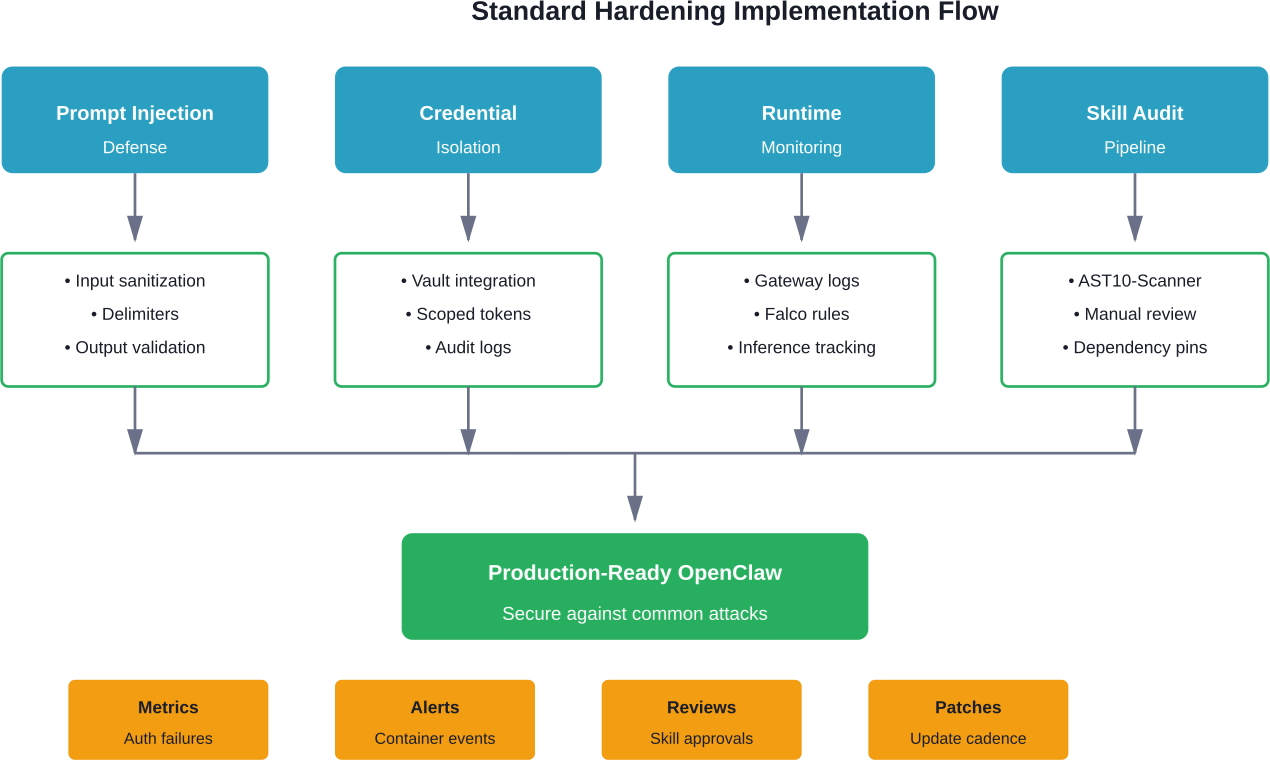
Advanced controls address sophisticated threats: supply chain attacks, insider threats, and zero-day exploits. These are resource-intensive but necessary for high-security environments like financial services, healthcare, or government.
The Gateway, sandbox, and supporting services should run in separate network zones with strict firewall rules between them.
In a segmented architecture:
This limits lateral movement. If the sandbox is compromised, the attacker can't reach the database or exfiltrate credentials directly. They'd need to pivot through the Gateway, which logs and monitors all requests.
Kubernetes network policies or service mesh tools like Istio enforce these boundaries at the pod level. Every connection is authenticated, encrypted, and logged.
Cryptographic signing ensures skills haven't been tampered with after publication. The skill author signs the package with a private key, and the Gateway verifies the signature before installation.
This doesn't prevent malicious skills from being signed—if an attacker compromises a developer's signing key, they can still publish malware. But it does prevent man-in-the-middle attacks where a registry is compromised or a CDN serves modified packages.
Organizations can maintain an internal allowlist of trusted signing keys. Skills signed by unknown keys are rejected automatically, even if they pass automated scans.
For maximum assurance, skills can be reproducibly built: the source code, build environment, and toolchain are documented so anyone can rebuild the package and verify the checksum matches.
In an immutable deployment model, containers are never updated in place. Instead, a new container image is built, scanned, and deployed to replace the old one.
This eliminates configuration drift and ensures every deployment goes through the full security pipeline. If a vulnerability is discovered, rolling back is as simple as deploying the previous known-good image.
Container images should be built in CI/CD pipelines with automated security scans at each stage: static analysis, dependency checks, and runtime behavior tests. Only images that pass all checks are pushed to the registry and tagged for production use.
OWASP's documentation on update drift (AST07) notes that deployed skills can drift out of sync with known-good versions either because patches aren't applied or because auto-update mechanisms blindly apply upstream changes that may themselves be malicious. Immutable infrastructure prevents both scenarios.
Theoretical controls look great on paper but often fail when attacked by skilled adversaries. Red team exercises simulate real attacks to identify gaps.
A red team might:
The results inform which controls need reinforcement. Maybe the Gateway authentication held but container monitoring didn't catch the escape attempt. Or skill scanning flagged the malicious package but the approval process allowed it through anyway.
Red team findings should feed directly into security roadmaps. Controls that failed become the next sprint's priorities.
Despite best efforts, breaches happen. Incident response procedures ensure the team can contain damage, investigate root cause, and recover quickly.
Response procedures should define:
Practice these procedures in tabletop exercises. Walk through scenarios like "ClawHub was breached and 100 skills are backdoored" or "a prompt injection attack exfiltrated customer data." Identify gaps in tooling, communication, or authority before they matter in a real incident.
According to SANS' analysis of the ClawHavoc campaign published in AtRisk March 26, 2026, response time was the difference between minor and major impact. Organizations that detected the malicious skills within hours contained the damage. Those that took days saw full network compromise.
Several OpenClaw-specific vulnerabilities were disclosed in early 2026. Teams running affected versions need to patch immediately.
Prior to version 2026.2.15, normalizeForHash in src/agents/sandbox/config-hash.ts made order-sensitive configuration arrays hash to the same value even when order changed. The hash determines whether existing sandbox containers should be recreated.
Attack scenario: An attacker modifies a skill's configuration to request dangerous permissions (filesystem write, network access) but keeps the same set of values, just in a different order. The Gateway sees the hash hasn't changed and doesn't recreate the container. The skill runs with elevated permissions without triggering security controls.
Mitigation: Upgrade to version 2026.2.15 or later. If upgrading isn't immediately possible, manually delete all sandbox containers and force recreation after any configuration change.
CISA's February 2, 2026 bulletin disclosed that username and password parameters in the Gateway authentication module were vulnerable to SQL injection. Unauthenticated attackers could bypass authentication completely and gain full administrative access.
This vulnerability affected deployments using password-based authentication with a SQL backend (PostgreSQL, MySQL). Token-based and trusted-proxy authentication modes were not affected.
Mitigation: Apply the security patch released in version 2026.2.18. If running an older version, switch to token-based authentication as a temporary workaround and disable password login until the patch is applied.
Check Gateway logs for suspicious authentication attempts: SQL keywords in username fields, unusual character sequences, or successful logins from unexpected IPs.
The January 2026 ClawHavoc campaign wasn't a software vulnerability—it was a supply chain attack. Attackers compromised developer accounts and published malicious skills to ClawHub.
By January 15, five of the top seven most-downloaded skills contained payloads. Some exfiltrated credentials, others established persistent backdoors, and a few deployed cryptominers.
The campaign was discovered on January 22 by Snyk researchers, but by then thousands of deployments had installed compromised skills.
Mitigation: Audit all installed skills against the IoC list published by OWASP's Agentic Skills Top 10 project. Remove any flagged skills immediately and rotate credentials that may have been exposed.
Going forward, enable skill scanning before installation and restrict skill sources to a vetted internal registry where possible.
Tier 3: Advanced Defense-in-Depth
Abstract security principles are useful, but concrete configuration examples help teams implement controls correctly. Here are hardened templates for three common deployment scenarios.
For personal use on a workstation or Raspberry Pi. The threat model assumes the host is trusted but skills may not be.
Docker Compose snippet:
services:
gateway:
image: openclaw/gateway:2026.2.18
environment:
- GATEWAY_AUTH_TOKEN=${GATEWAY_TOKEN}
- GATEWAY_BIND=127.0.0.1:3000
networks:
- openclaw
sandbox:
image: openclaw/sandbox:2026.2.18
user: "10000:10000"
security_opt:
- no-new-privileges:true
cap_drop:
- ALL
read_only: true
tmpfs:
- /tmp:noexec
networks:
- openclaw
This binds the Gateway to localhost only, runs the sandbox as non-root, drops all capabilities, and mounts the filesystem read-only except for a no-exec temp directory.
For a small team running OpenClaw on a VPS with remote access. The threat model includes external attackers and potentially malicious skills.
Add a reverse proxy with TLS termination:
services:
nginx:
image: nginx:alpine
ports:
- "443:443"
volumes:
- ./nginx.conf:/etc/nginx/nginx.conf:ro
- ./certs:/etc/nginx/certs:ro
networks:
- public
gateway:
image: openclaw/gateway:2026.2.18
environment:
- GATEWAY_AUTH_MODE=trusted-proxy
- GATEWAY_TRUSTED_PROXY=nginx
networks:
- public
- openclaw
sandbox:
image: openclaw/sandbox:2026.2.18
user: "10000:10000"
security_opt:
- no-new-privileges:true
- seccomp:default
cap_drop:
- ALL
networks:
- openclaw
networks:
public:
openclaw:
internal: true
The Gateway sits behind Nginx, which handles TLS and authentication. The sandbox is on an internal network with no direct internet access. Seccomp profiles restrict system calls.
For production use with strict isolation and compliance requirements. Threat model includes supply chain attacks, insider threats, and APTs.
Kubernetes manifest snippet:
apiVersion: v1
kind: Pod
metadata:
name: openclaw-gateway
spec:
securityContext:
runAsNonRoot: true
runAsUser: 10000
fsGroup: 10000
seccompProfile:
type: RuntimeDefault
containers:
- name: gateway
image: openclaw/gateway:2026.2.18
securityContext:
allowPrivilegeEscalation: false
capabilities:
drop:
- ALL
readOnlyRootFilesystem: true
env:
- name: GATEWAY_AUTH_TOKEN
valueFrom:
secretKeyRef:
name: openclaw-secrets
key: token
volumeMounts:
- name: tmp
mountPath: /tmp
volumes:
- name: tmp
emptyDir:
medium: Memory
Network policies restrict pod-to-pod communication. Service mesh mTLS encrypts all traffic. Admission controllers block images that haven't passed security scans.
Security controls only work if teams know when they're being attacked. Effective monitoring tracks both normal behavior and deviations from it.
Tuning alerts is an art. Too sensitive and teams ignore them. Too lax and real attacks go unnoticed.
Start with conservative baselines: alert on anything that would never happen in normal operation (sandbox connecting to Tor exit nodes, credentials accessed at 3 AM local time, skills requesting root privileges).
Then add statistical anomaly detection: flag events that are more than 3 standard deviations from the rolling 30-day average. This catches novel attacks that don't match known patterns.
Alerts should route to the appropriate team: authentication failures go to security ops, sandbox crashes go to infrastructure, and skill installation anomalies go to developers who can review code.
Logs are useless if they're deleted before an incident is discovered. Retain Gateway logs for at least 90 days, sandbox container logs for 30 days, and model inference logs for compliance-mandated periods (often 7 years for regulated industries).
Store logs in tamper-proof storage: write-once S3 buckets, immutable log aggregation services, or blockchain-backed audit trails. If an attacker gains access, they shouldn't be able to delete evidence of their actions.
Practice log analysis before incidents happen. Run quarterly exercises where the security team is given a set of logs and asked to reconstruct an attack timeline. This builds muscle memory for real forensics work.
Organizations in regulated industries face additional requirements when deploying AI agents.
If OpenClaw processes personal data of EU residents, GDPR applies. Key requirements:
Model inference logs often contain personal data from prompts. These logs must be encrypted at rest, access-controlled, and deleted after the retention period expires.
SOC 2 Type II audits assess whether security controls are not only documented but actually operating effectively.
For OpenClaw deployments, auditors will look for:
Generate compliance reports automatically from logs and monitoring data. If an auditor asks "how do you ensure only authorized users can install skills?", the answer should be a query that pulls skill installation events correlated with user authentication logs.
HIPAA (healthcare) and PCI-DSS (payment cards) impose strict requirements on systems handling sensitive data.
HIPAA requires encryption in transit and at rest, audit logs for all access to protected health information, and business associate agreements with any third parties that process data.
PCI-DSS prohibits storing full card numbers, CVVs, or PINs. If an OpenClaw agent processes payment data, it must be tokenized immediately and the raw data never logged or written to disk.
Both frameworks require regular penetration testing. Engage a qualified assessor (QSA for PCI, third-party auditor for HIPAA) to validate controls annually.
OpenClaw security is a rapidly evolving space. These resources provide ongoing updates.
The OpenClaw Docs security section covers authentication, sandboxing, and network architecture. It's updated with each release to reflect new features and known issues.
OWASP's project documents the ten most critical security risks for AI agent skills across OpenClaw, Claude Code, Cursor, and VS Code ecosystems. It includes real incident case studies, threat intelligence, and an interactive risk assessment tool.
The project's scanner integration guide shows how to automate security checks in CI/CD pipelines.
The SlowMist guide on GitHub provides a comprehensive checklist designed to be consumed by OpenClaw agents themselves. Drop the markdown file into a chat and the agent can audit its own configuration.
This approach—security automation through the agent platform itself—is a novel pattern worth exploring.
CISA publishes weekly summaries of new vulnerabilities. Subscribe to the RSS feed or email alerts to stay informed about OpenClaw CVEs as they're disclosed.
Recent bulletins have included OpenClaw-specific issues as well as vulnerabilities in related projects (Docker, Python runtime, model APIs) that could affect deployments.
The MITRE Center for Threat-Informed Defense extends ATT&CK to cover AI-enabled systems. The Secure AI research project facilitates rapid communication of evolving vulnerabilities through effective incident sharing.
ATT&CK techniques like T1059 (Command and Scripting Interpreter) and T1190 (Exploit Public-Facing Application) map directly to OpenClaw attack scenarios. Defenders can use these mappings to build detection rules and test coverage.
Even with the best intentions, teams make predictable mistakes when securing OpenClaw. Here are the most common and how to avoid them.
OpenClaw isn't a stateless web service. It's a runtime platform that executes arbitrary code from external sources. The threat model is closer to a CI/CD runner or a browser than a typical CRUD application.
Standard web app security controls (CSRF tokens, XSS sanitization) still matter, but they're not sufficient. Focus on sandbox isolation, credential management, and supply chain integrity first.
Public registries are convenient but carry supply chain risk. The ClawHavoc campaign proved that even popular, well-maintained skills can be compromised.
Treat every skill as untrusted until proven otherwise. Automated scanning catches obvious malware, but sophisticated attacks require manual review or acceptance that some risk is inevitable.
For high-security environments, mirror skills to an internal registry after vetting. This adds operational overhead but eliminates the risk of upstream tampering.
Prompt injection is fundamentally hard to prevent because the attack payload and legitimate input are both natural language. No sanitization technique is perfect.
Defense in depth is essential: combine input validation, output monitoring, runtime sandboxing, and credential isolation. If one layer fails, the others contain damage.
Don't assume that because a prompt injection attempt was blocked, the agent is secure. Test with adversarial inputs regularly to find bypasses.
Technical controls mean nothing if developer laptops are compromised or API keys are committed to public GitHub repos.
Enforce two-factor authentication on all accounts with access to production OpenClaw deployments. Use hardware security keys (YubiKey, Titan) for developers with admin privileges.
Scan repositories for leaked secrets using tools like TruffleHog or GitGuardian. Rotate any credentials found immediately and investigate how they were exposed.
The principle of least privilege applies to people, not just processes. Developers shouldn't have production database access or the ability to deploy without code review. Separate duties so no single person can compromise the entire system.
Organizations invest heavily in prevention but assume breaches won't happen. When they do, chaos ensues: unclear ownership, missing logs, and ad-hoc decision-making under pressure.
Document response procedures before they're needed. Assign roles (incident commander, communications lead, technical investigation). Practice in tabletop exercises quarterly.
The first hour after detection determines the outcome. Teams that can isolate compromised systems, rotate credentials, and begin forensics within 60 minutes limit damage. Those that take days face full network compromise.

Security best practices in OpenClaw focus on catching issues early, not reacting after something breaks. That same approach applies to ad performance. Waiting until campaigns run to see what fails usually means wasted budget.
Extuitive helps you test before that point. It predicts which ad creatives are more likely to perform using past data and simulated user response, so you can filter out weak options early. If you’re already working to reduce risk in your setup, it makes sense to do the same with your campaigns. Try Extuitive and validate your creatives before you spend.
OpenClaw security isn't optional anymore. The platform has moved from developer experiments to production infrastructure that processes sensitive data and holds valuable credentials. The ClawHavoc campaign and recent CVE disclosures demonstrate that attackers are already targeting OpenClaw deployments.
The good news? Most attacks succeed because of basic misconfigurations: exposed default ports, weak authentication, untrusted skills running with full privileges. Implementing the Tier 1 controls in this guide—Gateway authentication, network restrictions, sandbox isolation, and manual skill updates—blocks the majority of threats.
For production deployments handling sensitive data, Tier 2 controls add defense against prompt injection, credential theft, and runtime exploits. Advanced teams can implement Tier 3 controls for defense in depth against sophisticated adversaries.
But here's the thing: security is a process, not a state. New vulnerabilities will be disclosed. Attack techniques will evolve. Skills that were safe last month might be compromised tomorrow.
Successful OpenClaw security requires ongoing vigilance: monitoring logs, patching promptly, auditing skills, and testing incident response. The organizations that treat security as continuous practice—not a one-time checklist—are the ones that deploy AI agents safely and sustainably.
Start with the basic protections today. Schedule time for Tier 2 next quarter. And build muscle memory for incident response before incidents happen. OpenClaw can be secured—it just requires the same rigor applied to any critical infrastructure component.
Looking to implement these practices in your environment? Begin with a security audit using the official OpenClaw documentation and OWASP AST10 scanner. Document current state, prioritize the highest-risk gaps, and tackle them systematically. Security debt compounds quickly—start reducing it now.


