Top Free AI Agents: Tools, Platforms, and What’s Available
A curated list of free AI agent tools and platforms, plus context to help you understand what’s out there and where they fit.
Apr 10, 2026



The Facebook Lead Ads Testing Tool allows developers and marketers to generate test leads without running actual ad campaigns, enabling them to verify integrations and automation workflows before going live. This tool is accessible through Meta's developer portal and helps ensure that lead data flows correctly to CRMs, email platforms, and other connected systems.
Testing lead ads before launching campaigns saves time, money, and potential customer relationships. But here's the thing—not everyone knows Meta provides a dedicated testing tool that generates sample leads without spending ad budget or bothering real users.
According to Meta's official earnings report, Facebook announced 2.85 billion monthly active users (MAUs) in the first quarter of 2021, making it the most heavily trafficked social platform. With that kind of reach, lead ads become a powerful tool for businesses. Yet many marketers skip proper testing and discover integration failures only after campaigns are live.
The Facebook Lead Ads Testing Tool solves this problem. It creates sample leads that mimic real user submissions, allowing teams to verify that data flows correctly through every connected system. Whether connecting to Salesforce, Google Sheets, email marketing platforms, or custom CRMs, testing prevents costly mistakes.
Meta's testing tool lives in the developer portal at developers.facebook.com/tools/lead-ads-testing. It generates fake leads for any active lead form associated with your Facebook pages.
The tool doesn't require running actual ads or filling out forms manually. Instead, it populates form fields with test data and sends that information through the same channels as real leads. This means every integration, webhook, and automation gets tested under realistic conditions.
Community discussions on platforms like Reddit reveal that the tool occasionally experiences technical issues. Some users report pages loading without displaying form selection options. These problems typically resolve within a few days, but they highlight the importance of testing well before campaign launch dates.
The testing interface provides several essential functions. Users can select specific Facebook pages and forms, generate test leads with one click, and clear previous test data to start fresh.
Each test lead includes all form fields configured in the original lead form. Custom questions, multiple-choice fields, and conditional logic all appear in test submissions exactly as they would from real users.
The tool also supports multiple test submissions. Teams can send several test leads in succession to verify that automation handles volume correctly and doesn't skip entries.

When testing Facebook lead ads, one step is checking the ad variants before launch. Extuitive predicts likely ad performance using AI models validated against live campaign results. That makes it useful for teams that want to compare lead ad creatives before putting spend behind the test.
Use Extuitive to:
👉 Book a demo with Extuitive to see how it predicts ad performance before launch.
Getting to the testing tool requires a Facebook Business account with appropriate permissions. Developers and page administrators can access it directly through Meta's developer portal.
Navigate to developers.facebook.com/tools/lead-ads-testing to reach the interface. The page displays all Facebook pages connected to the account, along with any active lead forms.
Permissions matter here. Users need administrative access to both the Facebook page and the associated lead forms. Limited roles won't see the full testing interface or be able to generate test leads.
First-time users often encounter permission errors. Solving these requires verifying admin status on the Facebook Business Manager account.
Check that the Facebook page has active lead forms published. The testing tool won't display pages without at least one live lead form. Forms in draft status don't appear in the testing interface.
For agencies managing multiple client accounts, switching between Business Manager accounts is necessary. The tool only displays pages and forms accessible under the currently active business account.
Creating test leads follows a straightforward process. Start by opening the testing tool URL and confirming the page loads completely with all selection options visible.
Select the Facebook page from the dropdown menu. Only pages with published lead forms appear in this list. If a page doesn't show up, verify lead form status and page permissions.
Choose the specific lead form to test. Pages with multiple forms require selecting the exact form that needs testing. Each form generates unique test data based on its configuration.
After selecting page and form, the tool displays a button to generate test leads. Click this button to create a sample submission.
The test lead populates all form fields with placeholder data. Names appear as test values, email addresses use example domains, and phone numbers follow standard formatting.
Meta sends this test lead through the same delivery mechanism as real leads. Webhooks fire, integrations trigger, and connected systems receive the data exactly as they would from actual user submissions.
The testing tool includes a delete function for removing old test leads. This prevents confusion when verifying new integrations or troubleshooting issues.
Click the delete button repeatedly until the interface confirms no previous leads exist for the selected form. Some integration platforms may cache lead data, so clearing tests on both the Meta side and the receiving system can help ensure clean testing.
Starting with a clean slate makes it easier to confirm that new test leads arrive correctly. When multiple people test the same form, clearing data prevents mixing results.
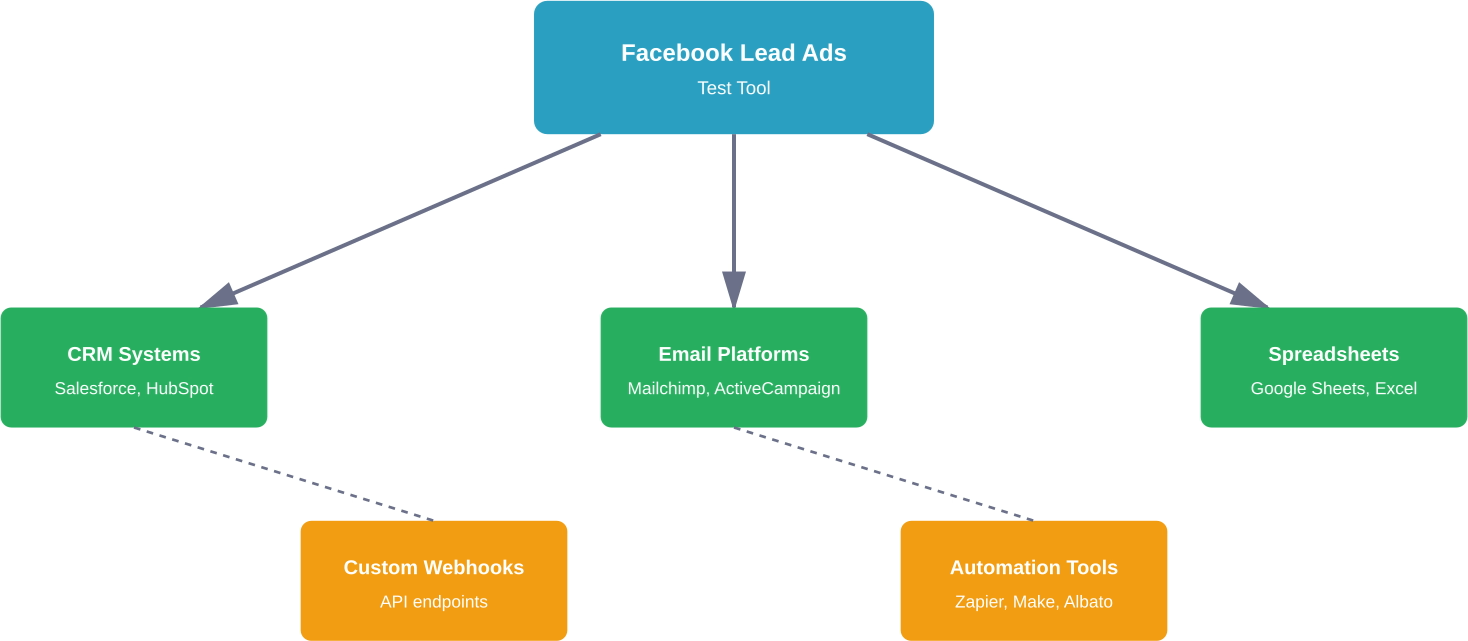
The real value of test leads emerges when verifying integrations. Lead ads rarely exist in isolation—they feed data into CRMs, marketing automation platforms, spreadsheets, and custom databases.
Integration platforms like LeadsBridge and Albato provide documentation specifically for testing with Meta's tool. These services recommend generating multiple test leads to verify consistent data flow.
According to Albato's documentation, users should remove all previous test leads before sending new ones. This practice helps identify whether integration issues stem from configuration errors or data conflicts.
CRM integrations represent the most common use case. Platforms like Salesforce, HubSpot, and Zoho rely on accurate lead data to trigger follow-up sequences and assign sales representatives.
Email marketing platforms need test verification too. Services like Mailchimp, ActiveCampaign, and Constant Contact use lead ads to build subscriber lists. Testing confirms that form fields map correctly to list segments and custom fields.
Spreadsheet integrations through Google Sheets or Microsoft Excel provide simple lead tracking for smaller operations. Test leads verify that data populates correct columns and rows update in real time.
Custom webhooks require careful testing because they involve direct server communication. The Facebook Lead Ads Testing Tool sends webhook requests just like production leads, including all standard headers and payload formatting.
Developers can monitor webhook endpoints during testing to verify payload structure. The test data should match the expected JSON format with all custom fields included.
Failed webhook deliveries often indicate URL configuration errors or authentication problems. Testing reveals these issues before real leads start flowing, preventing data loss.
User experiences shared in community forums reveal several recurring problems with the testing tool. Understanding these issues helps teams work around limitations and maintain testing schedules.
The most frequently reported problem involves the tool loading without displaying page or form selection options. The interface appears blank or shows loading states indefinitely.
This issue typically indicates temporary problems with Meta's developer infrastructure. Waiting several hours or a day often resolves the problem without any action required.
When specific pages or forms don't appear in selection dropdowns, permission issues are usually responsible. Verify administrative access through Facebook Business Manager settings.
Lead forms must have published status to appear in the testing tool. Draft forms remain invisible even with correct permissions. Publishing the form makes it available for testing immediately.
Some users report that newly created forms take time to propagate through Meta's systems. Waiting 15-30 minutes after publishing a form can resolve availability issues.
Generated test leads sometimes fail to appear in connected systems. This problem indicates integration configuration errors rather than testing tool failures.
Check webhook URLs for typos or incorrect protocols. HTTPS endpoints are required for most integrations, and even small URL errors prevent delivery.
Integration platforms like LeadsBridge provide specific troubleshooting guides for their services. These resources help identify whether problems exist in Meta's delivery system or the receiving platform's configuration.
Access denied messages suggest account permission problems. The testing tool requires specific roles within Facebook Business Manager.
Confirm that the user account has either admin or developer access to the Facebook page. Standard editor roles lack sufficient permissions for accessing developer tools.
For Business Manager accounts managing multiple businesses, verify that the correct business account is selected. The tool only displays resources from the active business context.
Effective testing goes beyond generating a single test lead. Comprehensive verification requires systematic approaches that catch edge cases and integration failures.
According to the Digital Marketing Blueprint's beginner's guide (published June 11, 2018), proper lead form testing ensures smooth campaign launches. The resource emphasizes testing before campaign activation.
Test each unique lead form separately. Forms with different field configurations require individual testing to verify that custom questions and conditional logic work correctly.
Generate several test leads in succession to verify that integrations handle volume appropriately. Some systems experience issues only when processing multiple simultaneous submissions.
Test forms with different field combinations when using conditional logic. Skip optional fields in some tests and complete all fields in others to verify flexible handling.
For forms with multiple-choice questions, test different answer combinations. This ensures that custom logic triggers correctly based on user selections.
Maintain records of testing activities including dates, forms tested, and results observed. This documentation helps diagnose problems when campaigns launch and integration issues surface.
Screenshot successful test submissions showing data in destination systems. These records prove integration functionality and provide reference points for troubleshooting.
Create checklists for testing procedures specific to each campaign type. Standardized processes reduce the risk of skipping critical verification steps.
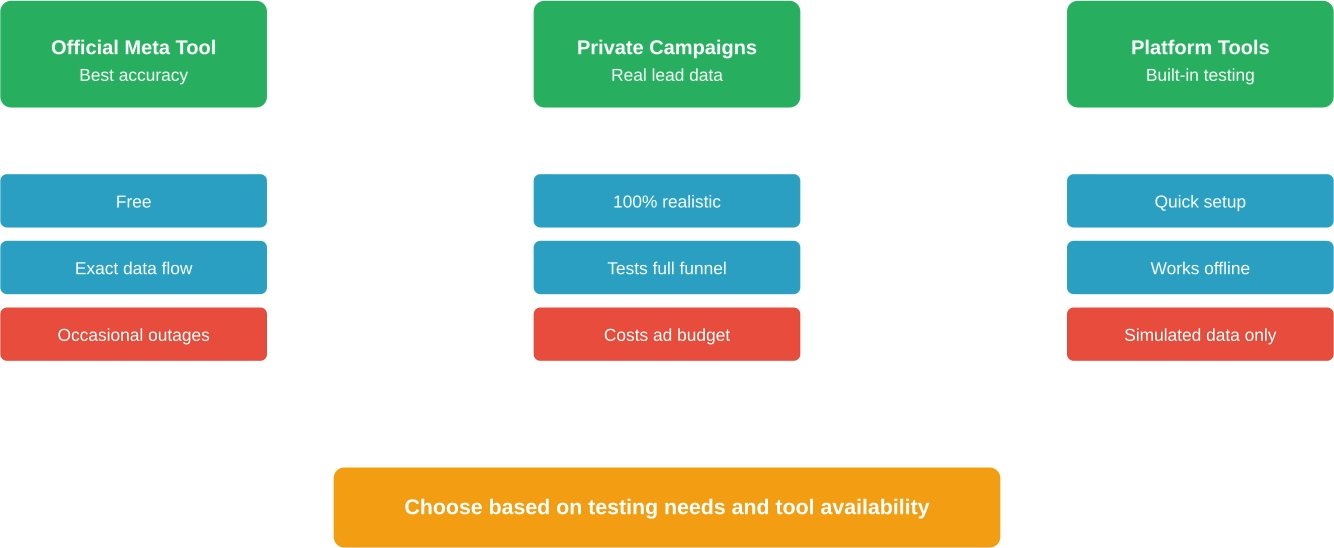
Technical issues sometimes prevent using Meta's official testing tool. Having backup testing methods ensures that integration verification continues despite tool availability problems.
Creating a private test campaign with minimal budget provides real lead data without significant ad spend. Target extremely narrow audiences or set daily budgets to a few dollars.
Manual form submission through Facebook's ad preview tools generates legitimate test data. These submissions follow the exact same data flow as production leads, making them reliable for integration testing.
Integration platforms often provide their own testing mechanisms. Albato's documentation describes a testing tool specifically designed for Facebook Lead Ads workflows within their platform.
These alternative tools generate test data on the integration platform side and simulate incoming leads. While not identical to Meta-generated tests, they verify that automation logic and data mapping work correctly.
LeadsBridge offers similar testing capabilities within their bridge configuration interfaces. These tools help diagnose issues when Meta's official testing tool experiences problems.
Technical teams can use Meta's Graph API to retrieve lead data programmatically and verify webhook configurations. This approach requires development resources but provides detailed debugging information.
API testing bypasses the web interface entirely, making it useful when the testing tool loads incorrectly. Developers can script test lead generation and automate verification processes.
Meta's developer documentation provides code examples for retrieving lead data and testing webhook subscriptions. These resources support custom testing workflows for complex integration scenarios.
Different integration platforms handle test leads in unique ways. Understanding platform-specific behaviors helps interpret test results accurately.
Some platforms differentiate between test leads and production data, storing them separately or flagging them with special markers. This prevents test data from contaminating production analytics.
Other systems treat all incoming leads identically regardless of source. Test leads become permanent records unless manually deleted, potentially skewing metrics and triggering unnecessary automation.
Community discussions indicate that Facebook Lead Ads modules can sometimes experience issues with Meta's API. Users report problems collecting leads for client accounts managed through agency Business Managers.
Testing with these platforms requires configuring triggers and verifying that test leads activate workflows. Both platforms provide testing features within their builders to simulate incoming data.
Real talk: automation platforms add complexity to testing. Each platform in the chain introduces potential failure points, so systematic testing at every integration layer becomes essential.
Salesforce and similar enterprise CRMs often have specific requirements for test data. Lead validation rules, required fields, and duplicate detection all affect whether test leads successfully create records.
Testing must account for these business rules to verify complete integration functionality. A test lead that arrives but fails CRM validation indicates configuration problems that would affect real leads.
Some CRMs provide sandbox environments specifically for testing integrations. Using these test environments prevents polluting production data with test records.
Timing matters for effective testing. Running tests at strategic points in campaign development catches problems early while leaving time for fixes.
Test immediately after creating new lead forms and before building ad campaigns around them. Early testing reveals form configuration issues when they're easiest to fix.
Retest after any changes to form fields, questions, or conditional logic. Even minor modifications can break existing integrations or introduce unexpected behavior.
The final testing phase before campaign launch requires comprehensive verification. Test all integrations again even if previous tests succeeded, as configuration drift can introduce new problems.
Verify that all team members who need access to lead data have appropriate permissions. Testing should include confirming that sales teams see new leads in their CRM views.
Check email notification settings to ensure that the right people receive alerts when new leads arrive. Many businesses rely on instant notifications for rapid lead response.
Active campaigns benefit from periodic testing to verify continued integration health. Systems change, webhooks expire, and API credentials rotate over time.
Schedule monthly or quarterly testing cycles for long-running campaigns. These regular checks catch degradation before it affects significant lead volume.
Test immediately when making changes to connected systems. CRM updates, email platform migrations, and spreadsheet reorganizations can break integrations that previously worked perfectly.
Proper testing transforms lead ads from risky experiments into reliable lead generation machines. The Facebook Lead Ads Testing Tool provides the foundation for this confidence, but effective testing requires systematic approaches and attention to detail.
Teams that prioritize testing before launch experience fewer integration failures, faster lead response times, and better conversion rates. When leads flow smoothly from ads to CRM to sales team, businesses can focus on optimization rather than troubleshooting.
The testing tool isn't perfect—it experiences occasional outages and technical issues. But it remains the most accurate method for verifying lead ad integrations without spending budget or bothering real users.
Sound familiar? Many businesses skip thorough testing, only to discover problems after spending thousands on campaigns. Test leads cost nothing but time, making them among the highest-ROI activities in digital marketing.
Start testing early, test often, and test systematically. Lead ads represent significant investment in customer acquisition, and testing protects that investment.
Looking ahead, Meta continues improving developer tools and integration capabilities. Staying current with testing best practices ensures that businesses leverage these improvements as they become available.
The difference between successful lead generation campaigns and expensive failures often comes down to proper testing. Verification catches problems during development rather than during live campaigns affecting real customer relationships.
Ready to launch your next lead generation campaign with confidence? Start by thoroughly testing every integration point using Meta's official testing tool. Generate multiple test leads, verify data flow to all connected systems, and document your results. When test leads flow flawlessly from form to final destination, real leads will follow the same proven path.


