Marketing Ideas for Embroidery Business: 2026 Guide
Discover proven marketing ideas for embroidery business growth. From niche targeting to social media strategies—boost visibility and sales today.
Jun 7, 2026



Claude Opus 4.6 is the best AI model for OpenClaw in 2026 for complex workflows, while Claude Sonnet 4.5 offers the best balance of performance and cost for daily tasks. DeepSeek V3 and local models provide cost-effective alternatives for developers with privacy requirements or high-volume workloads.
Choosing the right AI model for OpenClaw matters more than most developers realize. The model determines how well the agent handles multi-step tasks, whether it can recover from errors, and how much each workflow costs.
OpenClaw supports over a dozen providers — Anthropic, OpenAI, Google, DeepSeek, and local models through Ollama. But here's the thing: not all models are built for agentic workflows. Some excel at coding. Others handle research better. And cost differences can reach 10x between options.
This guide compares the top models for OpenClaw based on real-world benchmarks, pricing data, and community feedback. No fluff.
OpenClaw isn't a chatbot. It's an autonomous agent that executes complex workflows — managing files, running terminal commands, calling APIs, and making decisions across multiple steps.
The model needs to maintain context over long conversations. It must handle tool calls reliably. And it should recover gracefully when tasks fail.
According to arXiv research on OpenClaw security, the framework grants AI systems operating-system-level permissions and autonomy to execute complex workflows. That level of access means the model's reliability directly impacts what the agent can accomplish — and what risks it introduces.
Three factors drive model performance in OpenClaw:
Cost matters too. Community discussions on Reddit show developers can burn through OpenAI tokens quickly when running OpenClaw for daily work. The right model balances capability with sustainable pricing.
Claude Opus 4.6 is the most capable model for OpenClaw as of March 2026. According to competitor analysis, OpenClaw's creator recommends Anthropic Pro or Max subscriptions for users who prioritize quality and safety.
Opus 4.6 handles complex reasoning tasks that other models struggle with. It maintains context across long workflows and recovers from errors more reliably than alternatives.
Here's what Opus delivers:
The downside? Cost. Opus pricing sits at $5 per million input tokens and $25 per million output tokens. For power users running always-on agents or handling sensitive workflows in finance or healthcare, the premium makes sense. For daily assistant tasks, it's overkill.
Opus 4.6 fits specific use cases where quality justifies the cost:
According to arXiv research on OpenClaw, at Anthropic, engineers use AI coding agents in 60% of their daily work, with autonomous task complexity doubling over six months. For teams at that level of integration, Opus provides the reliability to support mission-critical workflows.
Sonnet 4.5 delivers 80-90% of Opus quality at roughly one-fifth the cost. That makes it the default choice for most OpenClaw users.
Pricing sits at $3 per million input tokens and $15 per million output tokens. For calendar management, email drafting, research queries, and general automation, Sonnet handles everything without breaking the bank.
The model is fast enough for real-time interactions and capable enough for most coding tasks. It won't match Opus on complex multi-step reasoning, but it handles typical agent workflows reliably.
Community rankings on Price Per Token show Sonnet consistently scoring high among OpenClaw users who balance cost and capability. The model works well for:
Real talk: unless specific requirements push toward Opus or a specialized model, Sonnet 4.5 should be the starting point. Upgrade only when hitting clear limitations.
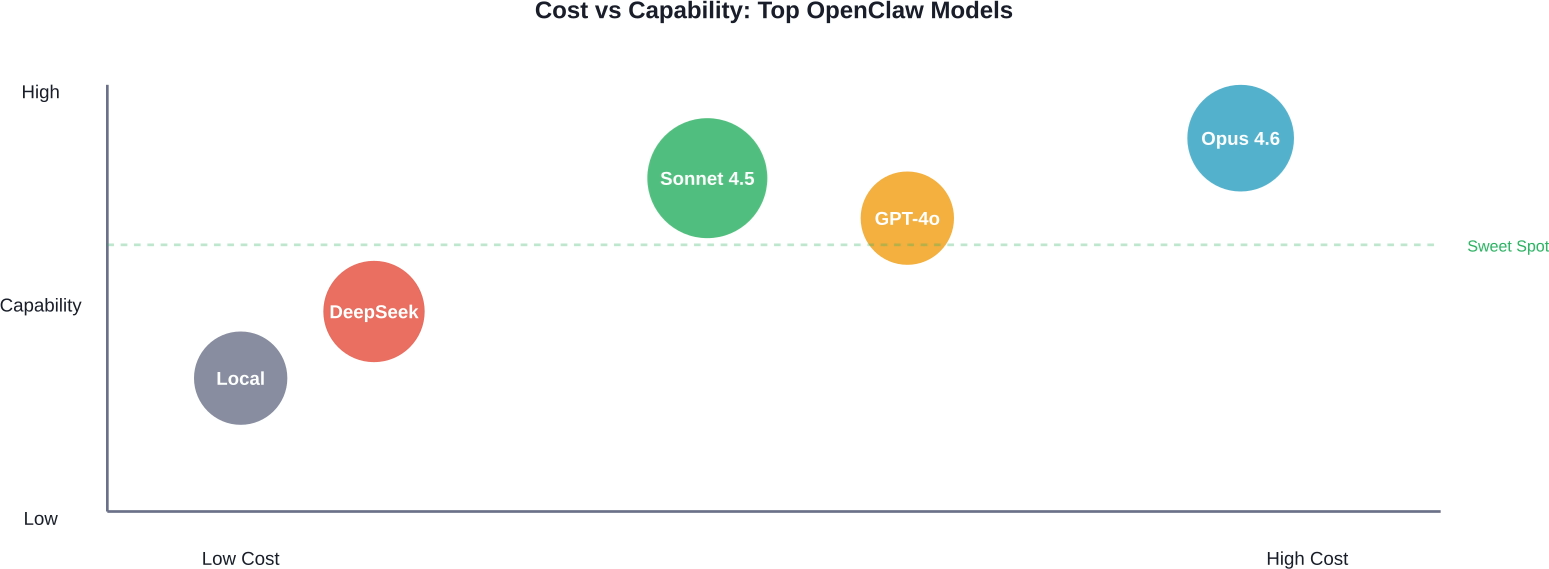
GPT-4o from OpenAI offers strong performance for OpenClaw, particularly for tasks requiring structured output or extensive tool use. The model handles function calling well and integrates smoothly with OpenAI's ecosystem.
OpenAI introduced GPT-5.3-Codex in February 2026, which advances both frontier coding performance and reasoning capabilities. According to OpenAI's release documentation, GPT-5.3-Codex demonstrates far stronger computer use capabilities than previous GPT models, scoring significantly higher on OSWorld-Verified benchmarks where models use vision to complete diverse computer tasks.
But here's the catch: OpenAI's pricing and token consumption can add up quickly for always-on agents. Community members report burning through tokens faster with OpenAI models compared to Claude alternatives for similar tasks.
OpenAI models work well when workflows heavily involve their ecosystem — GPT-based tools, OpenAI APIs, or codebases already optimized for GPT behavior. For purely OpenClaw-focused work, Claude models typically provide better value.
DeepSeek V3 offers compelling performance at budget-friendly pricing. The model handles many OpenClaw tasks reliably while costing significantly less than premium options from Anthropic or OpenAI.
Price Per Token community rankings show DeepSeek gaining traction among cost-conscious developers. The model works particularly well for high-volume workflows where per-token costs matter.
Limitations exist. DeepSeek V3 doesn't match Claude Opus or GPT-5.3-Codex on complex reasoning tasks. Error recovery isn't as robust. And the model occasionally requires more explicit prompting to achieve reliable tool use.
But for straightforward automation — data processing, API calls, routine coding tasks — DeepSeek delivers solid results at a fraction of premium pricing.
Several other models provide cost-effective OpenClaw alternatives:
These models trade some capability for lower costs. For developers running OpenClaw at scale or experimenting with agent workflows, budget options reduce financial risk while learning what works.
Local models through Ollama give developers complete control over data and eliminate per-token costs. Once hardware is in place, usage becomes unlimited.
Community discussions mention running models like Llama on Mac Studio hardware. A Hugging Face community article describes setting up OpenClaw on a Jetson AGX Orin, with the agent autonomously researching hardware requirements and recommending NVMe SSD upgrades.
Local deployment requires tolerance for latency and reduced capability compared to cloud models. But for privacy-sensitive workflows or high-volume tasks, local models eliminate data sharing concerns and ongoing API costs.
Running OpenClaw with local models involves tradeoffs:
For teams with existing GPU infrastructure or strict data residency requirements, local models make sense. For most developers, cloud models provide better performance and lower total cost once hardware and maintenance factor in.
Benchmarks provide objective comparison points, but real-world performance depends heavily on specific tasks and workflow design.
OpenAI reports that GPT-5.3-Codex scores significantly higher than previous models on OSWorld-Verified, where models complete diverse computer tasks using vision. Human performance on the same benchmark sits around 72%.
ArXiv research on OpenClaw-RL describes a framework for training agents through natural interaction. According to OpenClaw-RL research, every agent interaction generates a next-state signal — user replies, tool outputs, terminal changes — that can be recovered as a live learning source. This suggests model adaptability matters as much as raw benchmark scores.
Community feedback on Reddit and specialized forums provides practical insight. Users consistently report Claude Sonnet handling daily OpenClaw tasks reliably while keeping costs manageable. Opus gets recommendations for complex workflows where quality justifies premium pricing.
Beyond benchmarks, several factors impact model performance in production OpenClaw deployments:
Testing with real workflows reveals more than synthetic benchmarks. The best approach involves considering starting with a mid-tier model like Sonnet 4.5, monitoring performance and costs, then adjusting based on observed limitations.
OpenClaw grants AI models significant system access. Security research published on arXiv highlights risks inherent in autonomous agents with operating-system-level permissions.
One paper, "From Assistant to Double Agent," formalizes and benchmarks attacks on OpenClaw for personalized local AI agents. Another study presents a trajectory-based safety audit of Clawdbot (OpenClaw's previous name), noting that the agent exhibits varying safety performance across different risk dimensions.
The Hugging Face paper on Clawdbot safety evaluated 34 test cases across multiple risk categories. Results show the agent performs consistently on specified tasks but struggles with ambiguous or adversarial inputs.
Model choice affects safety. Claude models generally demonstrate stronger safety guardrails while maintaining usefulness. OpenAI models also include safety features, though behavior varies by version.
For production deployments, particularly those handling sensitive data or operating in regulated industries, model safety characteristics matter as much as capability. The research paper "Don't Let the Claw Grip Your Hand" provides a security analysis and defense framework specifically for OpenClaw deployments.
Regardless of model choice, several practices improve OpenClaw security:
ArXiv research describes architecting defenses in autonomous agents through analysis of OpenClaw security. The paper emphasizes that the rapid evolution of LLMs into autonomous, tool-calling agents has fundamentally altered the cybersecurity landscape.
Model costs for OpenClaw depend on usage patterns. A developer running occasional tasks faces different economics than a team operating always-on agents.
Here's how pricing stacks up for major models based on data from competitor analysis and Price Per Token community rankings:
Cost management strategies depend on workflow type. For daily assistant work, Sonnet provides the best balance. For high-volume automation, DeepSeek or local models reduce per-task costs.
One approach involves using different models for different task types. Simple queries can route to budget models while complex workflows use premium options. OpenClaw's flexible configuration supports per-task model selection.
Actual monthly costs vary widely based on usage. Community discussions provide rough estimates:
These figures assume typical task complexity. Complex multi-step workflows consume more tokens and drive costs higher. Simple queries cost less.
For teams concerned about runaway costs, usage monitoring and budget alerts can help prevent unexpected expenses. Most providers offer dashboard tools to track spending in real-time.
OpenClaw configuration determines which models are available and how the agent selects between them. The setup process varies slightly by provider.
For Claude models, users need an Anthropic API key. For OpenAI, a separate OpenAI API key. Local models require Ollama installation and model downloads.
The OpenClaw config file specifies default models and provider preferences. Users can override defaults on a per-task basis or configure automatic model selection based on task characteristics.
Community guides and GitHub resources provide detailed setup instructions. The centminmod/explain-openclaw repository on GitHub offers comprehensive documentation including security considerations and deployment guides.
Many users configure multiple models to optimize cost and capability:
This approach requires slightly more configuration but significantly reduces costs for mixed workloads. The agent automatically routes tasks to appropriate models based on complexity and requirements.
GitHub projects like openclaw-foundry demonstrate meta-extension capabilities where OpenClaw learns from workflow patterns and optimizes model selection over time. When patterns hit sufficient uses with high success rates, the system crystallizes them into dedicated tools.
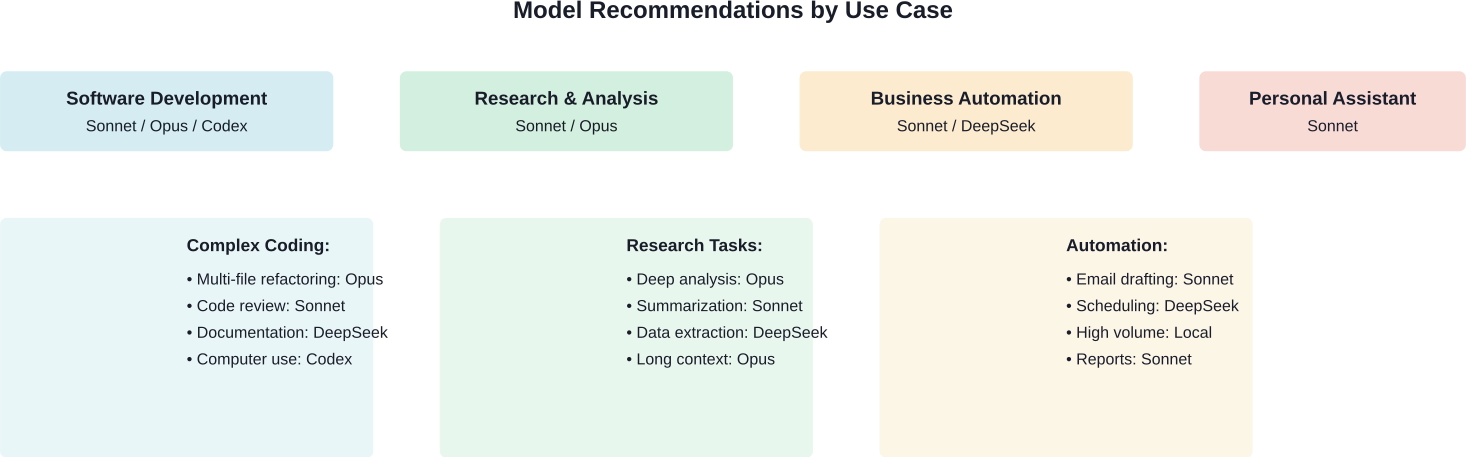
Different workflows favor different models. Here's what works based on community feedback and testing:
For coding tasks, model choice depends on complexity:
GPT-5.3-Codex specializes in coding workflows and demonstrates strong computer use capabilities according to OpenAI's February 2026 release. For teams deeply integrated with OpenAI's development tools, it offers advantages.
Research workflows benefit from models with strong reasoning:
The arXiv research on OpenClaw AI Agents characterizes an emergent learning community at scale, analyzing 231,080 non-spam posts and 1.55 million comments produced by autonomous agents. The study found that 18.4% of posts contain action-inducing language, based on analysis of posts in the Moltbook learning community, suggesting that research workflows involving agent-generated content require careful model selection.
Business process automation typically involves repetitive tasks:
For always-on business agents, cost becomes the primary constraint. Sonnet provides the best balance, but high-volume workflows may justify local models despite reduced capability.
Personal AI assistants need balance between capability and cost:
A Hugging Face community article describes a personal assistant setup where the agent managed itself, browsing forums to configure PyTorch with CUDA and recommending hardware upgrades. For that level of autonomy, model reliability matters more than marginal cost savings.
When comparing models like Claude or GPT for something like OpenClaw, the real bottleneck usually isn’t the model itself. It’s what you build around it – prompts, flows, and especially how outputs perform in the real world. That’s where Extuitive fits in. Instead of testing ideas after launch, it lets teams predict how creatives will perform before anything goes live, using AI simulations based on real consumer behavior patterns.
In practice, this means you can take outputs from different models, run them through a prediction layer, and see which direction is more likely to work – without burning time or budget on trial and error. If model choice matters for your project, don’t rely on assumptions – validate your outputs early and move forward with something you can actually trust with Extuitive.
The right OpenClaw model depends on specific requirements. But the decision framework is straightforward.
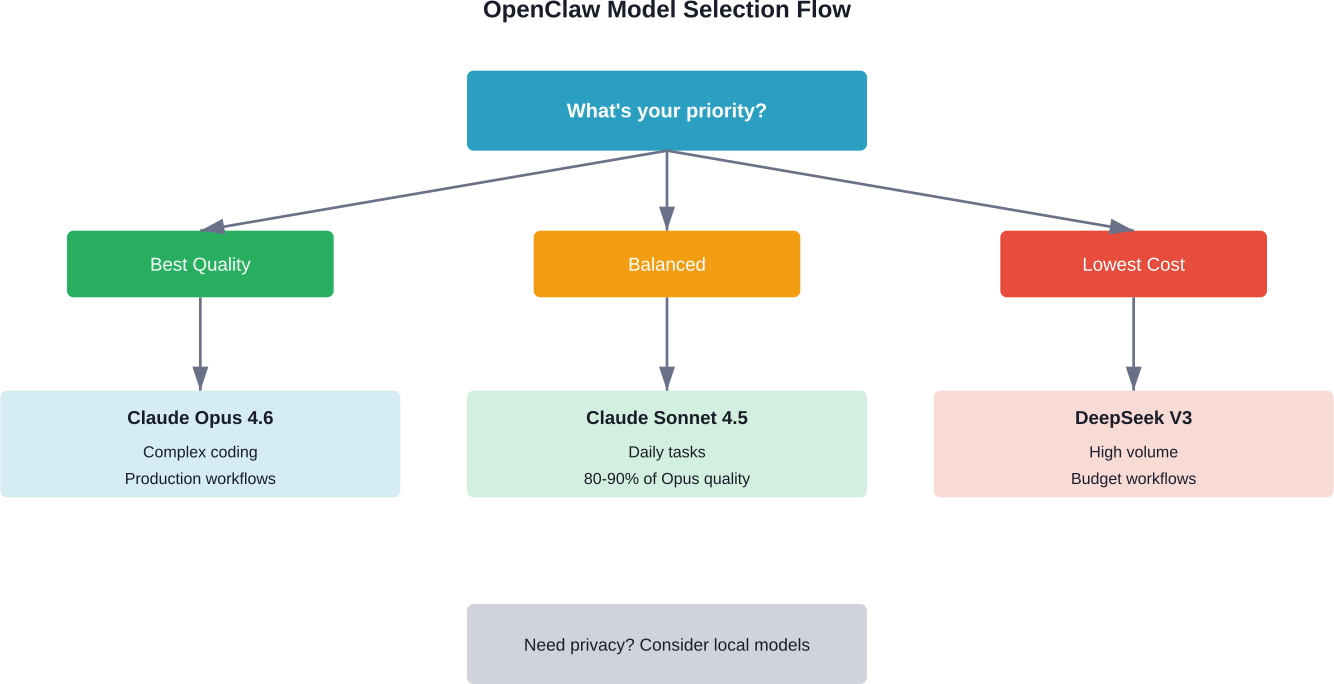
Start with Claude Sonnet 4.5 unless clear reasons push toward alternatives. Sonnet handles 90% of workflows reliably at reasonable cost. Upgrade to Opus when hitting capability limits on complex tasks. Consider DeepSeek for high-volume automation where cost matters more than capability. Evaluate local models if privacy requirements or usage volume justify hardware investment.
For developers building on OpenClaw, model flexibility provides a key advantage. The platform supports multiple providers, making it easy to test different options and optimize over time.
Testing matters more than benchmarks. Real workflows reveal which model best fits actual needs. Consider starting with mid-tier options like Sonnet, monitoring performance and costs, then adjusting based on observed results.
Security considerations matter particularly for production deployments. Research from arXiv and other sources highlights risks inherent in autonomous agents with system-level access. Choose models with strong safety features and implement application-level guardrails regardless of model selection.
The OpenClaw ecosystem continues evolving. New models are released regularly. Pricing changes. Capabilities improve. Regular reassessment ensures the model choice stays optimal as both the platform and available models advance.
Ready to get started? Configure OpenClaw with Claude Sonnet 4.5 as your baseline, test real workflows, and adjust based on what the agent actually needs to accomplish. That's how to find the best model for specific requirements without overpaying or sacrificing capability.


