Best Shopify Page Builder: What Actually Works
Looking for the best Shopify page builder? We compared top tools by speed, flexibility, and real-world results - just honest insights.
Jan 6, 2026



OpenClaw AI Gateway is the central control plane that manages all communication between your AI agents, messaging platforms, and external services. It runs locally as a daemon (default port 18789), handling authentication, WebSocket connections, session routing, and tool execution across channels like Discord, Slack, iMessage, and more. The Gateway multiplexes protocol traffic, enforces security policies, and provides REST and WebSocket APIs for external integrations.
AI agents promise to automate your life. But here's the thing—without a solid control plane, they're just scattered scripts with no way to coordinate, authenticate, or scale.
That's where the OpenClaw AI Gateway comes in.
According to the official OpenClaw documentation, the Gateway is the daemon process that binds a single port and multiplexes WebSocket control plane traffic, dashboard access, and protocol routing. Most tasks—status checks, logs, pairing, message sending, and agent runs—talk to the Gateway via its WebSocket RPC. It's the nervous system of your AI assistant.
This guide breaks down exactly what the OpenClaw Gateway is, how it works under the hood, and why it's designed the way it is. No fluff.
The Gateway is OpenClaw's runtime daemon. Think of it as the central hub that coordinates every interaction between your AI agents, messaging platforms, local tools, and external APIs.
Here's what it actually does:
According to the official Gateway Architecture documentation, the Gateway binds one port and multiplexes control UI, dashboard views, command palette, and mobile-friendly interfaces. Everything flows through this single entry point.
Direct agent exposure would require each agent to manage its own network stack, authentication, and protocol negotiation. That's a security nightmare.
The Gateway centralizes these concerns. Agents remain stateless workers that process requests; the Gateway handles all the operational complexity. This separation means you can:
Real talk: it's the difference between a sprawling mess of open ports and a clean API surface.
The Gateway is built on a hub-and-spoke model. All clients—Mac app, CLI, web dashboard, mobile nodes, headless bots—connect to the Gateway over WebSocket or HTTP. The Gateway then routes requests to agents, executes tools, and streams responses back.
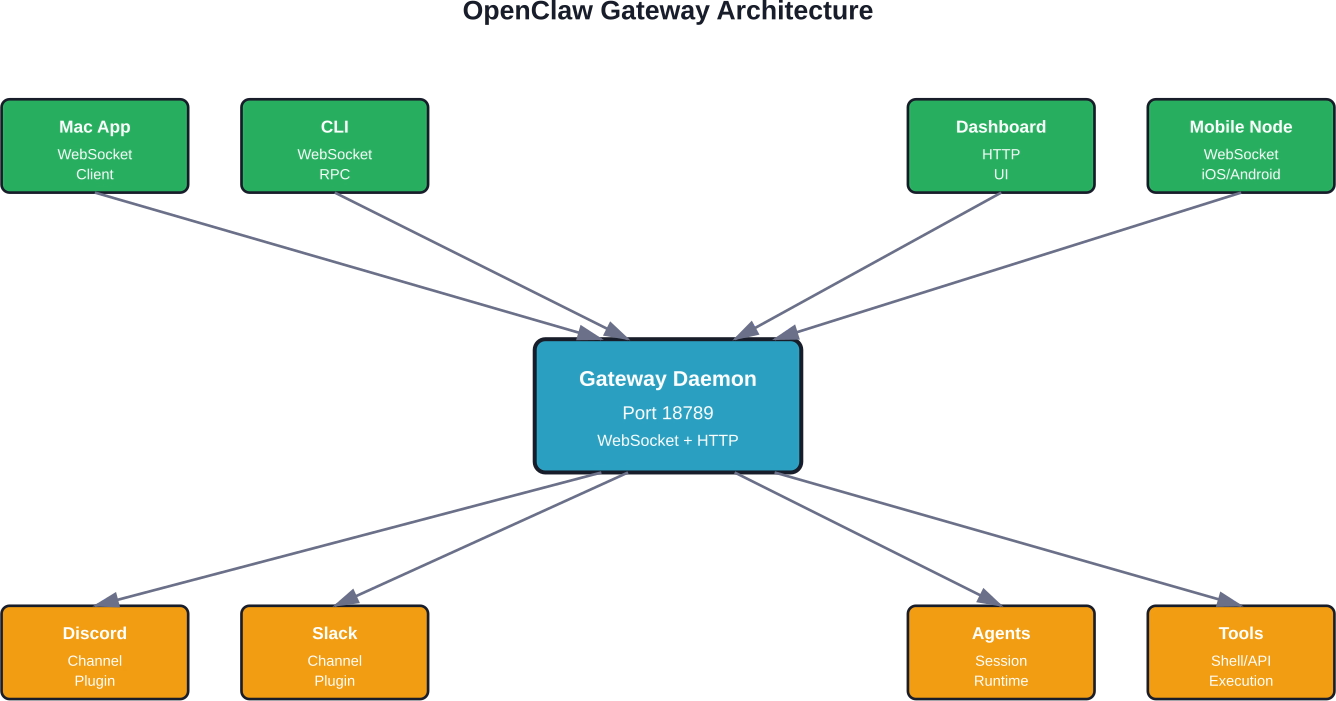
The Gateway orchestrates four main layers:
According to the official Gateway Protocol documentation, after pairing, the Gateway issues a device token scoped to the connection role and approved scopes. Clients persist this token (returned in hello-ok.auth.deviceToken) and reuse it on future connects.
The Gateway speaks a custom WebSocket-based RPC protocol. Understanding this protocol is key to building integrations or debugging connectivity issues.
When a client connects, it follows this handshake sequence:
The official documentation lists several error codes if handshake fails:
Every connection has a role and a set of scopes that determine what operations it can perform.
According to the official documentation, the Gateway uses roles and scopes to enforce least-privilege access. A node role might have scopes for reading messages and sending responses, while an admin role gets full control-plane access.
This design prevents compromised clients from escalating privileges or accessing unauthorized sessions.
While WebSocket is the native protocol, the Gateway also exposes HTTP REST endpoints. The most important is the OpenAI Chat Completions-compatible API.
According to the official Tools Invoke API documentation, external applications can send messages to agents via POST /api/sessions/main/messages with Bearer token authentication. This is how you integrate OpenClaw with existing tools, webhooks, or automation platforms.
curl -X POST http://localhost:18789/api/sessions/main/messages \
-H "Authorization: Bearer YOUR_GATEWAY_TOKEN" \
-H "Content-Type: application/json" \
-d '{
"role": "user",
"content": "Check if there are any security updates available"
}'
The Gateway routes this message to the main session, the agent processes it, executes any required tools (like checking package updates), and streams the response back.
This same endpoint supports streaming responses via Server-Sent Events (SSE) if you include Accept: text/event-stream.
The official documentation emphasizes a critical security boundary: gateway.auth (token/password/trusted-proxy/device auth) authenticates callers to gateway APIs. This is different from session-level authentication.
Common misconception: "The Gateway needs per-message signatures on every frame to be secure." That's not how it works. Authentication happens at connection establishment; once authenticated, the connection is trusted for its role and scopes. This is the same model used by Kubernetes API servers and other production control planes.
By default, the Gateway binds to localhost:18789 for security. This prevents external network access unless explicitly configured.
According to the official Gateway Runbook, port and bind settings follow this resolution order:
For remote access, teams typically use one of three patterns:
The Gateway supports hot configuration reload without restarting the daemon. This is critical for production deployments where downtime breaks active agent sessions.
Reload modes (from official docs):
Hot-safe changes include updating tool allowlists, sandbox policies, and rate limits. Changes that require restart: port binding, TLS certificates, and core auth methods.
The Gateway supports multiple authentication methods depending on your deployment model.
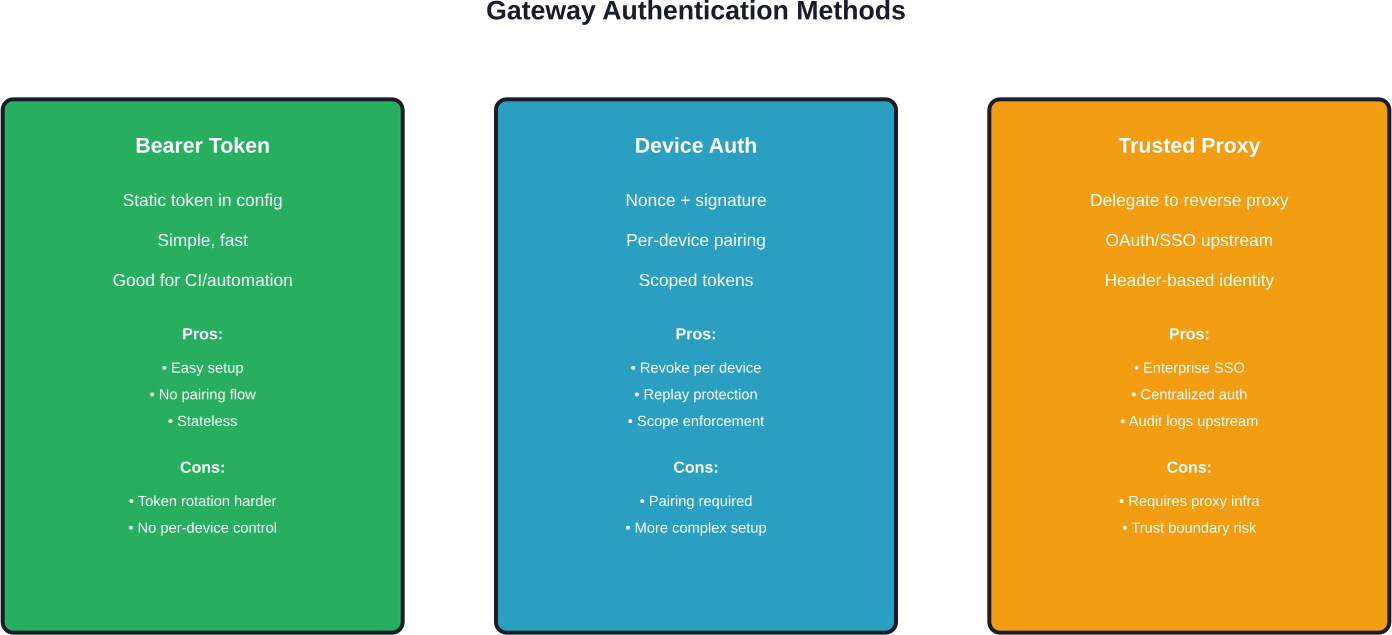
Simplest method. Set a static token in your config:
gateway:
auth:
token: "your-secret-token-here"
Clients include this in the Authorization header or as a URL parameter. Good for CI pipelines, internal scripts, and single-user setups.
More secure. Each device pairs once and receives a scoped device token. The Gateway tracks paired devices and can revoke individual devices without rotating the global secret.
According to the official documentation, after pairing, the Gateway issues a device token scoped to the connection role and approved scopes. Clients persist this token and reuse it on future connects.
This is the recommended method for Mac app, mobile nodes, and multi-user deployments.
For enterprise deployments behind SSO or OAuth gateways, the Gateway can trust identity headers from an upstream reverse proxy (e.g., X-Forwarded-User). The proxy handles authentication; the Gateway extracts the user ID and applies per-user policies.
Critical: only enable this when the Gateway is not exposed directly to the internet. Otherwise, attackers can spoof headers.
The Gateway dispatches tool execution requests to the agent runtime, which then invokes shell scripts, API calls, or built-in functions.
According to the official Security documentation, OpenClaw supports three sandbox modes:
Example config for read-only workspace with restricted tools:
agents:
list:
- id: "family"
workspace: "~/.openclaw/workspace-family"
sandbox:
mode: "all"
scope: "agent"
workspaceAccess: "ro"
tools:
allow: ["read"]
deny: ["write", "edit", "apply_patch", "exec", "process", "browser"]
This prevents the agent from modifying files, spawning processes, or launching browsers—useful for shared environments or untrusted agent personas.
Most teams run the Gateway locally. But for multi-device access or team deployments, remote access is essential.
The official documentation recommends Tailscale for secure remote Gateway access. Tailscale creates a private mesh network with end-to-end encryption. Your Gateway stays on localhost; only devices on your Tailnet can reach it.
No firewall rules, no port forwarding, no TLS certificates to manage. Tailscale handles identity, encryption, and NAT traversal.
For teams already running nginx or Caddy:
This works but adds operational complexity. You're now managing TLS certs, proxy configs, and an additional failure point.
The Gateway routes messages to agent sessions based on sessionKey or channel context. Each session maintains its own conversation history, memory compaction, and tool state.
Sessions are not authentication boundaries. According to the official Security documentation, the sessionKey is a routing key for context/session selection, not a user auth boundary. Authentication happens at the Gateway level; session keys just tell the Gateway which conversation thread to use.
This design allows multiple users to share a Gateway while keeping their agent contexts isolated. Each user authenticates with their own device token or Bearer token, and the Gateway routes their messages to user-specific sessions.
For teams running multiple agents—personal assistant, work assistant, family agent—the Gateway supports multi-agent routing.
Each agent registers with the Gateway on startup. Incoming messages include an agent ID or channel mapping. The Gateway dispatches to the correct agent runtime.
Presence tracking ensures the Gateway knows which agents are online, idle, or crashed. If an agent goes offline, the Gateway queues messages and delivers them when the agent reconnects.
The Gateway exposes operator commands for runtime inspection:
According to the official Gateway Runbook, these commands are available via CLI (openclaw gateway status) or WebSocket RPC from the dashboard.
The term "AI Gateway" is overloaded. How does OpenClaw's Gateway compare to products like Vercel AI Gateway or IBM API Connect AI Gateway?
OpenClaw Gateway is fundamentally different. It's not a cloud proxy for OpenAI API calls. It's a local runtime daemon that coordinates agents, channels, and tools—with full control over execution sandboxing and privacy.
Vercel AI Gateway and IBM API Connect are infrastructure services. OpenClaw Gateway is part of an agent runtime.
Running AI agents with shell access introduces security risks. The Gateway implements defense-in-depth to mitigate common attacks.
According to the official Security documentation, OpenClaw publishes a formal threat model aligned with MITRE ATLAS. Key attack surfaces:
The Gateway mitigates these through:
Research from arXiv case studies on OpenClaw security found that reconnaissance- and discovery-related attack behaviors constitute the most prominent weakness. Average attack success rate in these categories exceeds 65%, indicating attackers can use agents to enumerate system information with relatively high probability.
The Gateway's sandbox mode is critical here. Running with sandbox.mode: "all" and restrictive tool policies significantly reduces reconnaissance surface area.
The OpenClaw A2A Gateway Plugin implements the Agent-to-Agent (A2A) protocol v0.3.0 for bidirectional agent communication.
According to the GitHub repository for openclaw-a2a-gateway, this plugin allows one OpenClaw agent to invoke another agent's skills over HTTP. Use case: an orchestrator agent delegates specialized tasks (code review, design feedback, security audit) to expert agents.
Example A2A invocation:
node <PLUGIN_PATH>/skill/scripts/a2a-send.mjs \
--peer-url http://<PEER_IP>:18800 \
--token <PEER_TOKEN> \
--non-blocking \
--wait \
--timeout-ms 600000 \
--poll-ms 1000 \
--message "Discuss A2A advantages in 3 rounds and provide final conclusion"
This creates a multi-agent workflow where agents coordinate via the Gateway protocol. The Gateway routes A2A requests just like any other tool invocation, applying the same auth and sandbox policies.
Teams deploying OpenClaw Gateway in production typically follow one of these patterns:
According to community discussions on Reddit, the most common production blocker is credential management. Teams struggle with securely distributing Bearer tokens or pairing multiple devices without leaking secrets in config files.
Best practice: use device authentication and store device tokens in OS-level keychains (macOS Keychain, Linux Secret Service, Windows Credential Manager). The official Mac app handles this automatically.
The Gateway is single-threaded for control-plane operations (authentication, session routing, protocol framing). Tool execution and LLM inference happen in separate worker processes.
For most personal and small-team deployments, this is fine. The Gateway handles hundreds of concurrent WebSocket connections without issue.
Scaling bottlenecks appear when:
Solution: run multiple Gateway instances with a load balancer. Each Gateway gets a subset of agents or channels. The official documentation mentions support for multiple gateways on the same host (different ports), but cross-Gateway session routing is not yet supported.
Based on official Node Troubleshooting documentation and community reports, here are the most frequent Gateway problems:
The OpenClaw Gateway is under active development. Based on official GitHub issues and community discussions, upcoming features include:
Verify feature availability in official documentation before building dependencies.

If you are looking at what OpenClaw AI Gateway is, it also helps to compare it with tools built for a narrower job. Extuitive is focused on ad prediction. It helps brands review creative before launch and estimate which ads are more likely to perform well, using AI models trained on campaign outcomes.
Talk with Extuitive to:
👉 Book a demo with Extuitive to review ads before launch.
The OpenClaw Gateway is what makes local AI agents practical. Without it, every agent would need its own network stack, authentication layer, and protocol parser. That doesn't scale, and it's a security nightmare.
By centralizing these concerns in a single control plane, the Gateway enables clean separation of responsibilities. Agents focus on reasoning and tool execution. The Gateway handles everything else—routing, auth, sandboxing, protocol translation, and operational telemetry.
This architecture mirrors production patterns from Kubernetes (kube-apiserver as control plane), service meshes (Envoy as data plane), and enterprise messaging (RabbitMQ as message broker). The Gateway is the API server for your AI infrastructure.
If deploying OpenClaw, invest time in understanding the Gateway. Configure authentication properly. Choose the right bind mode and remote access pattern. Enable sandboxing for untrusted agents. Monitor Gateway health and connection states.
The Gateway is where security, reliability, and operational sanity live. Get it right, and your AI agents become a force multiplier. Get it wrong, and you're one prompt injection away from disaster.
Ready to deploy? Start with the official Gateway Runbook for step-by-step setup. Join the Discord for troubleshooting and architecture discussions. And check the GitHub repository for the latest protocol specs and security advisories.
The lobster way is the right way. Build with the Gateway, not around it.


