What Is Shopify Pay and How Does It Work?
Learn about Shopify Pay, the simple and secure payment solution for Shopify merchants. Find out how it works and how it can streamline your checkout process.
Feb 3, 2026



OpenClaw is an open-source AI assistant framework that runs locally on your computer, executing tasks autonomously 24/7. Originally launched as Moltbot in November 2025, it integrates with multiple AI providers (OpenAI, Anthropic, etc.), chat platforms (Telegram, Discord, Slack), and supports custom "skills" for automation, coding, web browsing, and file management. Unlike cloud assistants, OpenClaw gives you full control and privacy while enabling proactive task execution, persistent memory, and background operations.
An AI tool with a quirky name has caused quite a stir lately. Developers are talking about it on Reddit, researchers are writing security papers about it, and some users claim it's changed how they work entirely.
So what exactly is OpenClaw?
The short answer? It's an open-source AI assistant that actually runs on your machine—not in some cloud service you don't control. It connects to chat apps like Telegram, executes code, browses the web, manages files, and runs tasks in the background while you sleep.
But that's just scratching the surface. Let's break down what makes this tool different, why developers are obsessed with it, and whether the hype is justified.
OpenClaw didn't start with that name. When it launched in November 2025, it was called Moltbot. A few weeks later, it became Clawdbot. By early 2026, the project settled on OpenClaw—and that's the name that stuck.
According to GitHub data, the main OpenClaw repository has accumulated 349,000+ stars and 70,000+ forks, making it one of the fastest-growing AI projects in recent memory. The official tagline on the GitHub page reads: "Your own personal AI assistant. Any OS. Any Platform. The lobster way."
Yes, there's a lobster mascot. No, nobody's entirely sure why.
Most AI assistants respond when you ask them something. OpenClaw can do that too, but here's the thing—it doesn't stop there.
OpenClaw is an autonomous agent. That means it can:
Real talk: this isn't just a chatbot. It's more like having a junior developer who never sleeps and follows instructions obsessively.
OpenClaw uses a concept called the "tank" architecture. Your machine—whether that's a laptop, VPS, or home server—is the "tank." OpenClaw runs there, consuming your local resources but giving you complete control and privacy.
Skills are the building blocks. Each skill is a discrete function—think "send an email," "check website uptime," "run tests on my app," or "summarize Hacker News." Skills aren't LLM prompts; they're actual executable code (usually TypeScript or Python) that the agent calls when needed.
According to the ClawHub repository on GitHub, there are 7.5k stars and 1.2k forks on the skills directory, with community-contributed automations for everything from monitoring server logs to posting on social media.
Here's where it gets interesting. OpenClaw hit a nerve with developers for a few specific reasons.
Cloud AI services are convenient, but they come with trade-offs. Every conversation, every file you share, every task you automate—it all goes through someone else's servers.
OpenClaw flips that model. Everything runs on hardware under the developer's control. API keys for AI providers are stored locally. Chat logs stay local. File operations happen on the local filesystem.
For teams working on proprietary code or sensitive data, that's a game-changer.
Most chat-based AI tools forget context after a few thousand tokens. OpenClaw implements session compaction and long-term memory storage.
According to a GitHub Gist titled "You Could've Invented OpenClaw" by user dabit3 (last active April 4, 2026), the memory system uses a simple but effective approach: estimate token count, summarize old messages when approaching limits, and keep recent messages intact.
The implementation includes two core functions:
def estimate_tokens(messages):
"""Rough token estimate: ~4 chars per token."""
return sum(len(json.dumps(m)) for m in messages) // 4
def compact_session(user_id, messages):
"""Summarize old messages, keep recent ones."""
Simple? Yes. Effective? Also yes. Context persists across sessions, so the agent remembers what happened yesterday, last week, or last month.
Most AI assistants are reactive. OpenClaw can be proactive.
The heartbeat feature lets developers schedule periodic tasks using a cron-style syntax. Create a file called HEARTBEAT.md, add instructions like "Every weekday at 08:00 send a daily briefing," and the agent handles it.
By default, the heartbeat triggers every 30 minutes, checking for scheduled tasks and executing them without human intervention.
One developer on the official OpenClaw site noted: "Proactive AF: cron jobs, reminders, background tasks. Memory is amazing, context persists 24/7."
OpenClaw supports over 20 AI providers. That means developers can route requests to whichever model makes sense for the task—GPT-4 for complex reasoning, Claude for long context, or cheaper models for simple operations.
One user on the OpenClaw site described setting up a proxy to route their GitHub CoPilot subscription as an API endpoint: "First I was using my Claude Max sub and I used all of my limit quickly, so today I had my claw bot setup a proxy to route my CoPilot subscription as a API endpoint so now it runs on that."
Cost control + flexibility = happy developers.
Let's get technical for a moment.
At its heart, OpenClaw runs a chat loop:
But wait—there's more. Sessions can be managed programmatically. According to the openclaw-claude-code repository by Enderfga (over 2,000 stars), developers can route messages between different agent sessions:
await manager.sessionSendTo('planner', 'coder', 'The auth module needs rate limiting');
await manager.sessionSendTo('monitor', '*', 'Build failed!'); // broadcast
Idle sessions receive messages immediately; busy sessions queue them for later. This enables multi-agent workflows where specialized agents collaborate on complex tasks.
Large language models have token limits. Long conversations hit those limits fast.
OpenClaw's solution: automatic session compaction. When the estimated token count approaches the limit, older messages get summarized into a condensed context block. Recent messages stay intact for immediate relevance.
This isn't groundbreaking technology—but it's implemented cleanly and it works reliably.
Giving an AI agent unrestricted access to your filesystem and shell is... risky. OpenClaw developers know this.
According to an arXiv paper titled "OpenClaw PRISM: A Zero-Fork, Defense-in-Depth Runtime Security Layer for Tool-Augmented LLM Agents" by Frank Li (submitted March 12, 2026), the project implements defense-in-depth security including:
A separate security practice guide repository by SlowMist (slowmist/openclaw-security-practice-guide, 2,700 stars, 185 forks) provides agent-facing security documentation. The guide itself is designed to be read by the OpenClaw agent, not just humans—so the agent can self-audit and follow security best practices.
Version 2.7 and 2.8 Beta of the security guide are available, suggesting active development and iteration on security protocols.
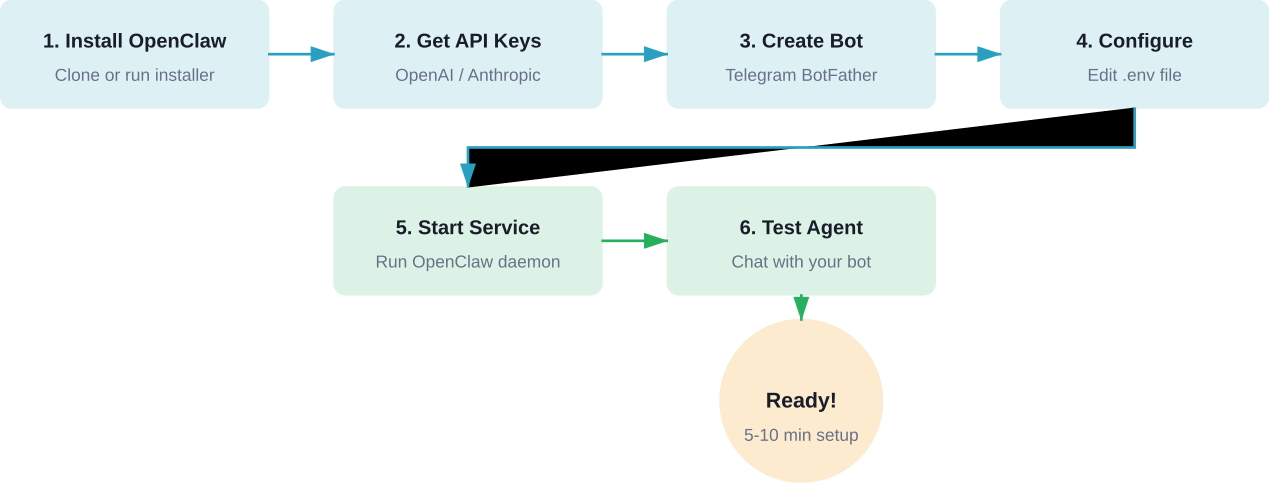
So how do developers actually get this running?
OpenClaw runs on any modern OS: Windows, macOS, Linux, or WSL. According to installation guides on Flowith and various GitHub repositories, the minimum requirements are:
There are several paths to get OpenClaw running:
irm https://github.com/nearai/ironclaw/releases/latest/download/ironclaw-installer.ps1 | iex
For macOS, Linux, and WSL, a shell script installer exists:
curl --proto '=https' --tlsv1.2 -sSf https://install.openclaw.sh | sh
After installation, configuration involves:
According to a GitHub Gist by user yalexx (created February 8, 2026), the complete setup involves editing a .env file with keys like:
OPENAI_API_KEY=sk-...
TELEGRAM_BOT_TOKEN=123456789:ABC...
MEMORY_BACKEND=sqlite
HEARTBEAT_INTERVAL=30
One of the most popular interfaces for OpenClaw is Telegram. The setup process is straightforward:
According to MiniMax API documentation (platform.minimax.io), this process takes about 5-10 minutes for a basic working setup.
Okay, so what are people actually doing with OpenClaw?
Developers use OpenClaw to monitor codebases, run test suites automatically, and report failures. One user mentioned on the official site: "autonomously running tests on my app and capturing errors."
The agent can be configured to watch a Git repository, detect new commits, run CI/CD pipelines, and send notifications via Telegram or Discord when builds fail.
Server uptime monitoring, website health checks, API endpoint testing—OpenClaw handles these with scheduled heartbeat tasks. If something breaks at 3 AM, the agent sends an alert immediately.
According to an arXiv paper titled "From Agent-Only Social Networks to Autonomous Scientific Research" (arXiv:2602.19810, submitted February 23, 2026 [v1], last revised March 4, 2026 [v3]) by Weidener et al., OpenClaw has been used for autonomous scientific research workflows.
The paper describes lessons from OpenClaw and a related project called Moltbook, leading to architectures like ClawdLab and Beach.Science for agent-driven research.
Another arXiv paper, "When OpenClaw Meets Hospital: Toward an Agentic Operating System for Dynamic Clinical Workflows" (arXiv:2603.11721, submitted March 12, 2026 [v1], revised March 21, 2026 [v2]) by Yang et al., describes applying OpenClaw principles to healthcare.
The research introduces manifest-guided retrieval for navigating hierarchical patient records. Using a benchmark from the MIMIC-IV dataset (v2.2) with 100 de-identified patient records and 300 clinical queries stratified across three difficulty tiers, the system demonstrates practical medical data management.
Daily briefings, calendar management, email summarization, task reminders—these are the "boring" automations that save hours per week. OpenClaw handles them with simple skill configurations.
Let's address the elephant in the room. Giving an AI agent access to your shell, filesystem, and API keys is inherently risky.
According to the arXiv paper "Don't Let the Claw Grip Your Hand: A Security Analysis and Defense Framework for OpenClaw" (arXiv:2603.10387, submitted March 11, 2026) by Shan et al., code agents powered by LLMs can execute arbitrary commands based on natural language instructions.
Potential attack vectors include:
The OpenClaw community has responded with several defensive measures:
Developers can drop the security guide markdown directly into a chat with the agent, which then self-audits and applies recommended hardening.
Based on discussions across GitHub and community channels:
OpenClaw isn't the only AI agent framework. How does it stack up?
Worth mentioning: IronClaw is an OpenClaw-inspired implementation in Rust, developed by NEAR AI (nearai/ironclaw on GitHub with 11.5k stars and 1.3k forks).
IronClaw focuses on privacy and security, leveraging Rust's memory safety guarantees. According to the repository, installation is available via Windows Installer or cross-platform shell script.
The project is positioned as a more secure, performance-oriented alternative for developers who prefer Rust's ecosystem.
In March 2026, researchers from Princeton University introduced OpenClaw-RL, a framework that updates agent weights in real time without separate data collection or manual annotation.
According to NeuroHive (published March 17, 2026) and the corresponding arXiv paper (arXiv:2603.10165, "OpenClaw-RL: Train Any Agent Simply by Talking" by Wang et al., submitted March 10, 2026), this framework represents a shift from batch-mode reinforcement learning to continuous learning.
Most RL frameworks collect data first, then train. OpenClaw-RL trains on-the-fly using next-state signals—user replies, tool outputs, terminal states, GUI changes—as immediate feedback.
The paper's abstract notes: "Every agent interaction generates a next-state signal, namely the user reply, tool output, terminal or GUI state change that follows an agent action."
This enables agents to improve through use, learning from corrections and outcomes without explicit reward modeling.
The OpenClaw ecosystem has expanded rapidly since November 2025.
According to GitHub data:
At least six arXiv papers referencing OpenClaw have been published in early 2026:
This level of academic attention just months after launch is unusual for open-source developer tools.
OpenClaw has partnered with VirusTotal for skill security scanning, according to the official OpenClaw site. This partnership helps detect malicious code in community-contributed skills before they reach users.
Based on community feedback and documentation, here are frequent issues and solutions:
Let's get real for a second. OpenClaw has generated a lot of excitement—and some skepticism.
Community discussions on platforms like r/LocalLLaMA have included questions about OpenClaw's popularity. Responses varied from enthusiastic endorsements to cautious concerns about security and complexity.
Here's the thing: OpenClaw isn't magic. It's a well-architected framework that combines existing technologies (LLMs, chat APIs, task scheduling) in a coherent way.
OpenClaw makes sense for:
It probably doesn't make sense for:
Where does this project go from here?
Based on current trajectory, several developments seem likely:

Tools like OpenClaw help developers move faster, but speed alone doesn’t guarantee that what you build will actually work. Whether it’s a feature, product concept, or marketing angle, most teams still rely on trial and feedback after release to figure that out.
Extuitive adds a different layer before anything goes live. It uses AI agents that simulate real consumer behavior to generate ideas and test how people would respond to them in advance.
If you’re already building faster with tools like OpenClaw, the next step is making sure you’re building the right things. Use Extuitive to validate ideas early, so you spend less time iterating on guesses and more time shipping what actually has a chance to work.
So, what is OpenClaw?
It's an open-source AI agent framework that runs on your hardware, remembers context across sessions, executes tasks autonomously, and integrates with the tools developers already use.
It's not perfect. Security concerns are real, setup complexity is nontrivial, and reliability varies with LLM quality. But for developers who value privacy, control, and genuine automation, OpenClaw represents a meaningful step forward.
The project's rapid growth—nearly 350,000 GitHub stars in months, multiple academic papers, active security research, and expanding ecosystem—suggests it's more than hype. Whether OpenClaw becomes the standard for local AI agents or remains a developer power-user tool, it's already changed how many people think about AI assistants.
And honestly? Any project with a lobster mascot and a tagline like "the lobster way" deserves at least a curious look.
Ready to give it a try? Check the official OpenClaw repository on GitHub, review the security practice guides, and start with a simple Telegram bot setup. Just remember: with great automation comes great responsibility to not accidentally give an AI root access.


