Principles of Building AI Agents: 2026 Guide
Master the core principles of building AI agents with proven architectural patterns, evaluation strategies, and responsible deployment practices for 2026.
Apr 10, 2026



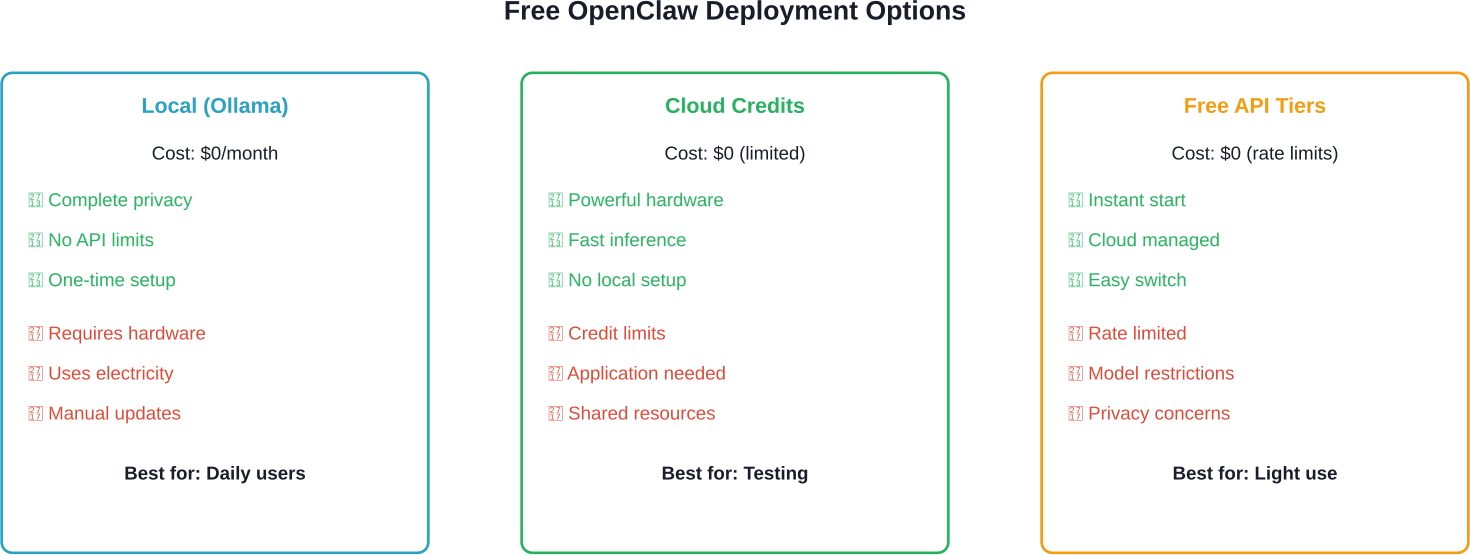
OpenClaw can run completely free using local LLMs through Ollama or LM Studio on your own hardware, cloud-hosted models via AMD Developer Cloud credits, NVIDIA DGX Spark, or no-cost API tiers from OpenRouter and NVIDIA's inference endpoints. The only costs are electricity and optional hardware upgrades—no subscription fees required.
OpenClaw has become the most viral open-source project of 2026, transforming how developers think about autonomous AI agents. According to freeCodeCamp's comprehensive tutorial published in February 2026, the AI landscape has shifted from passive chatbots to proactive autonomous agents, with OpenClaw leading this transformation.
But here's the thing though—everyone's asking the same question: Can OpenClaw actually run free? The short answer? Absolutely. And it's easier than most people think.
Community discussions reveal a common concern about API costs. A comment on a GitHub Gist from February 2026 stated: "Using it with Claude feels almost impossible, it's basically a minimum of $20 per day in credits." That's $600 monthly just for API access.
That pricing model doesn't work for most developers, students, or small teams experimenting with autonomous agents. The good news? Multiple free pathways exist, each with different trade-offs.
Running OpenClaw locally eliminates API fees entirely. According to the OpenClaw documentation on GitHub, local deployment works on any OS and platform—"the lobster way."
Here's what local deployment requires:
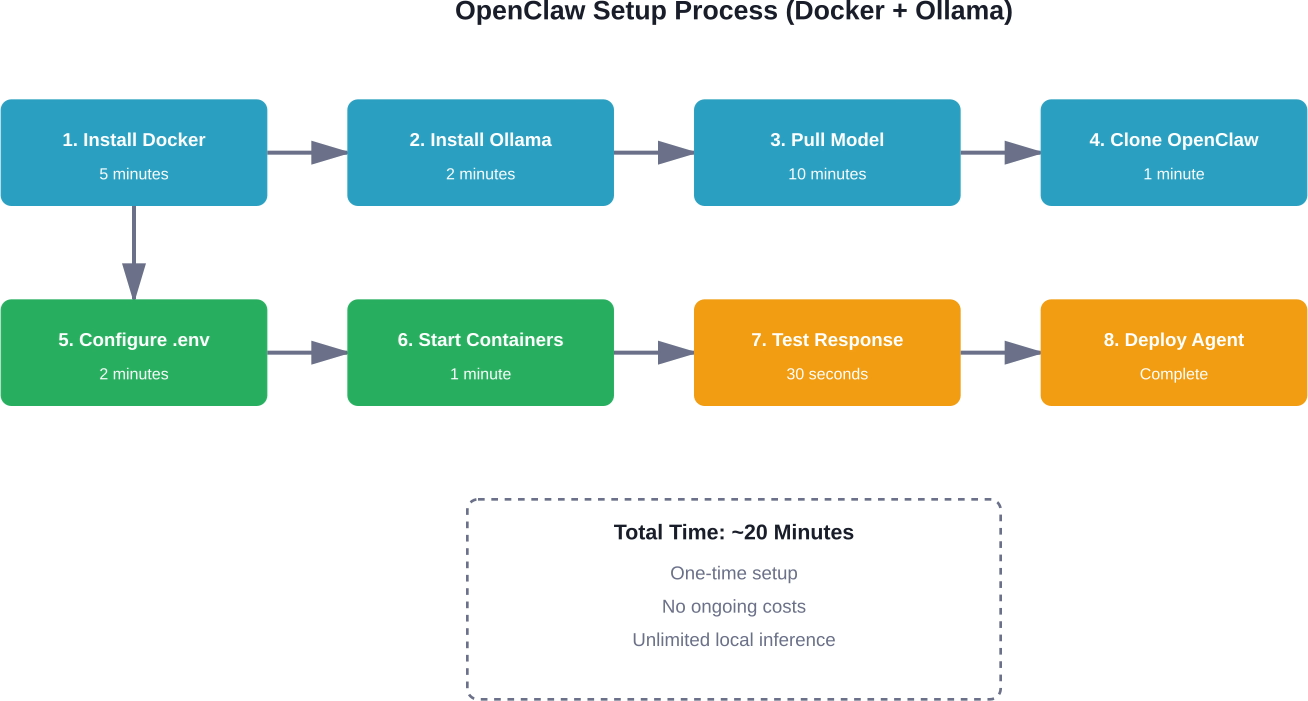
According to the quickstart guide on glukhov.org, installation may take about 20 minutes. First, install Ollama:
curl -fsSL https://ollama.com/install.sh | sh
Then pull a model. The guide recommends starting with Llama3:
ollama pull llama3
Configure OpenClaw's environment file with these settings from the official documentation:
LLM_PROVIDER=ollama
OLLAMA_BASE_URL=http://host.docker.internal:11434
OLLAMA_MODEL=llama3
Restart containers and OpenClaw routes all requests to the local instance. No API calls. No recurring fees.
NVIDIA's documentation notes that RTX GPUs provide optimal performance thanks to Tensor Cores that accelerate AI operations. CUDA accelerations work with both Ollama and Llama.cpp, making inference significantly faster than CPU-only setups.
But CPU-only configurations work fine for lighter workloads. Testing shows that older MacBooks handle basic tasks without issues, though response times increase for complex reasoning.
AMD's Developer Cloud offers free credits for running OpenClaw on enterprise-grade hardware. According to AMD's official documentation from February 2026, developers get access to MI300X accelerators with 192GB of memory—far exceeding consumer GPU capabilities.
The setup process involves joining the AMD AI Developer Program, then requesting cloud credits. Once approved, developers can run massive models that wouldn't fit on typical hardware.
AMD's guide demonstrates deploying a pruned MiniMax-M2.1 model (139B parameters). First, open the required port:
ufw allow 8090
Then pull the model from HuggingFace and launch vLLM. The MI300X's 192GB memory handles inference comfortably, delivering speeds impossible on consumer hardware.
This approach works well for developers needing powerful models without purchasing expensive GPUs. The trade-off? Credits are limited, and application approval takes time.
NVIDIA offers free OpenClaw access through DGX Spark, optimized for RTX GPUs. According to NVIDIA's documentation, RTX Tensor Cores accelerate AI operations, while CUDA optimizations boost Ollama and Llama.cpp performance.
DGX Spark provides a particularly good option because it's purpose-built for this workflow. Developers get enterprise-grade infrastructure without managing their own servers.
Real talk: This option works best for developers already in the NVIDIA ecosystem or those needing maximum inference speed for complex tasks.
OpenRouter provides free API access to various models with rate limits. According to a beginner-friendly guide on Towards AI, OpenRouter offers no-cost LLM access that integrates seamlessly with OpenClaw.
Configuration requires updating the environment file with OpenRouter credentials, then selecting from available free models. Response times vary based on server load, but for intermittent use, the free tier handles most personal assistant tasks.
According to the official OpenClaw repository on GitHub (with 319k stars), Docker provides the most reliable deployment method across all platforms. The repository documentation shows active development with thousands of commits.
Docker configuration isolates OpenClaw from system dependencies. Whether running local models or connecting to cloud endpoints, Docker ensures consistent behavior.
Community setup guides note that absolute beginners can get OpenClaw running in approximately 2 minutes using Docker with proper configuration. The guides emphasize that OpenClaw "looks scary or 'too technical'" but really isn't.
The .env file controls which backend OpenClaw uses. For local deployment, set the provider to Ollama. For cloud endpoints, specify the appropriate API credentials and base URLs.
Switching between free methods requires changing a few environment variables, then restarting containers. This flexibility lets developers test different approaches without reinstalling.
For those wanting zero configuration, ClawBox offers pre-installed hardware. According to setup documentation, ClawBox includes an NVIDIA Jetson Orin Nano Super Developer Kit with 512GB NVMe SSD, carbon fiber case with cooling fan, and OpenClaw pre-installed.
The setup process? Unbox, connect power, and turn it on. OpenClaw runs immediately with no terminal commands required.
Now, this isn't technically "free"—hardware costs apply. But ongoing costs remain zero because it runs local models. No monthly subscriptions. No API fees. Just electricity.
Community discussions reveal several recurring problems when running OpenClaw for free.
Models require significant RAM. If containers crash with memory errors, switch to smaller models. Llama 3.2 (3B parameters) runs on 8GB systems, while larger models need 16GB+.
CPU-only inference feels sluggish compared to GPU acceleration. For faster responses without buying hardware, consider AMD or NVIDIA cloud options. Alternatively, quantized models (4-bit or 8-bit) run faster on limited hardware with minimal quality loss.
Docker networking sometimes fails to connect OpenClaw to Ollama. The fix involves checking that the base URL uses host.docker.internal instead of localhost when running in containers.
The answer depends on specific needs and constraints.
For daily personal use with complete privacy, local Ollama deployment wins. Initial setup takes nearly 20 minutes, then OpenClaw runs indefinitely without external dependencies or API costs.
For testing powerful models without hardware investment, AMD Developer Cloud provides enterprise GPU access. But credit limits mean this works better for experimentation than production use.
For quick experiments with minimal setup, OpenRouter's free tier gets OpenClaw running in minutes. Rate limits restrict heavy usage, but light testing works fine.
For maximum performance without managing infrastructure, NVIDIA DGX Spark delivers RTX-optimized inference. Developers comfortable with NVIDIA's ecosystem find this option particularly seamless.

Running OpenClaw without API costs usually means working with local models, tweaking prompts, and iterating a lot. The trade-off is time – you still end up guessing which outputs are actually useful. Extuitive helps close that gap by letting you test and predict the performance of different outputs before relying on them, using AI simulations instead of post-launch feedback.
So instead of just running OpenClaw for free and hoping the results are good enough, you can validate what it generates early. That means fewer iterations, less guesswork, and a clearer signal on what’s actually worth using. If you want to avoid wasting time on outputs that won’t deliver, validate them upfront with Extuitive.
Running OpenClaw completely free is achievable through multiple pathways. Local deployment offers unlimited usage with full privacy. Cloud credits provide enterprise hardware access for testing. Free API tiers enable instant experimentation.
The barrier to entry has never been lower. According to freeCodeCamp's analysis, OpenClaw represents a fundamental shift toward autonomous agents that work proactively rather than reactively. And now that shift is accessible to anyone—without subscription fees or API costs.
Start with Docker and Ollama for the most straightforward path to free OpenClaw. The 20-minute setup investment delivers unlimited autonomous agent capabilities running entirely under your control.
Ready to deploy your free AI assistant? Pick the method that matches your hardware and privacy requirements, then follow the setup guides linked throughout this article. OpenClaw is waiting—and it won't cost you a penny.


