Finding the Right Shopify Agencies in New York for Your Brand
Discover top Shopify agency services in New York that help brands launch, grow, and scale online with strategy, design, and hands-on support.
Mar 24, 2026



OpenClaw WhatsApp integration enables developers to connect their personal AI assistant to WhatsApp using the Baileys library, allowing AI-powered conversations through a familiar messaging platform. The setup involves pairing a WhatsApp account via QR code, configuring channel settings, and optionally deploying to a cloud server for 24/7 availability.
OpenClaw has become a popular choice for developers who want a personal AI assistant that works across multiple platforms. WhatsApp integration stands out as one of the most requested features, and for good reason—WhatsApp's massive user base and end-to-end encryption make it an ideal channel for AI-powered conversations.
But here's the thing: setting up OpenClaw with WhatsApp isn't quite as straightforward as clicking a button. The integration relies on the Baileys library, which connects to WhatsApp Web's multi-device protocol. This approach has both advantages and quirks that developers need to understand.
This guide walks through the entire process, from initial pairing to production deployment considerations. Whether setting up a personal assistant or exploring automation possibilities, understanding the technical foundation matters.
OpenClaw uses Baileys as its WhatsApp connector. Baileys is an open-source library that reverse-engineers WhatsApp Web's protocol, allowing Node.js applications to act as a linked device on a WhatsApp account.
This architecture means OpenClaw connects to WhatsApp the same way the web client does—through multi-device pairing. The WhatsApp account remains on a phone, while OpenClaw appears as an additional linked device.
According to OWASP mobile security guidelines, understanding the permission model and data flow in messaging integrations is critical for maintaining security. The Baileys implementation handles authentication through QR code scanning, establishing an encrypted session that persists across restarts.
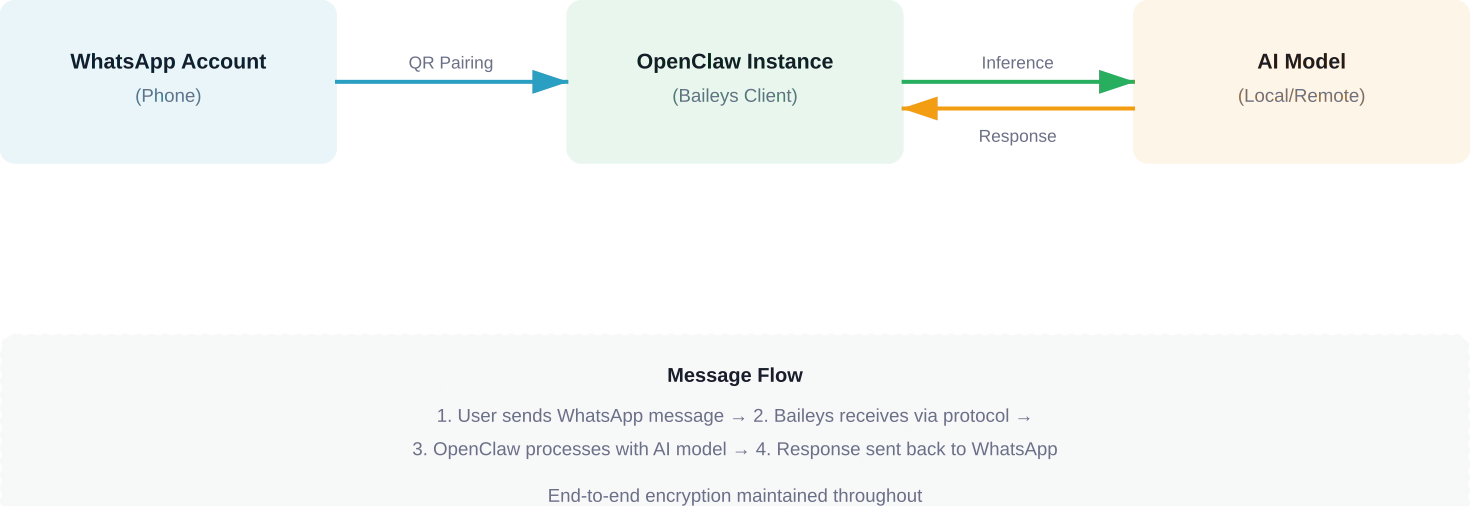
The connection persists because Baileys stores authentication credentials locally. When OpenClaw restarts, it uses these stored credentials to reconnect without requiring a new QR scan. This session data lives in the OpenClaw data directory, typically under the WhatsApp channel configuration.
OpenClaw's WhatsApp channel supports on-demand installation. Baileys dependencies may install automatically depending on configuration.
Here's what happens during first-time setup:
No manual dependency installation is required for basic functionality. OpenClaw handles the technical setup behind the scenes.
That said, certain advanced features or custom configurations might need additional tools. For production deployments, developers should verify that Node.js version compatibility aligns with both OpenClaw and Baileys requirements.
The pairing process mirrors how WhatsApp Web works. Open the WhatsApp mobile app, navigate to linked devices, and scan the QR code that OpenClaw displays in the terminal or logs.
Once paired, OpenClaw can send and receive messages through that WhatsApp account. The phone doesn't need to be actively online after pairing—this is the advantage of WhatsApp's multi-device architecture.
But wait. There's a security consideration here. According to OWASP API security guidelines, credential storage and session management require careful attention. The session data OpenClaw stores gives full access to the WhatsApp account. Protecting this data is non-negotiable for production setups.
When the QR code is scanned, WhatsApp's servers establish a new device link. The mobile app authorizes OpenClaw as a trusted device, and cryptographic keys are exchanged for end-to-end encryption.
Baileys stores these keys along with session identifiers. Future connections use this stored data to authenticate without re-pairing. The session remains valid unless explicitly logged out from the mobile app's linked devices menu.
Community discussions on GitHub indicate that session persistence can occasionally break after WhatsApp protocol updates. When this happens, re-pairing solves the issue. Keeping OpenClaw updated helps minimize these disruptions.
OpenClaw's WhatsApp channel offers several configuration options that control behavior. Understanding these settings helps optimize the assistant's responsiveness and resource usage.
The reactionLevel setting deserves special attention. It determines how OpenClaw acknowledges messages before responding. Three levels exist: off, ack, and minimal.
Reaction levels affect user experience and system behavior:
The minimal setting provides the best balance for most use cases. Users see that OpenClaw received their message and is working on a response, reducing repeated messages due to perceived unresponsiveness.
By default, OpenClaw responds to all contacts on the paired WhatsApp account. For personal use, this might be fine. For shared or public-facing deployments, access control becomes critical.
OpenClaw supports whitelisting specific contacts or phone numbers. This prevents unauthorized users from consuming API quota or accessing the AI assistant. The configuration accepts phone numbers in international format without special characters.
Self-chat behavior—how OpenClaw handles messages sent to the account's own number—also has configuration options. This can be useful for testing or personal note-taking scenarios where the assistant processes self-directed messages.
OpenClaw normalizes incoming WhatsApp messages before passing them to the AI model. This process handles media, formatting, and context preservation.
Text messages pass through relatively unchanged. But media messages—images, voice notes, videos—require special handling. OpenClaw can extract text from images, transcribe voice messages, or describe visual content depending on the configured AI model's capabilities.
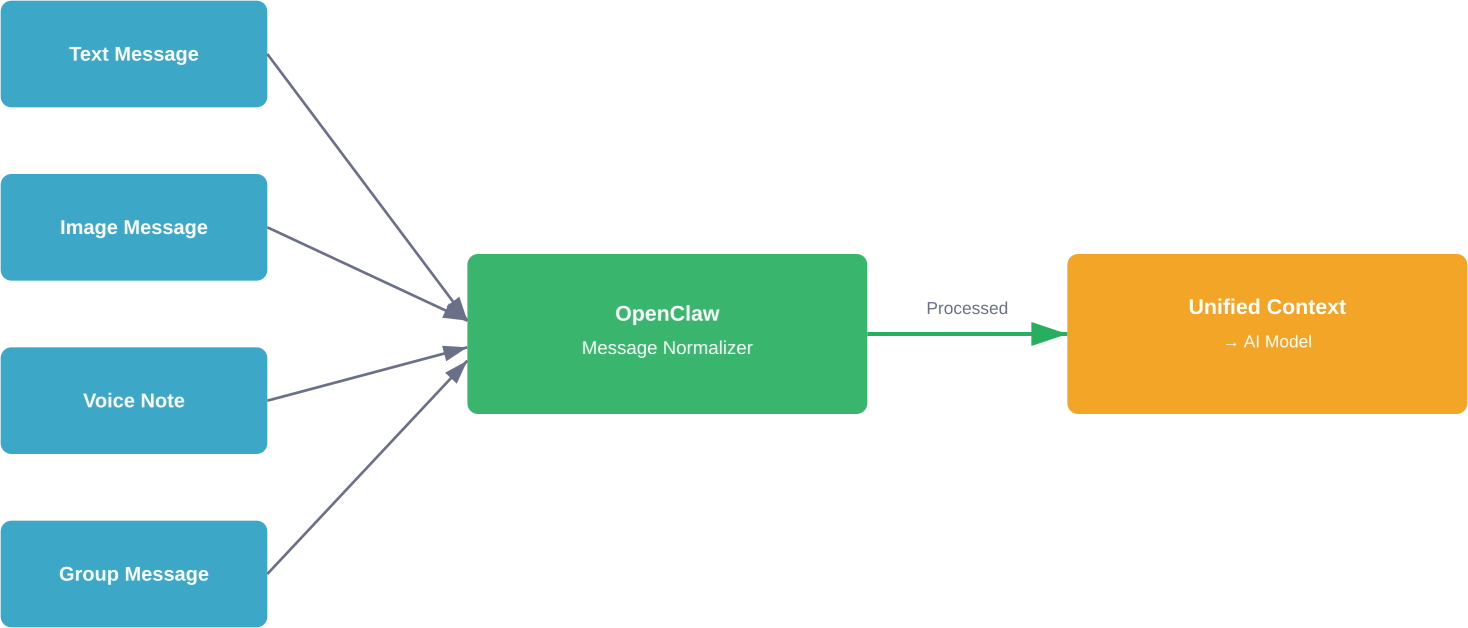
Context preservation matters for natural conversations. OpenClaw maintains conversation history per contact, allowing the AI to reference previous messages. The depth of this history depends on the model's context window and OpenClaw's memory configuration.
Group message handling introduces additional complexity. OpenClaw needs to identify when it's mentioned or should respond in group contexts. The default behavior responds only to direct mentions or replies, preventing the assistant from spamming group chats.
WhatsApp has message length limits. When OpenClaw generates a response exceeding these limits, automatic chunking splits the response into multiple messages.
This chunking happens transparently, but the delivery timing can affect user experience. Sending chunks too quickly looks spammy. Sending them too slowly feels unresponsive. OpenClaw balances this with configurable delays between chunks.
Media responses—when the AI generates images or files—use WhatsApp's media message format. The file uploads to WhatsApp's servers before the message is sent, which can add latency for larger files.
Running OpenClaw WhatsApp integration on a local machine works for testing. Production deployments need more robust infrastructure.
Cloud deployment ensures 24/7 availability. The OpenClaw instance needs to run continuously to receive and respond to messages. Community discussions frequently mention using cloud providers with dedicated server instances for reliable uptime.
According to integration guides, preliminary preparations should verify network stability and firewall configurations. WhatsApp's protocol requires consistent connectivity to maintain the session.
Here's the critical part: the WhatsApp account used for OpenClaw integration is fully accessible through the session credentials. Compromising the server means compromising the WhatsApp account.
OWASP mobile application security guidelines emphasize defense-in-depth for credential storage. For production deployments, this means:
Using a dedicated phone number for the OpenClaw WhatsApp integration separates personal communications from the AI assistant. This isolation limits exposure if the integration is compromised.
Two-factor authentication on the WhatsApp account adds another security layer. Even if session credentials leak, attackers can't link new devices without the 2FA code.
Session disconnections represent the most common issue. When Baileys loses connection to WhatsApp's servers, messages stop flowing. OpenClaw typically reconnects automatically, but persistent disconnections might require re-pairing.
GitHub issues document several patterns that improve reliability. The lid-mapping.update event helps maintain identity resolution in group chats when properly persisted. Without persisting these mappings, group message delivery can become unreliable.
Rate limiting can occur during high-volume usage. WhatsApp implements anti-spam measures that throttle accounts sending many messages quickly. Spreading responses over time and avoiding burst patterns helps prevent temporary blocks.
Missing dependencies occasionally cause startup failures. While OpenClaw installs Baileys automatically, system-level dependencies like build tools might be absent on minimal server environments. Installing build-essential packages resolves most compilation issues.
OpenClaw's logs provide detailed information about WhatsApp connection status. When troubleshooting, setting log levels to debug reveals the full communication flow between Baileys and WhatsApp's servers.
Look for authentication errors, protocol version mismatches, or network timeout messages. These point to specific failure modes that have targeted solutions.
Community discussions suggest that protocol updates from WhatsApp occasionally break compatibility. When widespread connection issues occur, checking OpenClaw's GitHub repository for recent issues often reveals whether others are experiencing similar problems and if a fix is pending.
OpenClaw supports running multiple WhatsApp channels simultaneously. Each channel requires a separate WhatsApp account and stores credentials independently.
This capability enables segmented use cases—one assistant for personal contacts, another for work communications, perhaps a third for community support. Each channel can have different AI model configurations, system prompts (when supported), and access controls.
The credentials storage keeps accounts isolated. Even though multiple Baileys instances run in the same OpenClaw process, session data doesn't cross between accounts.
Resource usage scales with the number of active channels. Each Baileys instance maintains its own WebSocket connection to WhatsApp's servers and processes messages independently. For deployments with many accounts, monitoring memory and network usage becomes important.
OpenClaw's tool system extends beyond simple question-answering. When integrated with external services through Bright Data skills or custom plugins, the WhatsApp interface becomes a control panel for complex operations.
Web search capabilities, for instance, let users request real-time information through WhatsApp messages. The AI assistant queries the web, processes results, and delivers summaries—all within the familiar messaging interface.
Configuration writes from the AI require special attention. Allowing the assistant to modify its own settings through conversation introduces powerful automation but also security considerations. Limiting which settings are writable and requiring confirmation for sensitive changes prevents accidental misconfigurations.
Community-developed skills continue expanding OpenClaw's capabilities. GitHub discussions document integration patterns for various APIs and services, making WhatsApp a versatile interface for automation tasks.
The OpenClaw community actively requests WhatsApp-related features. GitHub issue #7011 tracks the systemPrompt support request for WhatsApp channels, noting that Discord, Slack, and Telegram already support this feature.
Per-channel system prompts would allow different AI personalities or instruction sets for different WhatsApp accounts. This makes multi-account setups more versatile without requiring separate OpenClaw instances.
Reliability improvements for group message handling appear in issue #7433. The proposed enhancements address edge cases in identity resolution and message ordering that occasionally cause confusion in active group conversations.
One-click integration efforts, documented in issue #7590, aim to simplify the entire setup process. The goal is reducing the technical barrier for users who want WhatsApp AI assistance without dealing with configuration files and manual pairing.

OpenClaw WhatsApp integration is about getting messages delivered reliably – handling triggers, flows, and communication at scale. But that setup doesn’t tell you whether the content itself will perform once it reaches users.
That’s where Extuitive comes in, but on the ads side. It does the same kind of pre-check, just for ad creatives. Instead of testing live and reacting later, it predicts which creatives are more likely to work using your past data and simulated user response. So while OpenClaw handles delivery and interaction, Extuitive helps you decide what’s worth running before you spend the budget.
OpenClaw WhatsApp integration transforms the popular messaging platform into an AI-powered communication channel. The setup requires technical knowledge—pairing accounts, configuring channels, understanding session management—but the result is a responsive personal assistant accessible from any device with WhatsApp.
Security considerations matter, especially for production deployments. Protecting session credentials, using dedicated phone numbers, and following OWASP security guidelines help prevent unauthorized access. The convenience of WhatsApp integration comes with responsibility for proper security practices.
Looking forward, community-driven development continues improving reliability and adding features. System prompt support, enhanced group handling, and simplified setup processes are all in discussion stages. The ecosystem around OpenClaw grows as more developers explore its capabilities.
Ready to set up your own WhatsApp AI assistant? Start with a test deployment on a local machine, use a secondary phone number for initial pairing, and gradually move toward production infrastructure as you understand the system's behavior. The OpenClaw documentation and active GitHub community provide resources for troubleshooting and optimization.


