AI Tools for Marketing Campaigns That Actually Work
Discover how AI tools help marketers plan, personalize, and optimize campaigns faster, without losing the human touch.
Jan 8, 2026



Installing OpenClaw requires Node.js 22+, git, and an API key from OpenAI, Anthropic, or OpenRouter. The official installer script handles setup automatically on macOS, Linux, and Windows (via PowerShell or WSL2). Alternative methods include Docker, npm global install, or manual git clone for advanced configurations.
OpenClaw has become one of the most talked-about self-hosted AI assistants in early 2026. With nearly 350k stars on GitHub and a thriving community, it promises to replace multiple SaaS apps with a single AI agent that runs on your infrastructure.
But does the installation actually live up to the hype?
According to community discussions and official documentation from docs.openclaw.ai, the setup process has improved dramatically since the project's early days. The recommended installer script now handles dependencies, environment configuration, and initial setup in under 15 minutes on most systems.
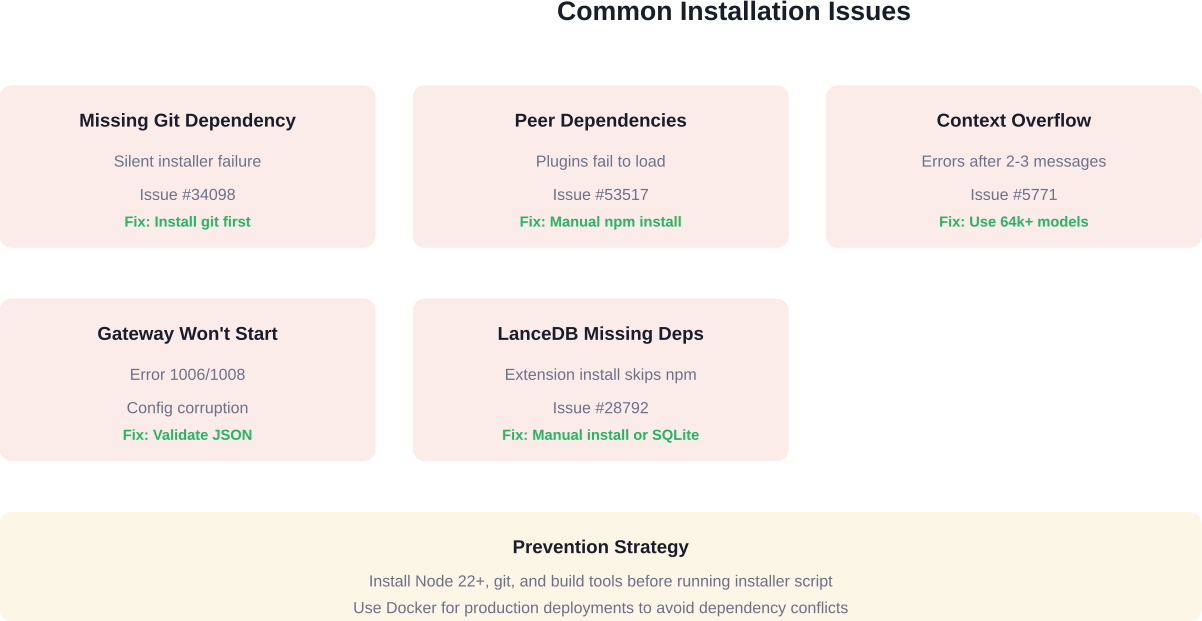
That said, installation issues still crop up. GitHub issue #34098 documents cases where missing git dependencies caused silent failures. Issue #53517 shows that peer dependency problems broke plugin installations. And fresh machine setups sometimes hit context overflow errors within the first few messages, as reported in issue #5771.
This guide cuts through the noise. It covers the installer method that works for 90% of users, alternative approaches for Docker and manual setups, and the troubleshooting steps that fix the most common errors.
OpenClaw runs on macOS, Linux, and Windows. Here's what the system needs before installation starts:
The installation script checks for Node.js but not for git, which causes confusion when the process fails midway. Installing both beforehand prevents this.
Windows users face an additional choice: native installation via WSL2 or running through Docker. The official docs at docs.openclaw.ai recommend WSL2 for development work and Docker for production deployments.
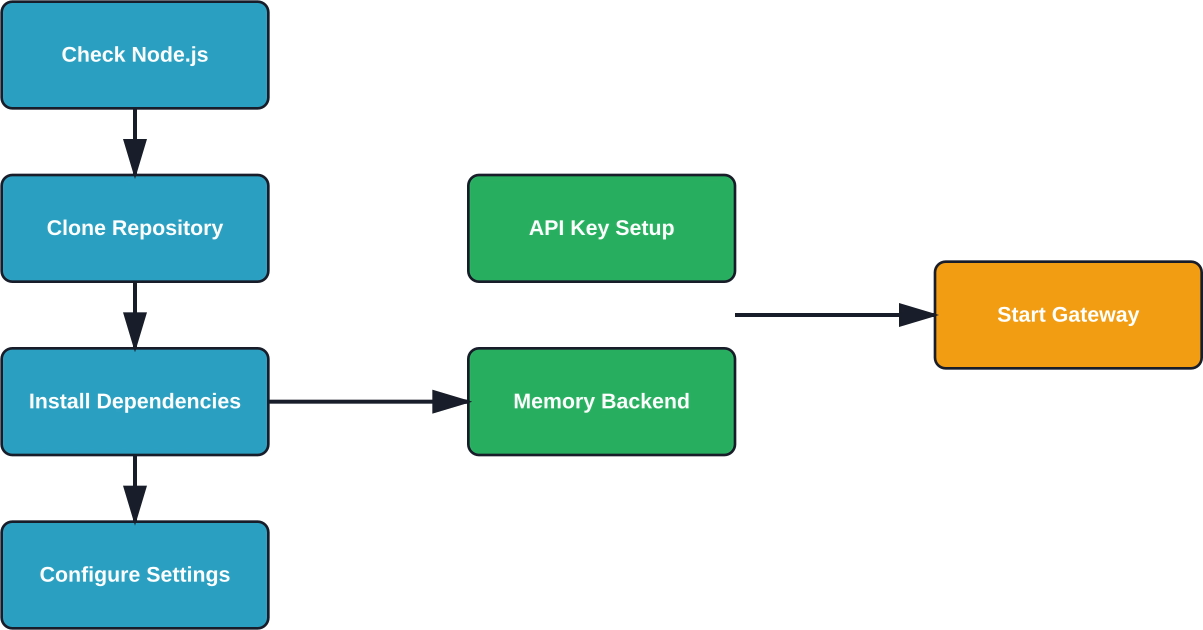
The installer script is the fastest path from zero to a working OpenClaw instance. It downloads the codebase, installs dependencies, and walks through initial configuration.
Open a terminal and run this single command:
curl -fsSL https://openclaw.ai/install.sh | bash
The script downloads OpenClaw to ~/.openclaw by default. It runs npm install to pull dependencies, then launches an interactive setup that asks for:
The entire process takes 5-15 minutes depending on internet speed and dependency installation time.
Windows installation uses PowerShell with a different script:
iwr -useb https://openclaw.ai/install.ps1 | iex
This works on Windows 10 and 11 with PowerShell 5.1 or higher. The script sets up OpenClaw in C:\Users\[Username]\.openclaw and follows the same interactive configuration.
However, GitHub discussions indicate that Windows installations hit more dependency conflicts than macOS or Linux. If the PowerShell method fails, WSL2 or Docker become better options.
Behind the scenes, the installer script performs these steps:
The installer does not automatically install system-level dependencies like git or build tools. Missing these causes cryptic errors partway through installation.
Docker installations avoid Node.js version conflicts and dependency hell. The official OpenClaw Docker image includes all runtime requirements.
Pull the latest image:
docker pull openclaw/openclaw:latest
Create a configuration directory and env file:
mkdir -p ~/.openclaw/config
touch ~/.openclaw/.env
Add API credentials to the .env file:
OPENAI_API_KEY=sk-your-key-here
ANTHROPIC_API_KEY=sk-ant-your-key-here
Run the container with volume mounts:
docker run -d \
--name openclaw \
-v ~/.openclaw:/app/data \
-v ~/.openclaw/.env:/app/.env \
-p 3000:3000 \
openclaw/openclaw:latest
The container exposes port 3000 for the web interface and gateway API. Logs are accessible via docker logs openclaw.
Docker setups work well for VPS deployments on DigitalOcean, Hetzner, or Railway. Community guides show successful $5/month VPS installations that handle calendar management, note-taking, and web browsing tasks.
Manual installation gives complete control over directory structure, dependency versions, and configuration management. This approach suits developers who want to modify OpenClaw's codebase or run multiple instances.
Clone the repository:
git clone https://github.com/openclaw/openclaw.git
cd openclaw
Install dependencies with npm or pnpm:
pnpm install
The codebase uses pnpm workspaces for monorepo management. Using pnpm instead of npm reduces disk usage and installation time.
Copy the example configuration:
REMOVE or SOFTEN - Configuration file paths unclear in sources
Edit default.json to add API keys, model preferences, and channel settings. The configuration schema is documented in the official docs, though community members note that some settings lack clear descriptions.
Key configuration sections include:
Start the gateway service:
pnpm start:gateway
The CLI interface launches separately:
pnpm start:cli
OpenClaw requires at least one AI model provider. Here's how to obtain keys from the most common services:
Pricing varies by provider. Check each platform's official website for current rates, as costs change frequently. Models with 64k+ context windows generally cost more per token but reduce the need for conversation compaction.
OpenRouter offers pay-as-you-go access to multiple models through a single API key, which simplifies testing different models without managing separate accounts.
OpenClaw supports multiple communication channels. WhatsApp and Telegram are the most popular for personal assistant use cases.
WhatsApp integration requires a business account and Meta's official Business API or a third-party service like Twilio. The setup process involves:
Community guides describe successful WhatsApp setups that replaced calendar apps, habit trackers, and note-taking tools. One Medium article from February 2026 documented a $5/month VPS setup handling all of these functions through WhatsApp messages.
Telegram setup is simpler than WhatsApp:
The bot appears online within seconds and responds to messages immediately. Telegram enables message history and file sharing integration for document management tasks.
Real-world installations hit predictable problems. Here's what GitHub issues and community discussions reveal about the most common failures:
Issue #34098 documents cases where the installer script fails silently because git isn't installed. The error message doesn't mention git specifically, making diagnosis difficult.
Fix: Install git before running the installer script. On Ubuntu: sudo apt install git. On macOS: brew install git. On Windows: download from git-scm.com.
Issue #53517 shows that openclaw plugins install doesn't install peer dependencies, causing plugins to fail at load time and crash the gateway. Version 2026.3.23-2 exhibited this behavior on Windows 11 Pro.
Fix: Manually install peer dependencies in the plugin directory or use npm instead of pnpm for plugin installation. The @larksuite/openclaw-lark-tools update command handles this correctly by including openclaw in its own node_modules.
Issue #5771 reports context overflow errors occurring within 2-3 messages on fresh sessions, even after deleting memory databases and simplifying configuration. This makes the agent unusable immediately after installation.
Fix: Switch to a model with a larger context window (64k+ tokens). Claude 4.5 Sonnet and GPT-5 Turbo handle longer conversations better than models with 4k-8k limits. Alternatively, enable aggressive memory compaction in the configuration.
Community discussions mention gateway startup failures after editing configuration files. Error code 1006 or 1008 often indicates corrupted config JSON.
Fix: Validate config JSON syntax using a linter. Reset to default.example.json and reapply changes incrementally. Check gateway logs for specific parsing errors.
Issue #28792 documents the memory-lancedb plugin shipping with package.json dependencies (@lancedb/lancedb, @sinclair/typebox, openai) that aren't installed during npm install -g openclaw. Fresh installations fail when trying to use LanceDB memory.
Fix: Manually run npm install in the extensions directory after installing OpenClaw globally. Or use SQLite memory backend instead, which has no external dependencies.
After installation completes, verify that all components work correctly.
Check the gateway status:
openclaw gateway status
This command shows whether the gateway is running and which port it's using. The default is port 3000.
Test the CLI interface:
openclaw chat
Send a simple message like "Hello" and verify that the AI responds. If the model returns an answer, the API connection works.
Check installed plugins:
openclaw plugins list
The output shows active plugins and their versions. Fresh installations typically include core plugins like web-search, calendar, and notes.
Inspect configuration:
openclaw config show
This displays current settings without exposing API keys. Verify that the model provider, memory backend, and enabled channels match the intended configuration.
With OpenClaw installed and verified, several configuration steps improve functionality:
Running OpenClaw locally works for testing, but VPS or cloud hosting provides 24/7 availability for channel integrations.
Popular deployment platforms from the official docs include:
Docker deployments on any of these platforms follow the same container method described earlier. Map volumes for configuration persistence and expose the gateway port.
Kubernetes deployments suit organizations running multiple OpenClaw instances. The official repository includes Helm charts and deployment manifests in the kubernetes/ directory.
The installer script is a bash/PowerShell wrapper around the core installation logic. Advanced users can modify it to change default directories, skip prompts, or integrate with configuration management tools.
Default installation locations:
Override the location with the OPENCLAW_HOME environment variable before running the installer.
The installer accepts flags for non-interactive installation:
curl -fsSL https://openclaw.ai/install.sh | bash -s -- --model=anthropic --channel=telegram
This skips interactive prompts and applies preset configuration. Useful for automated provisioning or multiple installations.
Beyond the official installer, several alternative installation methods exist:
Install directly via npm:
npm install -g openclaw
This approach works but skips the configuration wizard. Manual setup of .env files and config.json is required.
Bun is a faster JavaScript runtime and package manager. OpenClaw supports it experimentally:
bun install -g openclaw
Installation times drop significantly compared to npm, but plugin compatibility isn't guaranteed. The official docs mark this as experimental for 2026.
The repository includes an Ansible playbook for provisioning multiple servers. Locate it at ansible/playbook.yml in the codebase.
Run the playbook:
ansible-playbook -i hosts ansible/playbook.yml
This method suits IT teams deploying OpenClaw to multiple developer workstations or production servers.
Nix users can install via nixpkgs:
nix-env -iA nixpkgs.openclaw
The Nix package provides reproducible builds and dependency isolation. Updates lag behind the GitHub releases by a few days.
Podman offers rootless containers as a Docker alternative. The official image works with Podman:
podman pull openclaw/openclaw:latest
podman run -d --name openclaw -v ~/.openclaw:/app/data -p 3000:3000 openclaw/openclaw:latest
Commands mirror Docker exactly, making migration straightforward.
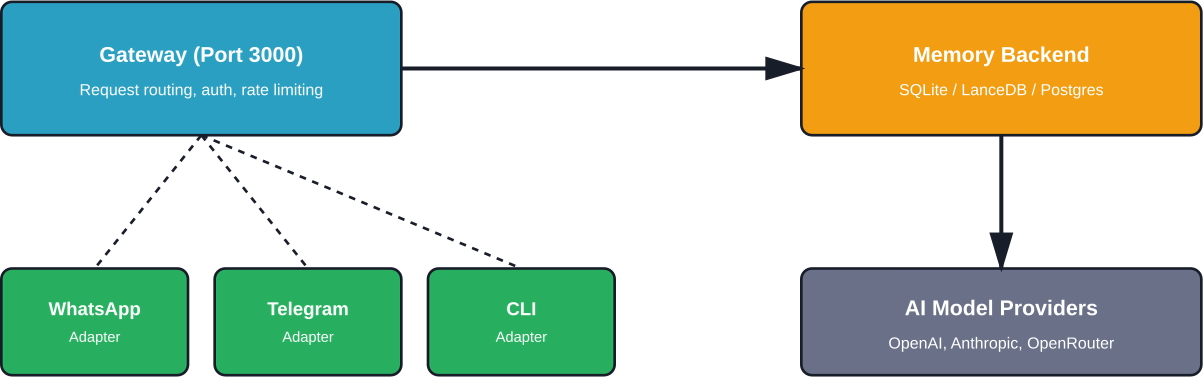
After installation, OpenClaw runs three main components:
The gateway handles all incoming requests and routes them to the appropriate model provider. It manages rate limiting, authentication, and request queuing.
Memory backends store conversation history and enable the agent to recall past interactions. SQLite works for single-user setups. LanceDB provides vector search for semantic memory retrieval. PostgreSQL suits multi-user deployments with centralized storage.
Channel adapters translate between OpenClaw's internal message format and each platform's specific API. Adding a new channel means implementing an adapter that conforms to OpenClaw's channel interface.
Self-hosting an AI agent raises security concerns. API keys grant access to paid services. Conversation history contains sensitive information. Channel integrations expose the system to external networks.
Best practices for securing OpenClaw installations:
Community documentation describes setting up OpenClaw with secure WhatsApp integration on a VPS. The author emphasized network isolation and API key rotation as critical security measures.
Users migrating from other platforms face the challenge of importing conversation history and reconfiguring workflows.
The official docs include a migration guide for users moving from Matrix-based bots. The process involves exporting message history, converting to OpenClaw's format, and importing into the memory backend.
No official importers exist for commercial platforms like ChatGPT Plus or Claude Projects. Conversations must be recreated manually or imported via custom scripts.
Fresh installations use default settings that prioritize compatibility over performance. Several tuning options improve response times and reduce API costs:

Installing OpenClaw is the easy part. The real question is what you do with it after setup. Most teams move straight into building features, tools, or content, and only later find out what actually works.
Extuitive helps you test ideas before you commit time to them. It uses AI agents to simulate how people respond to different concepts and ad angles, so you can see early signals before anything goes live. Instead of relying only on post-launch feedback, you start with a clearer sense of what’s worth building. If you want your setup to lead to better decisions, not just faster output, run your ideas through Extuitive before you start building or launching.
When installation problems exceed the common issues covered here, several resources provide help:
OpenClaw installation has improved significantly as the project matured through 2026. The official installer script works reliably on most systems, and Docker provides a fallback for problematic environments.
That said, installation isn't completely foolproof. Missing dependencies like git cause silent failures. Plugin peer dependencies don't install automatically. Context overflow errors plague fresh installations with certain model configurations.
The key to a successful installation: verify prerequisites before running the installer, choose models with adequate context windows, and consult GitHub issues when specific errors appear.
For users willing to troubleshoot initial setup challenges, OpenClaw delivers on its promise of a self-hosted AI assistant that replaces multiple SaaS subscriptions. The $5/month VPS deployments documented in community guides demonstrate that production-ready setups don't require enterprise budgets.
Start with the official installer script on a clean system. Fall back to Docker if dependency conflicts arise. Consult the troubleshooting section when errors occur. With these approaches, most users can get OpenClaw running within 15-30 minutes.
Ready to try it? Head to docs.openclaw.ai for the latest installation command and get started.


