AI Agents for Businesses: Drive Real Change Today
Discover how leading AI agent platforms are helping businesses automate marketing, validate ideas, streamline operations, and drive real growth-faster and cheaper than ever before.
Apr 10, 2026



OpenClaw itself is free open-source software, but running it costs $0-$200+ monthly depending on hosting and AI API choices. The cheapest setups use Oracle Cloud's free ARM tier with Gemini 2.5 Flash ($0/month), while production environments typically run $7-$50/month on Hetzner or similar VPS providers with GPT-OSS or commercial models.
OpenClaw has exploded in popularity as a personal AI assistant that actually gets things done. The software is open source and free to download. But here's what nobody tells you upfront: running OpenClaw isn't free.
The confusion is real. Community discussions show users shocked when their "free" assistant racks up $47 in a week or burns through Claude token limits in days. Others claim they run 19 agents for $6 monthly. So what's the actual cost?
This breakdown cuts through the marketing and shows what OpenClaw costs in practice—from hosting to API calls to the hidden expenses that catch people off guard.
OpenClaw has three core cost components. Miss any one of them and the budget projections fall apart.
First, the server or VPS. OpenClaw runs continuously—monitoring triggers, executing workflows, maintaining context. That requires always-on infrastructure. Cloud hosting starts around $0 with free tiers but scales to $4-$50 monthly for reliable production setups.
Second, AI model API calls. Every task OpenClaw performs consumes tokens. Ask it to write code, analyze data, browse the web, or manage files—each action hits an LLM API. Token costs vary wildly based on model choice and usage patterns.
Third, the stuff nobody mentions upfront. Storage for logs and memory. Bandwidth for browser automation. Background "heartbeat" processes that ping APIs even when idle. According to cost optimization documentation from the explain-openclaw repository, memory injection alone counts tokens every run when included in project context.
Many users misunderstand open source to mean zero cost. The software is free. The operational expenses are not.
OpenClaw needs a server running 24/7. The hosting choice determines baseline monthly costs before a single AI task runs.
Oracle Cloud offers an ARM-based free tier that works for OpenClaw. The "always free" instances provide 4 ARM cores and up to 24GB RAM—enough for basic OpenClaw deployments. Real users confirm this works, though performance lags compared to paid options.
The catch? Setup complexity. Oracle's free tier requires navigating their cloud console, configuring security groups, and dealing with occasional resource availability issues. Not beginner-friendly, but legitimately free if configured correctly.
Google Cloud and AWS offer free trials with time limits. These work for testing OpenClaw before committing to paid hosting, but they're not sustainable long-term solutions.
Hetzner's CAX11 ARM instance costs approximately $4-$7 monthly and handles OpenClaw well for moderate usage. The specs—4 vCPUs, 8GB RAM, 40GB storage—match OpenClaw's minimum requirements for daily work scenarios.
DigitalOcean, Linode, and Vultr offer similar ARM or x86 instances in the $5-$12 range. Standard uptime runs 99-99.9%, sufficient for personal assistant use cases where occasional downtime won't break critical systems.
These budget tiers work when OpenClaw runs periodic tasks, answers questions, and manages light automation. Heavy browser workflows or multi-agent swarms need more resources.
Serious OpenClaw deployments—multiple concurrent agents, browser automation, large context windows—require 4+ vCPUs and 16GB+ RAM. Hetzner, OVH, and dedicated VPS providers offer these specs for $15-$50 monthly depending on region and resources.
Multi-agent coordination systems like ClawTeam that spawn multiple agents for parallel research and experimentation demonstrate the need for higher-tier hosting when scaling beyond basic use cases.
Hosting is predictable. API costs are where OpenClaw expenses spiral or stay manageable, depending entirely on model selection and usage patterns.
Gemini 2.5 Flash offers a generous free tier that handles moderate OpenClaw usage. Rate limits apply—requests per minute and daily quotas—but for casual use the free allocation suffices.
The quality trade-off is real. Free models work for simple tasks—file management, basic Q&A, straightforward automation. Complex reasoning, code generation, and multi-step planning perform noticeably worse than flagship commercial models.
GPT-OSS-120B and similar open-weight models run on providers like Together.ai, Anyscale, or self-hosted inference servers. Costs run roughly $0.10-$0.30 per million tokens—dramatically cheaper than commercial APIs.
According to cost optimization documentation, GPT-OSS-120B handling daily OpenClaw workloads costs approximately $2-$5 monthly. The quality sits between free tiers and flagship models—good enough for most tasks, occasionally requiring manual intervention.
ClawRoute, an intelligent cost-optimizing router for OpenClaw, intercepts LLM requests and routes them to the cheapest model capable of handling each task. Simple tasks hit cheap models; complex reasoning escalates to better (pricier) models only when needed. The system adds under 5ms latency and requires no API calls itself.
GPT-5.4, Claude Sonnet 4.6, and Opus 4.6 deliver the best results but cost significantly more. Token pricing varies by model:
Real-world usage patterns matter more than rate cards. A community member reported spending $47 testing the system for one week with flagship models—extrapolated to roughly $200 monthly if usage stayed constant.
But usage rarely stays constant. Initial setup and experimentation consume far more tokens than steady-state operation. The first week involves context building, testing workflows, and iterating on prompts. Once configured, monthly costs often drop by 60-80%.
Community discussions mention setups using Claude subscriptions with routing systems to manage costs. Setup complexity increases, but costs stay contained by routing cheaper tasks to the CoPilot API endpoint instead of burning Claude Max limits on simple operations.
Token consumption determines API bills. Understanding when and why OpenClaw uses tokens prevents surprise expenses.
Every OpenClaw action that involves the LLM consumes tokens. Reading files, writing code, analyzing data, browsing websites, making decisions—all require API calls. But not all tasks consume tokens equally.
According to the cost optimization documentation, several factors drive token usage:
Browser automation consumes significantly more tokens than simple text tasks. Each page load, element inspection, and interaction generates context that feeds back to the model. Long browsing sessions spiral costs fast.
Multi-step reasoning and planning tasks hit APIs repeatedly. Simple Q&A might use 500-2,000 tokens. Complex code generation or research projects easily consume 20,000-50,000 tokens per task.
According to competitor SERP title evidence, community reports describe running 19 OpenClaw agents for approximately $6/month. How? Aggressive task routing, minimal memory injection, and choosing cheaper models for routine operations. The agents handled specific, scoped tasks rather than open-ended exploration.
The obvious costs—hosting and APIs—get all the attention. The hidden expenses catch people off guard.
OpenClaw runs background processes even when not actively performing tasks. Monitoring triggers, maintaining session state, and periodic health checks all consume small amounts of tokens continuously.
Background heartbeat processes can result in $5-$15 monthly in idle token consumption for users who expected $0 when not actively using the assistant. It's low-grade consumption, but over 30 days it accumulates.
Testing workflows, debugging automation, and iterating on configurations burns tokens at 3-5x production rates. The first month of OpenClaw usage costs far more than steady-state operation.
Budget accordingly. Initial setup might hit $50-$100 even with modest model choices, then drop to $10-$30 monthly once configurations stabilize.
Most VPS providers include sufficient storage and bandwidth for typical OpenClaw deployments. But heavy logging, extensive memory retention, or aggressive browser automation can push past included allocations.
Overage charges vary by provider. Hetzner charges minimally for extra bandwidth. Cloud providers like AWS or GCP bill more aggressively. Check allocation limits before deploying production workloads.
Systems like ClawTeam that spawn multiple agents for parallel research create coordination overhead. Each agent consumes resources independently, and the leader agent spends tokens checking results and managing cross-pollination.
The GitHub repository for ClawTeam-OpenClaw shows setups with 8 agents running simultaneous experiments. Resource requirements and token consumption scale roughly linearly with agent count—8 agents cost approximately 8x a single agent setup.
Theory meets reality. What do actual OpenClaw deployments cost?
Oracle Cloud free tier ARM instance, Gemini 2.5 Flash free API tier. Total monthly cost: $0.
Use case: Light personal assistance, occasional questions, simple file management. Token limits mean rationing API calls to stay within free quotas. Performance lags paid setups noticeably.
Good for: Testing OpenClaw before committing budget, students, hobby projects.
Hetzner CAX11 ($5-$7 monthly), GPT-OSS-120B on Together.ai ($1-$2 monthly). Total: approximately $6-$9.
Use case: Daily personal assistant for routine tasks. Code assistance, research help, task automation. The configurations running at this price point likely use aggressive task scoping and minimal context injection.
Good for: Personal productivity, side projects, learning automation.
Mid-tier VPS ($15-$20), Claude Sonnet 4.6 or GPT-5 API ($30-$40 monthly moderate use). Total: $45-$60.
Use case: Professional daily assistant handling complex tasks. Code reviews, research, content creation, multi-step automation. Quality matters more than cost optimization.
Good for: Professionals, freelancers, small teams sharing one instance.
High-end VPS ($30-$50), Claude Opus 4.6 or GPT-5.4 heavy usage ($100-$150+). Total: $130-$200+.
Use case: Mission-critical automation, multiple concurrent workflows, highest quality requirements. Browser automation, data analysis, complex multi-agent coordination.
Good for: Power users, businesses, teams running production workloads.
Running OpenClaw doesn't require breaking the bank. Strategic choices dramatically reduce monthly expenses without sacrificing too much capability.
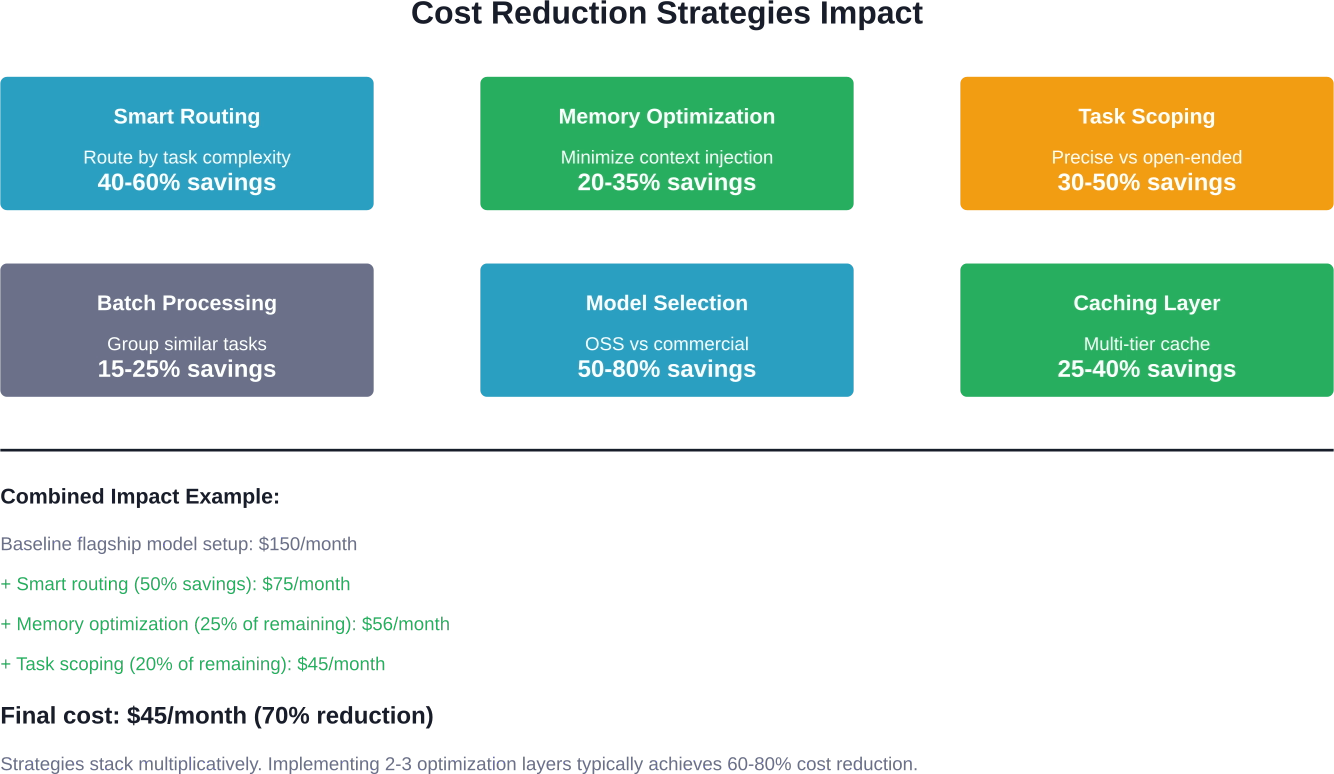
Use ClawRoute or similar routing layers to send simple tasks to cheap models and complex reasoning to expensive models. The intelligent classification happens locally in under 5ms—no API overhead.
A GitHub feature request for cost-optimized LLM gateways notes implementations achieving multi-tier caching, diff-only responses, and automatic escalation when cheaper models fail. These architectural patterns reduce costs by 40-80% depending on workload mix.
Minimize what gets injected into project context. Large MEMORY.md files count tokens every run—keep them lean or restructure to use retrieval-based memory only when needed.
Set appropriate bootstrapMaxChars caps to prevent excessive context loading at startup. More context seems better but costs compound quickly.
The difference between "research this topic" and "find three specific data points about X" is thousands of tokens. Tightly scoped tasks consume less, fail less often, and produce more actionable results.
Avoid open-ended exploration during early experimentation. Save broad research tasks for after core workflows are optimized.
Group similar tasks together rather than hitting APIs piecemeal. Process multiple files in one pass. Analyze datasets in bulk. Batching reduces per-task overhead and often improves quality through better context.
Starting with Opus or GPT-5.4 for every task wastes money. Begin with open-source or mid-tier models. Upgrade only when quality clearly suffers.
Many users report GPT-OSS-120B handling 70-80% of tasks adequately. Reserve flagship models for the 20% where quality matters most.
Local Deployment Alternative
Cloud hosting and API costs disappear with local deployment. But new costs emerge.
Running OpenClaw locally requires capable hardware. Hardware requirements for local deployment such as Mac Studio with substantial unified memory can cost $600-$2000+ upfront.
Local LLM inference using models like Llama, Mixtral, or other open weights eliminates API costs entirely. But inference speed depends heavily on hardware. Insufficient RAM or compute means slow responses that kill productivity.
The math works only when hardware is already available. Buying a $600-$2000+ machine to save $50 monthly takes 12-40+ months to break even. Most users are better served by cloud deployments initially.
Local deployment makes sense when:
Otherwise, cloud hosting plus managed APIs provide better economics and flexibility.

If OpenClaw cost is part of the decision, ad spend matters too. Extuitive helps brands predict ad performance before launch. It is built for teams that want to review creative early instead of spending budget just to find out what does not work.
Talk with Extuitive to:
👉 Book a demo with Extuitive to review ads before launch.
The ideal OpenClaw setup depends entirely on use case, budget, and quality requirements.
Start cheap. Oracle free tier plus Gemini free API costs nothing and lets you test whether OpenClaw fits your workflow. Most users discover they don't need flagship models for 70% of tasks.
Scale intentionally. When free tiers feel limiting, upgrade hosting to $5-$10 monthly before touching API costs. Reliable infrastructure improves the experience more than marginally better model outputs.
Optimize before spending. Implement smart routing, clean up memory injection, and scope tasks tightly before throwing money at bigger models. A $6 optimized setup often outperforms a $60 wasteful one.
Budget for experimentation. The first month costs 2-3x steady-state operation. Plan accordingly and don't panic when initial expenses run high.
Track actual usage. Monitor token consumption, identify expensive workflows, and optimize the costly 20% rather than over-optimizing everything. Most tasks consume negligible tokens—focus on the outliers.
OpenClaw costs whatever you choose to spend on it. The range spans $0 to $200+ monthly based entirely on hosting choices, model selection, and usage patterns.
The FOMO around expensive setups is real but misguided. Community discussions show users dropping $600 on hardware or burning through flagship API limits when a $6 optimized setup would serve them better.
Start with the cheapest configuration that works. Oracle free tier plus Gemini free API costs nothing and reveals whether OpenClaw fits the workflow. Most users discover they need reliability more than raw capability—which means spending $5-$10 on stable hosting before touching API costs.
Optimize before scaling. Smart routing, memory management, and task scoping reduce costs by 60-80% compared to naive deployments. A thoughtfully configured $20 setup outperforms a wasteful $100 one.
The math works when approached strategically. But the math breaks fast when throwing money at problems that better architecture would solve. Focus on optimization first, spending second.
Check current pricing on official provider websites before committing—rates change, free tiers adjust, and new options emerge regularly. Pricing information in this breakdown reflects data from authoritative sources and community reports current as of early 2026.


