Does Shopify Collect Sales Tax? Let’s Clear That Up
Find out when Shopify collects sales tax, when it doesn’t, and what sellers need to handle themselves.
Jan 6, 2026



Meta Ads Manager A/B testing allows advertisers to compare different versions of ads to determine which performs better. The platform's built-in testing feature automatically splits audiences, tracks performance, and provides statistical significance data. Testing elements like creative, copy, audiences, and placements helps optimize campaigns for better ROI and lower costs.
According to HubSpot's State of Marketing Report 2026, 93% of marketers say personalization improves leads or purchases, yet only 14% of teams segment or personalize at least half of their content. But how do advertisers know which version of personalization actually works?
That's where A/B testing comes in.
Meta Ads Manager provides built-in testing capabilities that let advertisers compare different ad variations and make data-driven decisions. Instead of guessing which creative, audience, or copy performs better, testing reveals what actually drives results.
The challenge? Many advertisers either don't test at all or run tests incorrectly, leading to unreliable results and wasted budget.
This guide breaks down how to set up, run, and analyze A/B tests in Meta Ads Manager to optimize campaign performance.
A/B testing—also called split testing—compares two or more versions of an ad to determine which performs better. Meta's platform automates this process by splitting the audience into random groups and showing each group a different version.
The platform then tracks performance metrics and calculates statistical significance to determine if one version truly outperforms another or if the difference happened by chance.
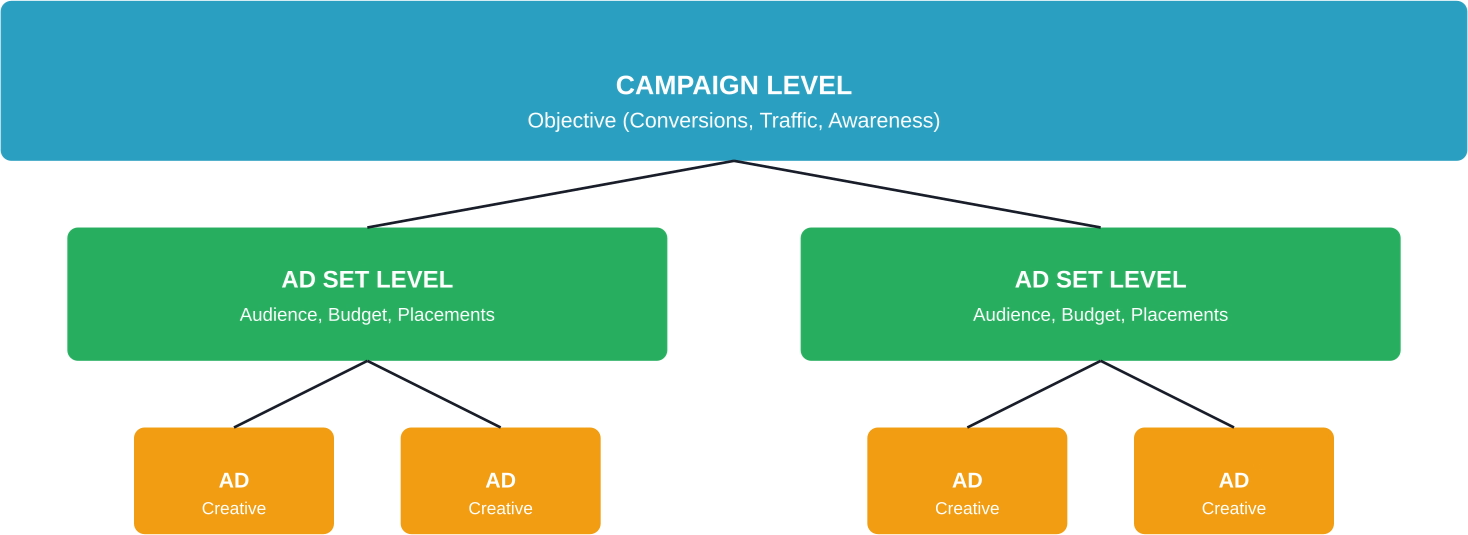
Meta Ads Manager structures campaigns in three levels: campaigns, ad sets, and ads. Understanding this hierarchy matters because it determines what elements can be tested.
The campaign level controls the objective (conversions, traffic, awareness). Ad sets contain targeting, budget, schedule, and placement settings. Individual ads include creative elements like images, video, copy, and headlines.
This structure influences testing strategy. Testing creative elements happens at the ad level. Testing audiences or placements requires ad set variations.

Most A/B testing in Meta ads starts after launch. You split creatives, wait for results, and spend part of the budget just to figure out which version should have been tested in the first place. That’s where a lot of inefficiency comes from.
Extuitive moves that step earlier. It uses AI agents that simulate real consumer behavior to evaluate and compare ad variations before they go live, helping you narrow down which versions are worth putting into A/B tests. Instead of testing everything, you start with a smaller set of stronger options and get clearer signals faster.
If you want your A/B tests to be more focused and cost less to run, validate your ad variations with Extuitive first, then launch only what actually has a chance to win.
Meta provides a dedicated A/B testing feature within Ads Manager that handles audience splitting and statistical analysis automatically.
Here's how to create tests using Meta's built-in tool.
From Meta Ads Manager, navigate to an existing campaign or create a new one. Click the checkbox next to the campaign, then select the A/B Test option from the menu.
Alternatively, start from scratch by clicking Create and selecting A/B Test during campaign setup.
Meta allows testing at different levels. Select the variable to test:
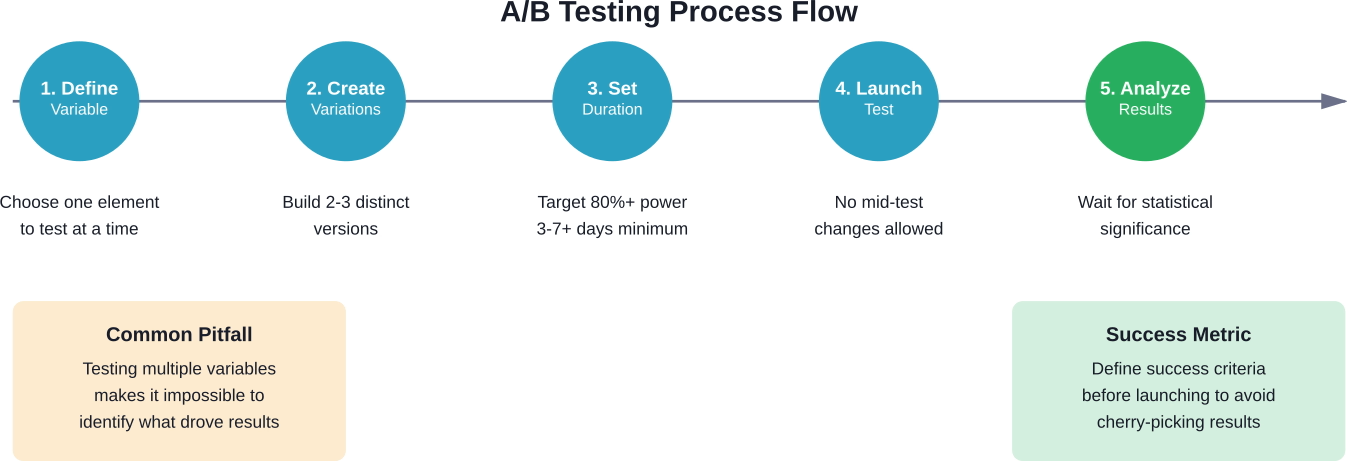
Only test one variable at a time. Testing multiple changes simultaneously makes it impossible to determine which change drove results.
Set the test duration and budget. Meta recommends running tests for at least 3-7 days to gather sufficient data, though the ideal timeframe depends on traffic volume and conversion rates.
According to A/B testing best practices from Seer Interactive, tests should aim for at least 80% estimated power. This represents the likelihood of the test returning a statistically significant result based on budget and duration.
Meta calculates estimated power automatically when configuring tests. If estimated power falls below 80%, increase the budget or extend the test duration.
Build each version of the test. For creative tests, upload different images or videos and write alternative headlines or primary text. For audience tests, define different targeting parameters.
Keep variations distinct enough to produce measurable differences. Testing a blue button versus a green button won't matter if the core offer remains weak.
Once live, Meta splits the audience randomly between versions and tracks performance. The platform monitors statistical significance automatically.
Avoid making changes during active tests. Editing budgets, targeting, or creative mid-test invalidates results by introducing new variables.
Not all test variables produce equal value. Some elements significantly impact performance, while others create marginal differences.
According to HubSpot's analysis of Facebook ad examples, creative elements often determine ad success or failure. Testing visual components typically produces the largest performance swings.
Test these creative variables:
On average, Facebook has 2.11 billion daily active users (DAUs), while Meta's Family of Apps reaches 3.58 billion daily active people (DAP). Standing out in crowded feeds requires strong creativity that stops scrolling.
Ad copy includes primary text, headlines, and descriptions. Each serves a different purpose and warrants separate testing.
Test messaging angles like:
Copy tests reveal which value propositions resonate with target audiences.
Even perfect creative fails when shown to the wrong people. Audience testing identifies which segments respond best to offers.
Test different audience approaches:
Audience tests often reveal surprising insights about who actually converts.
Tests don't stop at the ad. The post-click experience matters just as much.
According to Convert Experiences, traffic limitations shouldn't prevent testing. Moving testing upstream to paid ads allows testing messaging, landing pages, and offers faster than waiting for sufficient organic traffic.
Use ads to test:
Send ad variations to different landing page URLs to test the complete funnel, not just ad performance.
Running tests correctly separates useful insights from misleading noise.
This principle can't be overstated. Changing multiple elements simultaneously creates confusion about which change caused performance differences.
If testing both creative and audience together produces better results, there's no way to know if the creative worked with any audience or if that specific audience responded to any creative.
Statistical significance requires sufficient data. Ending tests too early leads to false conclusions.
Meta displays estimated power when setting up tests. Aim for 80% or higher. Tests with lower estimated power lack the sample size needed for reliable conclusions.
Generally speaking, tests need at least several hundred impressions per variation and ideally dozens of conversions to produce meaningful results.
When manually creating test variations outside Meta's A/B testing tool, ensure audiences don't overlap. Showing the same person both variations skews results.
Meta's built-in testing feature handles this automatically by splitting audiences into non-overlapping groups.
Performance fluctuates based on day of week, time of day, seasonality, and external events. A version that wins on Monday might lose on Friday.
Run tests long enough to account for these variations. A three-day test spanning Wednesday through Friday captures weekday and weekend differences.
Define what success means before launching tests. Is the goal lower cost per acquisition? Higher click-through rates? More purchases?
Different optimization goals produce different winners. An ad with high engagement might generate low-quality leads. An ad with lower click-through rates might attract more qualified prospects.
Meta Ads Manager displays test results with statistical significance indicators. But understanding what the data actually means requires looking beyond simple winner declarations.
Statistical significance indicates the likelihood that performance differences resulted from actual variation effectiveness rather than random chance.
Meta typically declares a winner when confidence reaches 90-95%. This means there's a 90-95% probability the winning version truly performs better.
But statistical significance doesn't equal business significance. A version might achieve statistical significance with only a 2% improvement—not enough to justify the effort of implementing the change.
The winning variation for click-through rate might lose for conversion rate. An ad that generates cheap clicks might attract unqualified traffic that doesn't convert.
Examine the complete funnel:
Sometimes the "losing" ad variation actually produces better business outcomes when examining end-to-end performance.
Overall results hide segment-level insights. A creative might perform better with women but worse with men. An audience might convert well on mobile but poorly on desktop.
Break down results by:
These insights inform future targeting and creative strategies beyond the specific test.
Even experienced advertisers make testing errors that waste budget and produce unreliable results.
The temptation to optimize during active tests undermines the entire experiment. Adjusting budgets, editing copy, or modifying targeting introduces new variables that contaminate results.
Let tests run their course. Make changes based on results, not during the test.
Testing five different creative variations simultaneously splits the budget and audience too thin. Each variation receives insufficient exposure to reach statistical significance.
Stick to 2-3 variations maximum per test. Run multiple sequential tests rather than one massive test with many variations.
The majority of Facebook and Instagram usage happens on mobile devices. Ads optimized for desktop often perform poorly on smaller screens.
Preview all variations on mobile before launching. Ensure text remains readable, images display properly, and calls-to-action are thumb-friendly.
A variation might lead after day one but lose by day seven. Early results often reflect timing or random chance rather than true performance differences.
According to academic research from Stanford Graduate School of Business (GSB), the increasing complexity of online platforms has revealed split testing's limitations. Modern testing requires sufficient sample sizes and duration to produce reliable insights.
Wait for Meta to indicate statistical significance before declaring winners.
Once basic testing becomes routine, more sophisticated approaches unlock deeper insights.
Instead of testing everything simultaneously, run tests in sequence. Use insights from one test to inform the next.
For example: First, test audiences to find the best-performing segment. Then test creative variations specifically for that winning audience. Finally, test offers or landing pages for the winning audience-creative combination.
This approach builds on validated insights rather than testing in isolation.
Create control groups that don't see ads at all. This reveals the incremental impact of advertising versus organic behavior.
Holdout testing answers the question: Would these people have converted anyway, or did the ads actually drive the action?
Test the same creative and messaging across Facebook, Instagram, Messenger, and Audience Network to identify which placements work best for specific objectives.
Platform behavior differs. What works on Instagram Stories might fail in Facebook Feed.
Individual test results matter less than the cumulative impact of continuous testing.
According to the 2025 Sprout Social Index™, 65% of marketing leaders say they need to prove how social media supports business goals to get leadership buy-in. Testing provides the data needed to demonstrate ROI.
Track testing impact over time:
Small incremental improvements compound. A 5% reduction in cost per lead doesn't seem dramatic, but sustained over a year it significantly impacts profitability.
Document test learnings in a central repository. Teams often forget insights from past tests and repeat the same experiments months later.
Meta provides built-in testing capabilities, but external tools can enhance analysis and implementation.
Third-party platforms offer features like:
For teams with limited traffic, consider using ads to test further up the funnel before investing in expensive on-site testing tools. According to Convert Experiences, moving testing to paid ads allows testing messaging and offers faster than waiting for organic traffic volume.
A/B testing in Meta Ads Manager transforms guesswork into data-driven decision-making. The platform's built-in testing capabilities make experimentation accessible to advertisers of all experience levels.
Start with high-impact variables like creative and audience. Run tests properly—one variable at a time, sufficient duration, adequate budget. Analyze results beyond surface-level metrics to understand the complete picture.
Most importantly, make testing a continuous practice rather than a one-time activity. Markets shift, audiences evolve, and creative fatigues. What works today might fail tomorrow.
The accounts that consistently outperform competitors aren't the ones that found a perfect ad combination and stopped testing. They're the ones that continuously experiment, learn, and optimize based on real performance data.
Set up a test this week. Start small if needed—even testing two headline variations produces more insight than running the same ads indefinitely.
The insights gained from systematic testing compound over time, leading to lower acquisition costs, higher return on ad spend, and stronger overall campaign performance.


