Is Amazon Dropshipping Legal? 2026 Rules & Compliance
Amazon dropshipping is legal but has strict rules. Learn Amazon's 2026 policies, INFORM Act requirements, and how to stay compliant while building your business.
Apr 15, 2026



OpenClaw is a self-hosted AI assistant that runs on your hardware and connects to messaging apps like WhatsApp, Telegram, or terminal interfaces. To use it, install via the official installer script, initialize your environment with API keys and models, configure a gateway for message routing, pair communication channels, and optionally connect tools like Google Workspace or Slack. The setup typically takes 15-30 minutes and can run on systems from Raspberry Pi to cloud VPS.
OpenClaw has become the go-to framework for developers and teams looking to build personal AI assistants that actually respect privacy. Unlike cloud-based alternatives, OpenClaw runs entirely on infrastructure under direct control—whether that's a local machine, a VPS, or even a Raspberry Pi sitting in a closet.
But here's the thing: the flexibility comes with setup complexity. The official documentation assumes familiarity with Node.js environments, API key management, and message routing concepts. For those approaching OpenClaw for the first time, the path from download to working assistant isn't always obvious.
This guide walks through the complete process—from running the installer to configuring communication channels, connecting workspace tools, and implementing security practices that prevent the most common mishaps.
OpenClaw is an autonomous AI agent framework that gives language models the ability to execute tasks through tool integrations. The architecture separates concerns into distinct layers: a gateway handles message routing, agents maintain context and execute workflows, and skills extend functionality through modular plugins.
The framework supports any LLM provider—OpenAI, Anthropic, local models through Ollama, or custom endpoints. According to the official OpenClaw repository on GitHub, the project maintains 349k stars and has been forked 70k times, indicating substantial community adoption.
What makes OpenClaw different from chatbot interfaces is persistent memory, scheduled task execution, and operating-system-level permissions. The agent can read files, execute commands, send emails, and manage calendars—capabilities that require careful configuration and security boundaries.
OpenClaw runs on macOS, Linux, and Windows (with some Windows-specific quirks). The minimum viable setup requires:
For production deployments, a VPS with 2 CPU cores and 4GB RAM typically costs around $5-12 per month on providers like DigitalOcean, Hetzner, or Oracle Cloud. Some users report running OpenClaw successfully on Raspberry Pi 4 with 8GB RAM, though response times increase noticeably with local models.
The framework integrates with communication platforms through paired channels. Common options include Telegram (easiest to configure), WhatsApp (requires phone number verification), Slack, Discord, or simple terminal interfaces for testing.
According to the OpenClaw documentation and the community setup guide on GitHub by ishwarjha, the official installer handles dependency resolution, binary downloads, and initial directory structure creation. The process differs slightly by operating system.
Open a terminal and run the installer script:
curl -fsSL --proto '=https' --tlsv1.2 https://openclaw.ai/install.sh | bash
The script downloads OpenClaw binaries, installs them to a local directory (typically ~/.openclaw), and adds the executable to the system PATH. The installation typically completes in 2-5 minutes depending on connection speed.
After installation completes, verify by checking the version:
openclaw --version
Windows users should open PowerShell with administrator privileges and run:
iwr -useb https://openclaw.ai/install.ps1 | iex
Windows installation occasionally triggers antivirus false positives due to the script's system-level access requirements. Temporarily allowing the script through Windows Defender usually resolves this.
The Windows version has historically lagged behind macOS and Linux in feature parity. As of early 2026, most core functionality works, but some community skills may assume Unix-like file paths.
Once installed, OpenClaw needs environment configuration before it can process requests. This involves creating a working directory, setting API credentials, and selecting model providers.
Initialize a new OpenClaw workspace in a dedicated directory:
mkdir my-openclaw
cd my-openclaw
openclaw init
The init command generates several critical files:
The initialization process prompts for basic choices: preferred model provider, default communication channel, and whether to enable autonomous mode (where the agent can initiate actions without explicit prompts).
OpenClaw requires at least one LLM provider. Edit the .env file to add credentials:
OPENAI_API_KEY=sk-...
ANTHROPIC_API_KEY=sk-ant-...
For teams running entirely offline or on local infrastructure, Ollama provides an alternative. According to the Ollama blog (February 23, 2026), Ollama 0.17 introduced one-command OpenClaw setup:
ollama launch openclaw
This downloads a preconfigured OpenClaw instance with Ollama's local models, bypassing the need for external API keys entirely. The tradeoff is reduced model capability—local models like Llama or Mistral variants typically underperform GPT-4 or Claude 3.5 on complex reasoning tasks.
The gateway sits between communication channels and agents. It receives incoming messages, routes them to appropriate agents based on rules or keywords, and returns responses through the same channels.
OpenClaw's gateway operates on a polling or webhook model. Polling checks channels for new messages at regular intervals (every 3-5 seconds is common). Webhooks receive push notifications when messages arrive, reducing latency but requiring public endpoints.
Edit config.json to configure the gateway:
{
"gateway": {
"mode": "polling",
"interval": 3000,
"channels": ["telegram", "terminal"],
"defaultAgent": "assistant"
}
}
The defaultAgent field determines which agent handles messages that don't match specific routing rules. For single-agent setups, this points to the primary assistant. Multi-agent deployments use routing rules to direct messages—for example, sending finance-related queries to a budget agent and calendar requests to a scheduling agent.
According to community discussions and the GitHub setup guide, gateway configuration is where most initial troubleshooting happens. Common issues include incorrect polling intervals causing rate limiting, missing channel credentials, and firewall rules blocking webhook endpoints.
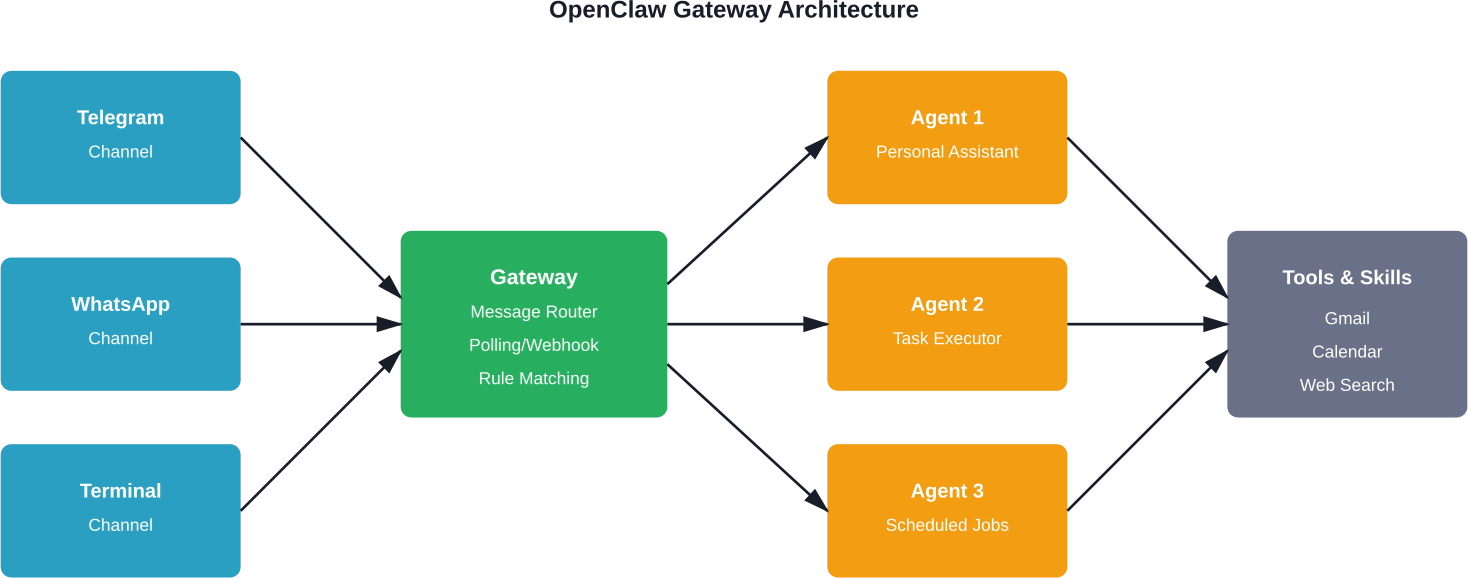
Channels are the interfaces through which users interact with OpenClaw. The framework supports dozens of channel types through community plugins, but Telegram, WhatsApp, and terminal interfaces see the most usage.
Telegram offers the smoothest onboarding experience. Create a bot through BotFather:
Start the OpenClaw gateway with Telegram enabled:
openclaw gateway start --channel telegram
Send a message to the bot in Telegram. The first message triggers the pairing process, where OpenClaw asks for confirmation before processing commands. This security step prevents unauthorized users from controlling the agent.
WhatsApp channels require phone number verification and maintain stricter rate limits than Telegram. The setup uses WhatsApp Business API or community libraries like whatsapp-web.js.
The process involves scanning a QR code to link OpenClaw with a WhatsApp account. Be aware: WhatsApp's terms of service technically prohibit automated bots on personal accounts. Business accounts are recommended for production use.
During initial setup, the terminal channel provides the fastest feedback loop. Enable it in config.json and start an interactive session:
openclaw chat
This opens a command-line chat interface directly connected to the agent. It's useful for testing tool integrations, debugging memory persistence, and verifying API connectivity before exposing the agent to external channels.
The SlowMist security guide on GitHub recommends several hardening steps:
The paired.json file maintains a list of authorized user IDs per channel. OpenClaw checks this before executing commands:
{
"telegram": ["123456789"],
"whatsapp": ["+1234567890"],
"approved_tools": ["gmail", "calendar", "web_search"]
}
Note that paired.json is checked for permissions but not cryptographically validated. A compromised filesystem could modify this file, so it shouldn't be the only security layer.
The Yellow Line concept from the security guide involves comparing system logs against OpenClaw's internal memory logs. Any sudo execution recorded in /var/log/auth.log should have a corresponding entry in OpenClaw's daily memory files (memory/YYYY-MM-DD.md).
Unrecorded sudo executions trigger anomalous activity alerts. This catches scenarios where an attacker gains shell access and executes privileged commands outside OpenClaw's awareness.
Implementing this requires a monitoring script that periodically diffs the logs. The security guide provides reference implementations in Python and Bash.
OpenClaw's capability expands through tools (built-in integrations) and skills (community-developed plugins). The official skill registry on GitHub maintains over 5,200 community-built skills, according to the VoltAgent/awesome-openclaw-skills repository.
Built-in tools include:
These activate through config.json settings. For example, enabling Gmail integration:
{
"tools": {
"gmail": {
"enabled": true,
"credentials_path": "./gmail-credentials.json"
}
}
}
Skills extend OpenClaw with specialized capabilities. Popular categories from the awesome-openclaw-skills repository include image generation, code execution environments, database interfaces, and cryptocurrency wallet management.
Install skills through the CLI:
openclaw skill install gmail-automation
Skills downloaded from the registry run in isolated contexts when properly configured, but they have access to agent memory and configured tools. Review skill source code before installation—the community repository includes filtering and categorization, but not security audits.
According to the repository, AI image generation skills vary in pricing. The best-image skill costs approximately $0.12-0.20 per image, while beauty-generation-api offers free generation with quality tradeoffs.
Connecting OpenClaw to Google Workspace enables calendar management, email automation, document access, and contact synchronization. The integration uses OAuth 2.0 for secure credential handling.
Run the authentication flow:
openclaw auth google
This opens a browser window for Google account authorization. After granting permissions, OpenClaw stores refresh tokens locally for ongoing access.
With Google Workspace connected, the agent can:
User experiences from community discussions indicate calendar management and email triage as the most valuable integrations for daily workflows.
OpenClaw maintains conversation history and contextual information in the memory/ directory. Each day generates a new markdown file containing that day's interactions.
Memory serves several purposes:
The framework implements hierarchical memory navigation. According to research on clinical workflow applications (arXiv paper 2603.11721), manifest-guided retrieval enables efficient searching through longitudinal records. That study used 100 de-identified patient records with 300 queries across three difficulty tiers to benchmark memory retrieval performance.
As memory grows, older entries become less relevant but still consume disk space and processing time during context retrieval. OpenClaw supports memory compaction—summarizing old conversations into condensed representations.
Configure automatic compaction in config.json:
{
"memory": {
"compaction_enabled": true,
"compact_after_days": 30,
"summary_model": "gpt-4o-mini"
}
}
After 30 days, the system uses a faster, cheaper model to generate summaries of old conversations. The original detailed logs move to an archive directory.
For production deployments, OpenClaw should run as a persistent background service that survives terminal closures and system reboots.
Create a systemd service file at /etc/systemd/system/openclaw.service:
[Unit]
Description=OpenClaw AI Agent
After=network.target
[Service]
Type=simple
User=openclaw
WorkingDirectory=/home/openclaw/my-openclaw
ExecStart=/usr/local/bin/openclaw gateway start
Restart=always
RestartSec=10
[Install]
WantedBy=multi-user.target
Enable and start the service:
sudo systemctl enable openclaw
sudo systemctl start openclaw
Monitor logs with journalctl -u openclaw -f.
macOS uses launchd for service management. Create a plist file at ~/Library/LaunchAgents/com.openclaw.agent.plist with similar configuration to the systemd example.
Load the service:
launchctl load ~/Library/LaunchAgents/com.openclaw.agent.plist
Docker provides consistent deployment environments across platforms. The official OpenClaw repository includes reference Dockerfiles. Build and run:
docker build -t openclaw .
docker run -d --name openclaw-agent \
-v $(pwd)/memory:/app/memory \
-v $(pwd)/.env:/app/.env \
--restart unless-stopped \
openclaw
The volume mounts ensure memory persistence and configuration survive container restarts.
Running OpenClaw involves several cost factors: compute infrastructure, API usage, and optional tool subscriptions. According to a user report on Medium from February 2026, a personal deployment on a $5/month VPS handled calendar management, note-taking, habit tracking, and web browsing for several weeks.
Model selection significantly impacts monthly costs. GPT-4 API calls cost substantially more than GPT-4o-mini or Claude 3 Haiku. For routine tasks that don't require advanced reasoning, configure cheaper models:
{
"agents": {
"assistant": {
"default_model": "gpt-4o",
"task_routing": {
"simple_queries": "gpt-4o-mini",
"summarization": "claude-3-haiku",
"complex_reasoning": "gpt-4o"
}
}
}
}
Task routing reduces costs by reserving expensive models for queries that genuinely need them.
For teams with privacy requirements or tight budgets, local models through Ollama eliminate API costs entirely. The tradeoff is reduced capability—local models currently lag frontier models on complex multi-step tasks and tool use reliability.
Ollama supports models like Llama 3.1, Mistral, and Phi-3. Running these requires more RAM (8-16GB depending on model size) but incurs no per-token charges.
Community discussions and published guides highlight several practical applications where OpenClaw demonstrates clear value.
OpenClaw connects to Gmail and applies rules: archive newsletters, flag urgent messages, draft responses to routine inquiries, and summarize long email threads. Users report saving 30-60 minutes daily on email triage.
The agent checks calendar availability, proposes meeting times, sends invitations, and sets reminders. Integration with email enables responding to scheduling requests autonomously.
Voice-to-text through messaging apps lets users dictate notes, which OpenClaw formats, tags, and stores in markdown files or Google Docs. The agent can later search and summarize these notes.
Scheduled cron jobs check in at set times to prompt habit logging. Responses get recorded in memory for weekly summaries and trend analysis.
OpenClaw can browse websites, extract information, and compile research summaries. This proves useful for market research, competitor analysis, or staying current with industry news.
Based on community discussions and setup guides, several issues surface repeatedly during OpenClaw configuration.
Check polling interval settings and channel credentials. Verify the bot token is correct and the channel is enabled in config.json. For webhook-based channels, confirm the endpoint is publicly accessible and SSL certificates are valid.
Tool failures typically stem from missing dependencies or incorrect credential paths. Check that required system packages are installed (for example, Chrome/Chromium for web browsing tools). Verify file paths in config.json point to actual credential files.
Unexpected API expenses usually trace to overly verbose logging sent to models or inefficient tool use. Enable debug logging to see full prompt contents. Consider reducing context window size or implementing model routing to use cheaper models for routine tasks.
If conversations don't carry over between sessions, check write permissions on the memory/ directory. Verify config.json has "memory_enabled": true. For Docker deployments, ensure the memory directory is volume-mounted.
OpenClaw may encounter permission issues when trying to execute commands or access files. Run with appropriate user permissions—avoid running as root. Instead, add the OpenClaw user to necessary groups (like docker if using Docker tools).
For complex workflows, deploying multiple specialized agents often outperforms a single generalist assistant. Each agent maintains separate memory, tool access, and model configuration.
Define multiple agents in config.json:
{
"agents": {
"personal": {
"model": "gpt-4o",
"tools": ["gmail", "calendar"],
"memory_path": "./memory/personal"
},
"finance": {
"model": "claude-3-opus",
"tools": ["spreadsheet", "calculator"],
"memory_path": "./memory/finance"
},
"research": {
"model": "gpt-4o",
"tools": ["web_browser", "web_search"],
"memory_path": "./memory/research"
}
}
}
Route messages to specific agents using keywords or channel-based rules. For example, messages starting with "research:" automatically route to the research agent.
This separation prevents context pollution—the finance agent doesn't need to sift through personal calendar events when analyzing budget spreadsheets.
Production OpenClaw deployments require ongoing monitoring to catch issues before they impact functionality.
Set up automated alerts for:
OpenClaw releases updates regularly. Check for updates:
openclaw update check
Apply updates during low-usage windows to minimize disruption. Review release notes for breaking changes—major version updates may require configuration migrations.
The official documentation includes migration guides for moving between versions with incompatible config formats.

If you are learning how to use OpenClaw, it helps to compare it with tools built for a narrower task. Extuitive is focused on ad prediction. It helps teams review creative before launch and estimate which ads are more likely to perform well.
Talk with Extuitive to:
👉 Book a demo with Extuitive to review ad creative before launch.
OpenClaw transforms personal productivity by bringing AI assistance to existing communication workflows. The framework's flexibility enables everything from simple email automation to complex multi-agent task orchestration.
The setup process involves clear steps: install via the official script, initialize a workspace, add API credentials, configure the gateway, pair communication channels, install relevant tools and skills, implement security boundaries, and deploy as a persistent service.
Start with a minimal configuration using the terminal interface for testing. Verify basic functionality before expanding to multiple channels and specialized skills.
For production deployments handling sensitive data, security configuration is non-negotiable. Implement channel pairing, tool allowlists, operation logging, and Yellow Line monitoring. Regular audits of memory logs and system access patterns catch anomalies before they escalate.
The OpenClaw community provides substantial support through GitHub discussions, documentation contributions, and the skills registry. When facing configuration challenges, consult the official docs, search GitHub issues, and review community setup guides—particularly the step-by-step walkthrough by ishwarjha, which distills 15 days of troubleshooting into actionable instructions.
Ready to deploy a personal AI assistant? Start with the official installer, work through the onboarding process, and gradually expand functionality as comfort with the framework grows. The investment in setup pays dividends through automated workflows that previously consumed hours of manual effort.


