How Does OpenClaw Work? Architecture Explained (2026)
OpenClaw is an open-source AI agent framework that runs locally on any platform, enabling autonomous task execution through a Gateway control plane, session-based agent runtime, and extensible skill system. It works by routing messages through channel adapters (WhatsApp, Telegram, CLI), assembling context from memory and tools, invoking AI models, and executing actions—all coordinated by a heartbeat loop that manages multi-step workflows.
As of early April 2026, OpenClaw has approximately 349,400–350,600 GitHub stars. It crossed 250,000 stars in early March 2026 and reached about 341,000 stars by late March 2026. That's not a typo. The framework that started as a weekend WhatsApp relay project became the most-starred AI repository of the year.
But how does it actually work?
Strip away the hype, and OpenClaw is a surprisingly elegant system. It's not magic—it's an operating system for AI agents, built on five core components that work together to turn chat messages into executed tasks.
The Five-Layer Architecture That Powers OpenClaw
OpenClaw doesn't work like a chatbot. It works like an OS kernel, routing requests and coordinating execution across subsystems.
Here's the stack:
Channel Adapters — Bring messages in from WhatsApp, Telegram, Signal, iMessage, CLI, or web
Gateway Control Plane — Routes, multiplexes, and manages all agent communication
Agent Runtime — Runs the core agentic loop (think → plan → act → observe)
Skill System — Extensible tools the agent can invoke (file ops, API calls, terminal commands)
Memory & Context — Persistent storage with semantic search for agent recall
Every task flows through these layers. Send a message on WhatsApp asking OpenClaw to "analyze this spreadsheet and post results to Slack," and here's what happens under the hood.
Step-by-Step: How OpenClaw Processes a Request
Let's walk through a real execution path.
Phase 1: Ingestion (Channel Adapter Layer)
Messages arrive via channel adapters. These are protocol bridges—WhatsApp uses a headless browser automation layer, Telegram hits the Bot API, CLI connects via WebSocket RPC.
The adapter normalizes the message into OpenClaw's internal format, attaches metadata (sender ID, timestamp, channel), and forwards it to the Gateway.
Phase 2: Gateway Routing & Access Control
The Gateway binds a single port (default 18789) and multiplexes everything—control UI, WebSocket RPC, agent sessions, logs.
Routes the message to the correct agent session (or spawns a new one)
Manages session state transitions (idle → active → waiting for tool response)
According to the centminmod/explain-openclaw repository, the Gateway is the control plane. Most operations—status checks, pairing new channels, sending messages—talk to it via WebSocket RPC.
Phase 3: Context Assembly
Before the agent thinks, it needs context. The runtime pulls:
Session history — Previous messages in this conversation (with automatic compaction to fit token budgets)
Memory search results — Semantic retrieval from past conversations and stored facts
Tool schemas — Descriptions of available skills the agent can invoke
System prompt — Behavioral directives and role definition
OpenClaw builds a vector index over memory files for semantic search. Markdown files get chunked (~400 tokens, 80-token overlap), embedded using OpenAI/Gemini/local GGUF models, and stored for retrieval.
When a message mentions "that spreadsheet from last week," vector search finds the relevant memory entry and injects it into context.
Phase 4: Model Invocation
Context assembled, the runtime calls the LLM. OpenClaw supports multiple providers through AI Gateway routing:
Provider
Model Examples
Use Case
OpenAI
GPT-4, GPT-3.5
General reasoning, coding
Anthropic
Claude 3 Opus, Sonnet
Long-context analysis
Local GGUF
Llama, Mistral via Docker Model Runner
Zero-cost, offline execution
Gemini
Gemini Pro
Multimodal tasks
The model decides which skills to invoke (if any), formulates responses, and returns a structured output with tool calls.
Phase 5: Tool Execution (Skills Layer)
This is where autonomy happens. The agent doesn't just talk—it acts.
Skills are registered tools with defined schemas. When the model returns a tool call, the runtime:
Validates the skill exists and the agent has permission
Executes the skill function (these are TypeScript modules in the skills/ directory)
Captures the output
Feeds it back to the model for interpretation
Example skill flow for "analyze this spreadsheet":
Model invokes file-read skill → reads CSV content
Model invokes data-analysis skill → runs pandas operations
Model invokes slack-post skill → sends results to #analytics channel
According to the Medium article 'OpenClaw Explained: How the Hottest Agent Framework Works' (Mar 3, 2026), a typical data analysis workflow that would take 90 minutes manually completes in under 2 minutes with OpenClaw's skill chaining.
Phase 6: Response Delivery
Final output gets routed back through the Gateway to the originating channel adapter. WhatsApp users see the message in their chat. CLI users get terminal output. Telegram receives a formatted reply.
Session state persists to R2 storage (on Cloudflare Workers deployments) or local disk. Memory gets indexed. The agent returns to idle, waiting for the next heartbeat or incoming message.
The Heartbeat Loop: Proactive Agent Behavior
Here's where OpenClaw diverges from reactive chatbots. It doesn't just wait for messages—it runs a heartbeat.
Every configurable interval (default: 5 minutes), the agent runtime:
Checks for scheduled actions (cron jobs defined in agent config)
Scans for external triggers (webhooks, file watchers, system events)
Evaluates proactive goals ("remind me to review PRs every morning")
Runs background tasks (memory compaction, vector index updates)
This allows time-based automation. Ask OpenClaw to "check my email every hour and summarize important threads," and the heartbeat loop handles execution without further input.
One detail from the architecture documentation: mental notes don't survive session restarts—files do. The heartbeat ensures periodic persistence of ephemeral state.
Multi-Agent Coordination and Session Routing
OpenClaw supports multiple agents running simultaneously, each with isolated sessions and scoped permissions.
The Gateway manages session routing. When a message targets a specific agent (via channel pairing or explicit routing), it lands in that agent's session queue. Idle sessions receive messages immediately; busy sessions queue for later delivery.
Agent-to-agent communication works via session tools:
This enables team-style workflows. A planning agent can spawn specialist agents (coder, tester, documenter) and coordinate their outputs—similar to how Claude Code CLI implements multi-agent coding teams in the Enderfga/openclaw-claude-code plugin.
Extensibility: Skills, MCP, and Plugin Architecture
OpenClaw's power comes from extensibility. Out of the box, it ships with ~50 core skills (file operations, web requests, data analysis, messaging integrations).
But the real value is custom skills. Adding a new capability requires:
Define a skill schema (TypeScript interface describing inputs/outputs)
Implement the skill function (async handler that executes the action)
Register the skill in the agent's tool registry
Model Context Protocol (MCP) integration extends this further. MCP servers expose tools, resources, and prompts that agents can dynamically discover and invoke—similar to how browser extensions augment web functionality.
The Clawhub skill directory hosts community-contributed skills (31,000+ referenced in SERP data), ranging from Notion integrations to local database queries to hardware control.
Memory System: How OpenClaw Remembers
Session state is ephemeral. Memory is persistent.
OpenClaw stores memory in three layers:
Layer
Storage
Retention
Use Case
Short-term (session)
In-memory buffer
Until compaction
Active conversation
Working memory
Markdown files
Indefinite
Facts, preferences, notes
Long-term (vector)
Embedded chunks
Indefinite
Semantic recall
Session compaction runs when context exceeds token budgets. The runtime summarizes old messages, preserves key facts to memory files, and trims the session buffer.
Vector search enables semantic queries. Ask "What did I decide about database migrations?" and the system retrieves relevant memory chunks even if the exact phrasing differs.
Indexing pipeline: Markdown → chunking → embedding → vector store. Search queries get embedded with the same model and matched via cosine similarity.
Deployment Options: Local, Cloud, and Hybrid
OpenClaw runs anywhere. That's the architectural advantage of separating Gateway, runtime, and channels.
Common deployment patterns:
Local Docker — Run on any machine with Docker. Zero API costs if using local GGUF models via Docker Model Runner.
DigitalOcean Droplet — Official recommendation from secure-openclaw documentation: $6/month Ubuntu 24.04 droplet with 1GB RAM.
Cloudflare Workers — Proof-of-concept deployment using R2 for persistence, AI Gateway for routing, Browser Rendering for automation. Requires paid plan ($5/month minimum).
The openclaw-ansible repository provides automated, hardened installation with Tailscale VPN, UFW firewall, and Docker isolation for production deployments.
Security Model: Access Scoping and Sandboxing
Autonomous agents with shell access are inherently risky. OpenClaw mitigates this through layered security.
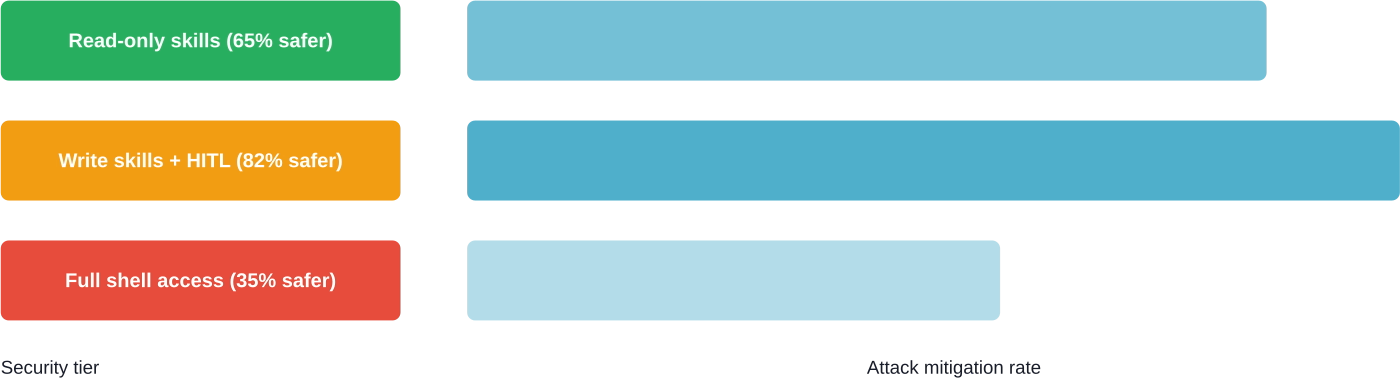
Per-agent access scoping limits which skills each agent can invoke. A Telegram bot might have read-only file access; a local terminal agent gets full shell permissions.
According to arXiv security research, reconnaissance and discovery attacks succeed at 65%+ rates against default agent configurations. Security hardening guides including slowmist/openclaw-security-practice-guide address this with defense-in-depth:
Human-in-the-loop (HITL) approval for high-risk actions
Sandboxed skill execution environments
Credential isolation (secrets never exposed to LLM context)
Audit logging of all tool invocations
Research from arXiv papers on OpenClaw security shows HITL layers can intercept severe attacks that bypass native defenses, with defense rates ranging from 19-92% depending on configuration.
Real-World Performance: What to Expect
OpenClaw isn't instant. Agentic workflows trade speed for autonomy.
Typical latencies from the architecture deep-dive documentation:
Simple query (no tools): 1-3 seconds
Single tool invocation: 3-8 seconds
Multi-step workflow (3+ skills): 30-120 seconds
Background scheduled task: Executes at cron interval
Context assembly and memory search add overhead. Vector search performance depends on memory dataset size and hardware configuration. Session compaction adds overhead depending on configuration and message volume.
Local GGUF models via Docker Model Runner eliminate API costs but run slower than cloud providers.
Limitations and Known Issues
OpenClaw works well for many tasks. But it's not magic.
Visualization quality is functional, not presentation-grade. Built-in visualization skills produce functional charts, but not presentation-quality output designed for client-facing reports.
Long-running tasks (>5 minutes) can timeout depending on channel adapter limits. WhatsApp sessions expire after 24 hours of inactivity.
Memory search accuracy degrades with very large datasets (100,000+ documents). Chunking and embedding strategies need tuning for specialized domains.
And security remains an active research area. Multiple arXiv papers from early 2026 document attack vectors against tool-augmented agents, including prompt injection via external data sources and privilege escalation through skill chaining.
The Bigger Picture: OpenClaw as Agent Operating System
The architecture reveals OpenClaw's true ambition. It's not a chatbot framework—it's an OS for autonomous agents.
The Gateway acts as kernel, managing processes (sessions), I/O (channels), and resources (memory, credentials). Skills are system calls. MCP servers are device drivers. The heartbeat is the scheduler.
This abstraction enables composability. Swap LLM providers without changing skills. Route the same agent across multiple channels. Run multiple specialized agents that share memory and coordinate via session routing.
That's why medical institutions are experimenting with OpenClaw for clinical workflows (arXiv 2603.11721 documents MIMIC-IV dataset integration). Why data teams use it for automated analytics pipelines. Why it crossed 349,000 stars in months.
It's not the features. It's the architecture that makes features composable.
Use Extuitive to Predict Ad Performance Early
If you are looking at how OpenClaw works, Extuitive is a more focused example. It is built to predict ad performance before launch. The platform helps teams compare creatives, spot weaker concepts early, and make decisions before campaigns go live.
Need a Tool for Pre-Launch Ad Review?
Talk with Extuitive to:
forecast ad performance before launch
compare creatives at scale
use prediction data to guide campaign choices
👉 Book a demo with Extuitive to see how pre-launch ad prediction works.
Final Thoughts
OpenClaw works by orchestrating five layers—channel adapters, Gateway routing, agent runtime, skill execution, and persistent memory—into a cohesive system that transforms chat messages into autonomous task execution.
The elegance isn't in any single component. It's in how they compose.
Want to deploy your own instance? The official OpenClaw repository provides Docker images and setup guides. For hardened production deployment, check the openclaw-ansible automation scripts. And if you're building custom skills, the Clawhub directory shows what's possible.
The framework continues evolving—version updates ship weekly, new MCP integrations land daily, and the security research community actively hardens the attack surface.
OpenClaw isn't perfect. But it's open, extensible, and proven at scale. That matters more than perfection.
Frequently Asked Questions
Does OpenClaw require internet connectivity to work?
No. OpenClaw can run locally without internet when using local models. Internet access is only required for external integrations such as APIs or messaging platforms.
Can OpenClaw access my private files and data?
Only if permissions allow it. Access is controlled through enabled tools and configurations. Limiting permissions to only what is necessary helps reduce risk.
How much does it cost to run OpenClaw?
Costs depend on setup. Running locally with open-source models can be free aside from electricity. Cloud hosting and API usage introduce additional costs based on usage.
Is OpenClaw safe for production use?
It can be safe with proper configuration. Security measures like restricted permissions, approval workflows, and logging are essential. Default setups may not be secure enough for production environments.
Can multiple agents run simultaneously?
Yes. OpenClaw supports multiple agents running at the same time with separate sessions and contexts, allowing parallel workflows.
How does OpenClaw compare to AutoGPT or LangChain?
OpenClaw focuses on practical deployment and system integration. Unlike experimental frameworks or libraries, it provides a full runtime environment with built-in execution and management features.
What happens if the model generates a dangerous command?
Commands are validated before execution, but risky actions can still occur if permissions allow them. Approval workflows and restricted access are important to prevent harmful operations.
How much are you wasting on Meta ads? Connect your ad account. See your ad efficiency.