Top Facebook Ads Agencies in New York Worth Your Attention
Looking for Facebook ads agencies in New York? Here’s a curated list of top NYC agencies brands trust for Meta advertising results.
Mar 24, 2026



OpenClaw is an open-source AI agent framework that executes real tasks locally on your machine, from automating DevOps workflows and managing personal schedules to building custom AI assistants. Unlike standard chatbots, OpenClaw connects to your calendar, file system, APIs, and tools to perform actions autonomously, offering 25+ documented use cases across productivity, development, content creation, and business automation.
OpenClaw crossed nearly 350,000 GitHub stars in April 2026, according to community reports, making it one of the fastest-growing open-source projects in recent memory. It runs on your own machine or private server, giving AI agents access to your file system, terminal, calendar, and third-party tools without sending data to external platforms.
But what does that actually mean for daily work?
This isn't another chatbot that answers questions. OpenClaw does things. It reads your email, creates GitHub issues, orders products, generates reports, and manages infrastructure—all through natural language instructions.
The framework went through several name changes (Clawdbot, then Moltbot, then OpenClaw) before exploding in popularity in late January 2026, with 60,000 GitHub stars gained in 72 hours. According to community-curated repositories on GitHub, developers have documented 74 distinct use cases across multiple community repositories, from simple calendar syncs to complex multi-step business workflows.
Here's the thing though—most people don't know where to start.
This guide covers 25 proven use cases organized by category: productivity automation, DevOps and infrastructure, content creation, business workflows, and personal assistant setups. Each example includes what the agent does, which tools it connects to, and when the automation makes sense.
Traditional AI assistants run in sandboxed environments. They can't touch your files, can't execute shell commands, can't modify your calendar without manual approval for every single action.
OpenClaw operates at the operating-system level.
When configured, it has the same permissions you do—read/write file access, terminal execution, API credentials for your services. That power comes with security considerations (addressed in multiple arXiv papers analyzing OpenClaw's threat model), but it also enables genuine automation.
The framework is model-agnostic. Connect it to GPT-5, Claude, Gemini, or local models. Switch providers when better models are released. According to community discussions, this flexibility prevents vendor lock-in that plagues proprietary agent platforms.
And it runs locally. Your data stays on your infrastructure. For teams handling sensitive information—financial data, customer records, proprietary code—this architecture matters.
Before diving into specific examples, understanding OpenClaw's technical foundation explains why certain automations work.
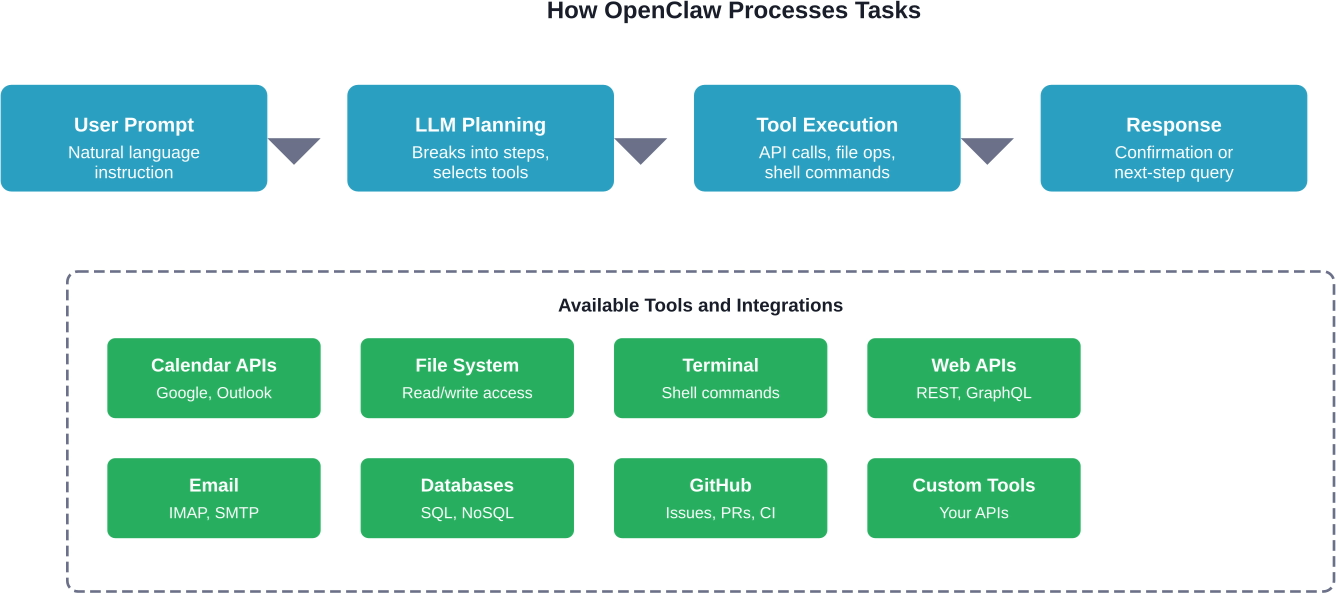
OpenClaw doesn't just generate text—it calls functions. When you ask it to check your calendar, it executes an actual API call to Google Calendar or Outlook, parses the response, and acts on the data.
The framework supports custom tool definitions. Write a function that interacts with your internal API, describe its parameters in JSON schema, and OpenClaw learns to call it contextually.
The agent can navigate directories, read logs, modify configuration files, and execute bash commands. This makes it viable for DevOps tasks that traditionally require manual terminal work.
Security controls vary by deployment. Production setups typically use sandboxed environments or human-in-the-loop (HITL) confirmation layers for destructive operations.
OpenClaw maintains conversation history across sessions. It remembers past tasks, preferences you've stated, and project context. When token limits approach, the framework can summarize older messages while preserving recent context—a pattern detailed in developer documentation.
The agent doesn't just respond to prompts. Heartbeats wake OpenClaw on a schedule (every 30 minutes, hourly, daily) to check conditions and proactively act. This enables monitoring, scheduled reporting, and event-driven workflows.
These automations handle daily tasks that consume hours each week—email triage, calendar management, file organization, and reminder systems.
OpenClaw connects to email via IMAP. On a scheduled heartbeat, it reads new messages, categorizes them by urgency and topic, archives spam, and drafts responses for routine inquiries.
According to GitHub repositories documenting this pattern, the agent can identify newsletter subscriptions, tag customer support threads, and flag time-sensitive requests that need immediate attention.
When to use it: Teams that receive high email volume with predictable categories (customer questions, internal notifications, vendor outreach).
The agent reads calendar events, identifies conflicts, suggests reschedules, and prepares briefing documents for upcoming meetings. Before each call, it compiles attendee LinkedIn profiles, previous conversation notes, and relevant project files.
One user pattern from the OpenClaw showcase: the agent sends a daily summary each morning listing meetings, participants, and one-sentence context for each.
Downloads pile up. Documents scatter across folders. OpenClaw monitors specified directories, reads file contents (PDFs, docs, images), and moves them to categorized folders based on content and metadata.
The file system access allows renaming with standardized conventions, tagging by project or date, and archiving old files to storage drives.
According to Hostinger's documentation, OpenClaw searches social platforms, filters noise, and delivers scheduled sentiment reports. The automation highlights influential accounts, flags posts needing responses, and tracks brand mentions across channels.
The agent consolidates fragmented social listening into a single report delivered on the schedule you choose.
GitHub repositories document a "Second Brain" use case where OpenClaw captures ideas, interesting links, conversation notes, and random thoughts. It reads bookmarks, processes web articles, generates summaries, and stores them in a searchable database.
When you need information later, the agent retrieves relevant notes contextually rather than requiring manual folder navigation.
Connect OpenClaw to bank APIs or receipt forwarding addresses. It categorizes expenses, tracks spending against budgets, and alerts when categories exceed thresholds.
Community examples show expense splitting for shared costs, automatic receipt filing, and monthly financial summaries.
Each morning, the agent compiles a custom briefing: calendar events, weather, news from specified sources, unread priority emails, GitHub notifications, and Slack mentions. Delivered as a formatted message or PDF.
The briefing adapts to what actually matters—no generic news feeds or irrelevant updates.
Describe travel requirements (dates, destination, budget constraints). OpenClaw searches flights, compares hotel options, checks visa requirements, and compiles itineraries with booking links.
The agent can monitor price changes and alert when costs drop below targets.
Infrastructure management involves repetitive checks, log analysis, deployment coordination, and incident response. OpenClaw's terminal access and API integration make it viable for operational automation.
The agent tails application logs, identifies error patterns, correlates failures across services, and creates GitHub issues with stack traces and reproduction steps.
When critical errors appear, OpenClaw alerts the on-call engineer with context—recent deployments, affected endpoints, failure frequency.
OpenClaw executes scheduled health checks across servers: CPU usage, memory, disk space, service uptime. When thresholds exceed limits, it triggers alerts, scales resources (if connected to cloud provider APIs), or restarts failing services.
According to community patterns, the agent can compare current metrics against historical baselines to detect anomalies before they cause outages.
Monitor build status across repositories. When tests fail, OpenClaw reads logs, identifies the failing test, checks recent commits, and notifies the author with specific failure context.
For successful deployments, the agent updates documentation, posts release notes to Slack, and tags the production version in GitHub.
Security vulnerabilities emerge. Dependencies need updates. OpenClaw scans package.json, requirements.txt, or go.mod files, checks for outdated packages, creates update branches, runs tests, and submits pull requests when tests pass.
The agent prioritizes security patches over feature updates and batches compatible changes.
Backups run nightly, but are they valid? OpenClaw executes test restores on a schedule, verifies data integrity, checks backup sizes against expected ranges, and alerts when corruption occurs.
This catches backup failures before data loss becomes critical.
Connect OpenClaw to AWS, GCP, or Azure billing APIs. It analyzes spending patterns, identifies idle resources (stopped instances still accruing charges, unused storage), and recommends cost-saving actions.
Community examples show automated instance rightsizing and scheduled shutdown of development environments during off-hours.
When alerts fire, OpenClaw gathers context: recent deployments, error logs, affected services, customer reports. It creates incident tickets, notifies stakeholders, and compiles status updates as the situation evolves.
The agent maintains a timeline of actions taken, decisions made, and resolution steps for post-incident reviews.
Content workflows involve research, generation, editing, publishing, and performance tracking. OpenClaw can handle multiple steps in these pipelines.
Provide a topic. OpenClaw searches current articles, identifies knowledge gaps, analyzes competitor content, and generates a structured outline with key points to cover.
The agent can compile sources, extract statistics, and flag outdated information that needs verification.
Write content once. OpenClaw adapts it for Twitter (character limits), LinkedIn (professional tone), Instagram (visual focus), and schedules posts across platforms.
The agent tracks engagement metrics and suggests optimal posting times based on audience activity patterns.
According to community use cases, OpenClaw can generate video scripts from blog posts, create shot lists, suggest B-roll footage, and write captions for accessibility.
For editing workflows, the agent organizes footage by scene, renames files with descriptive tags, and generates edit decision lists.
The agent analyzes existing content for keyword density, readability scores, meta description quality, and internal linking opportunities. It suggests improvements based on current SEO best practices and competitor analysis.
When new content is published, OpenClaw can automatically submit sitemaps and ping indexing services.
Gather articles, updates, and announcements throughout the week. OpenClaw compiles them into a formatted newsletter, segments subscribers by interests, personalizes content blocks, and schedules delivery.
The agent tracks open rates and click-throughs to refine future content selection.
These use cases target operational processes: customer communication, data analysis, vendor management, and compliance tracking.
OpenClaw reads incoming support tickets, categorizes by issue type, checks knowledge bases for known solutions, and drafts responses for common questions.
Complex issues get escalated to human agents with full context and relevant documentation attached.
The agent monitors CRM data, identifies stalled deals, schedules follow-up reminders, and drafts personalized outreach based on previous conversation history.
When prospects go silent, OpenClaw can trigger re-engagement sequences or notify sales reps to intervene personally.
Read invoice emails, extract amounts and due dates, create payment reminders, track which invoices are paid versus outstanding, and flag overdue accounts.
The agent can reconcile invoices against purchase orders to catch billing discrepancies.
OpenClaw maintains a database of vendor contracts, tracks renewal dates, monitors service level agreements, and alerts before contracts expire.
When SLA violations occur, the agent compiles evidence and drafts dispute documentation.
Regulatory requirements demand documentation. OpenClaw gathers required records, organizes them by category, generates compliance reports, and identifies gaps before audits.
The agent can monitor regulatory changes and flag when new requirements affect existing processes.
Granting AI agents system-level access introduces risk. Multiple arXiv papers have analyzed OpenClaw's security model and proposed defense frameworks.
A 2026 security analysis found that OpenClaw's native defenses can be bypassed by sophisticated prompt injection attacks, with an average defense rate of only 17%. Introducing a human-in-the-loop (HITL) confirmation layer significantly improved defense, successfully intercepting up to 8 severe attacks. The combined defense approach—native capabilities plus HITL verification—improved overall defense rates to a range of 19% to 92% depending on attack sophistication.
Run OpenClaw in sandboxed environments for testing. Use containerization to limit file system access. Configure read-only modes for sensitive directories.
Implement confirmation prompts for destructive operations: file deletion, database writes, financial transactions, external communications.
Rotate API credentials regularly. Use least-privilege access principles—grant only the permissions each automation actually needs.
Monitor agent actions. Log all commands executed, files modified, and API calls made. Set up alerts for unexpected behaviors.
Start small. Pick a single repetitive task that consumes 30-60 minutes daily and has clear success criteria.
Good first projects:
Avoid complex multi-step workflows initially. Master tool integration, context management, and error handling on simple automations before tackling business-critical processes.
Test extensively. Run automations manually at first. Verify outputs. Adjust prompts and tool configurations based on results.
When the agent performs reliably for two weeks, enable scheduled execution. Monitor closely for the first month.
Recommended implementation path showing progressive complexity stages, time investment, example tasks, and corresponding security measures for each maturity level.
OpenClaw's value scales with the breadth of tools it can orchestrate. The framework supports standard protocols and APIs, making integration straightforward for most platforms.
Calendar systems (Google Calendar, Outlook, CalDAV), email protocols (IMAP, SMTP, Gmail API), file storage (local file system, Dropbox, Google Drive), messaging platforms (Slack, Discord, Telegram), and version control (GitHub, GitLab, Bitbucket) have documented integration patterns.
When native integrations don't exist, developers can write custom tools. Define the function signature, parameter schema, and execution logic. OpenClaw learns to call the tool based on the description provided.
According to GitHub documentation, custom tool development varies in complexity depending on API requirements.
IEEE workshops have explored combining OpenClaw with workflow platforms like n8n. The hybrid approach uses OpenClaw for intelligent decision-making and natural language interaction while n8n handles visual workflow design and third-party service connectors.
This combination bridges no-code accessibility with AI agent capabilities.
Running AI agents involves computational costs—API calls to LLM providers, processing time, token consumption. Optimization strategies reduce expenses without sacrificing functionality.
Developer guides describe token estimation functions that calculate message size. When conversations approach token limits, the agent summarizes older context while preserving recent exchanges.
This prevents expensive context window overflows and maintains conversation coherence.
Not every task requires the most powerful model. For simple categorization, data extraction, and formatting, smaller and cheaper models work well. Reserve premium models for complex reasoning, planning, and creative tasks. Many users report cost optimization through tiered model selection.
Cache responses for repeated queries. When the agent needs the same information multiple times (documentation lookups, API schemas, knowledge base entries), store results and reuse them.
This reduces redundant API calls and speeds up response times.
Group similar tasks. Instead of processing emails one at a time, batch 20 messages and analyze them together. This reduces overhead and often improves categorization accuracy through comparative context.
Community showcases reveal how teams actually deploy OpenClaw in production environments.
One pattern involves dedicated agent instances per function—one agent handles email, another manages infrastructure, a third coordinates customer support. This separation prevents context pollution and allows specialized tool configurations.
Another approach uses a single orchestrator agent that delegates to specialized sub-agents. The orchestrator handles routing and coordination while specialists execute domain-specific tasks.
For personal use, single-agent setups suffice. The agent maintains context across all tasks and learns personal preferences over time.
Research papers published in 2026 explore advanced applications beyond current mainstream usage.
OpenClaw-RL research demonstrates training agents through conversational feedback. Users correct mistakes in natural language, and the agent learns from these corrections to improve future performance.
This approach eliminates traditional reward function engineering—the agent learns directly from user replies and tool feedback.
ROSClaw extends OpenClaw into robotics. The framework connects to ROS 2 (Robot Operating System) for physical robot control. Agents can perceive sensor data, plan motion, and execute actions in the physical world.
Early research shows successful completion of structured manipulation tasks with success determined by objective sensor checks—velocity published within target ranges, position accuracy within tolerances.
According to community repositories, OpenClaw integrations now include image generation (Nano Banana 2, Gemini 3.1 Flash), video creation (37 models including Sora, Kling, Veo), and music composition (Suno v4-v5).
These expansions enable creative workflows—generate product images, create marketing videos, compose background music—all coordinated through the same agent interface.
Real deployments encounter obstacles. Understanding common failure modes accelerates successful implementation.
Long-running conversations exceed context windows. The agent forgets earlier instructions or loses track of ongoing projects.
Solution: Implement summarization at regular intervals. Store project context in external databases that the agent can query. Use vector embeddings for semantic search across historical interactions.
Third-party services impose request limits. Aggressive automation triggers throttling or temporary bans.
Solution: Implement exponential backoff. Cache responses. Batch requests where possible. Monitor rate limit headers and proactively slow requests before hitting limits.
Natural language contains ambiguity. The agent interprets instructions differently than intended, producing unexpected results.
Solution: Start with explicit, structured prompts. Build a library of tested instruction templates. Use confirmation dialogs for high-impact actions. Iteratively refine prompts based on actual agent behavior.
APIs fail. Network timeout. Authentication expires. Brittle automations break silently.
Solution: Implement comprehensive error handling. When tools fail, the agent should report the failure, explain the cause, and suggest remediation. Configure alerts for repeated failures. Build fallback workflows that degrade gracefully rather than stopping completely.

Automation tools like OpenClaw make it easy to execute faster, but they don’t answer whether the workflows or ideas behind that automation will actually work. Teams often automate content, campaigns, or processes first, then adjust later based on results.
Extuitive helps you check those ideas upfront. It simulates how people respond to different concepts before you build or automate them. That way, you’re not just speeding up execution, you’re focusing it on options that already make sense. If you want your automation efforts to lead to better outcomes, not just faster output, run your ideas through Extuitive before you scale them.
Understanding use cases is the first step. Implementation is the second.
Pick one automation from this guide that addresses a specific pain point in daily work. Choose something that happens frequently (daily or multiple times per week), has measurable outcomes, and won't cause critical damage if it fails.
Good starter projects: daily briefing compilation, email spam filtering, calendar conflict detection, or log monitoring for a non-critical service.
Install OpenClaw following the official documentation. Configure API credentials for the tools your automation needs. Write your first prompt describing the task in clear, explicit language.
Run it manually. Check the output. Refine the prompt. Repeat until results meet expectations consistently.
Then schedule it. Monitor closely for the first week. Adjust as needed.
Once that automation runs reliably, build a second one. Over time, the cumulative effect of multiple small automations compounds into significant time savings and reduced cognitive load.
The OpenClaw community continues documenting new patterns. GitHub repositories like hesamsheikh/awesome-openclaw-usecases maintain curated collections with implementation examples, tool configurations, and troubleshooting guides.
2026 marks a shift from AI that answers questions to AI that executes tasks. OpenClaw represents this transition—from conversational assistants to operational agents.
The 25 use cases covered here demonstrate breadth across productivity, DevOps, content creation, and business workflows. But they represent a fraction of what's possible.
The real question is not what OpenClaw can do in general, but what it can do for your specific workflows, constraints, and goals.
That answer comes from experimentation, iteration, and deployment.
Start with one automation. Build from there.


