How to Increase Sales on Shopify With Practical, Proven Moves
Practical ways to increase Shopify sales using clear tactics, smarter optimization, and small changes that actually move revenue.
Mar 16, 2026



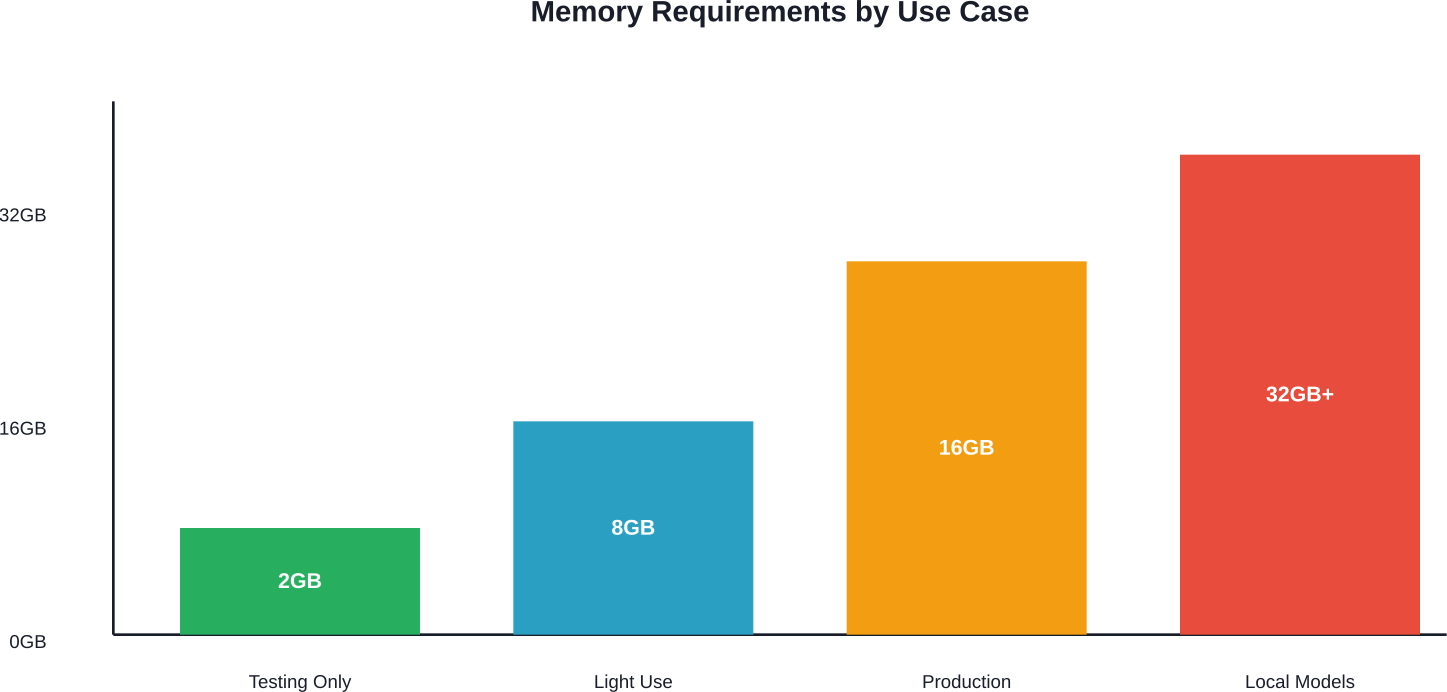
OpenClaw requires a minimum of 2GB RAM, 2 vCPUs, and 20GB SSD storage, but 16GB RAM is recommended for production use. Node.js 22+ is mandatory, with native support on macOS, Linux, and Windows via WSL2. For reliable 24/7 operation, dedicated hardware like a Raspberry Pi 5 (8GB), Mac Mini M4, or cloud VPS provides better stability than shared resources.
OpenClaw has exploded to over 349,000 GitHub stars in a matter of months. The open-source AI assistant orchestrates autonomous tasks, manages multi-channel messaging, and connects to various LLM backends. But here's the thing—it won't matter how capable the software is if the hardware can't keep up.
The right hardware configuration makes the difference between smooth automation and constant crashes. Too little memory triggers "JavaScript heap out of memory" errors. Insufficient CPU causes gateway timeouts. Wrong operating system setup leads to install failures that waste hours of troubleshooting.
This guide breaks down exactly what OpenClaw needs, from absolute minimum specs to production-grade configurations.
These represent the absolute floor for getting OpenClaw to start. According to data from BoostedHost published in February 2026, anything below these specifications will crash during onboarding or gateway startup.
Real talk: these minimum specs exist for testing purposes only. Running OpenClaw on 2GB RAM means operating right at the edge of stability. Any additional load—background processes, log accumulation, concurrent API calls—pushes the system over the threshold.
The CPU requirement is surprisingly modest because OpenClaw primarily orchestrates API calls rather than performing heavy local computation. A single vCPU can handle the coordination loop. The memory constraint matters far more.
For reliable operation, especially in production environments or continuous automation scenarios, substantially higher specs prevent bottlenecks. Multiple authoritative sources from GitHub hardware comparison guides updated through March 2026 consistently recommend 16GB RAM as the comfort threshold.
Here's what production-grade OpenClaw deployments typically use:
The 16GB threshold appears repeatedly in community discussions and technical documentation. Systems with 8GB can work but leave little margin for growth. Once log files accumulate or multiple automation channels run simultaneously, memory pressure builds quickly.
Hardware means nothing without compatible software. OpenClaw has specific runtime dependencies that dictate which operating systems and configurations actually work.
OpenClaw requires Node.js 22+ (version 22 or later), while the recommended one is Node.js 24. According to ClawBot's official documentation, the runtime depends on modern Node features and up-to-date dependencies. Using an older Node version leads to install failures or gateway processes that crash under load.
The jump from Node.js 18 to 24 brought significant performance improvements for event loop handling and async operations—exactly what OpenClaw's orchestration engine relies on. Trying to run on Node 16 or 18 will fail during package installation.
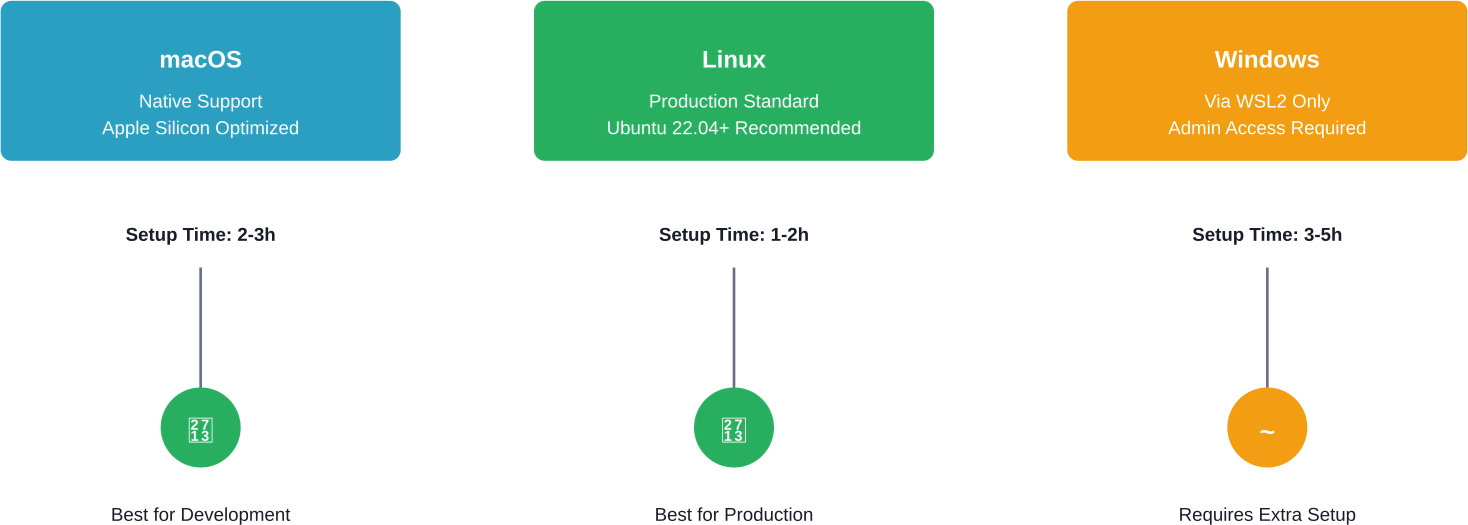
OpenClaw supports three operating system categories:
For Windows users, WSL2 adds a virtualization layer that introduces slight overhead but enables full Linux compatibility. Setting up WSL2 properly requires administrator privileges and specific Windows features enabled.
Different hardware platforms offer distinct trade-offs in cost, performance, and operational complexity. Data from GitHub hardware comparison guides updated through March 2026 provides comprehensive comparisons across popular options.
The Raspberry Pi 5 with 8GB RAM represents the entry point for dedicated OpenClaw hardware. At roughly €80 for the board, it gives you genuine headroom for the core orchestration loop.
According to technical documentation, the Raspberry Pi 5 handles multi-channel messaging reliably. Since OpenClaw primarily orchestrates API calls rather than performing local inference, the modest ARM processor proves more than adequate.
Critical requirements for Pi 5 deployments:
Setup time ranges from 4-6 hours for first-time users. Power consumption stays around 5W idle, making it economical for 24/7 operation. Two-year total cost of ownership sits around €140 according to GitHub hardware comparison data.
Best use case: learning, testing, or personal automation projects where budget matters more than raw performance.
Apple's Mac Mini with M3 chip sits at the opposite end of the spectrum. GitHub comparison data from March 2026 consistently rates it five stars for performance.
The M3's unified memory architecture and efficient ARM design provide exceptional responsiveness. Setup time typically ranges from 2-3 hours thanks to macOS's straightforward environment. Power consumption averages 20W, and the system runs virtually silent.
The catch? Cost. Two-year total cost of ownership approaches €1,200 when factoring in the base hardware price. That makes it a premium option justified primarily for development work or scenarios where the Mac Mini serves multiple purposes beyond OpenClaw.
For teams already invested in the Apple ecosystem, Mac Mini offers a smooth development experience. Native macOS support means fewer compatibility issues and faster iteration cycles.
Cloud virtual private servers offer flexibility and eliminate hardware maintenance. Popular options include AWS, DigitalOcean, Linode, and Hetzner.
Authoritative data from GitHub discussions in February 2026 highlights ARM64 cloud instances for their excellent price-to-performance ratio:
Cloud deployment suits teams that need elastic scaling, geographical distribution, or want to avoid managing physical hardware. Monthly costs vary widely based on instance size and provider.
The main trade-off: ongoing operational expense versus one-time hardware purchase. A modest VPS costs €10-20 monthly, accumulating to €240-480 over two years—comparable to dedicated hardware but without ownership.
Dedicated mini PCs bridge the gap between single-board computers and full workstations. Multiple sources from early 2026 highlight configurations optimized for continuous operation.
Typical mini PC specifications for OpenClaw: Intel N-series or AMD Ryzen 3 processors (4 CPU threads minimum), 16GB DDR4 RAM for comfortable headroom, 256GB NVMe SSD for fast storage, and Gigabit Ethernet for stable connectivity.
These systems cost €300-600 depending on configuration. They offer better performance than a Raspberry Pi while consuming only slightly more power (15-25W typical). Setup complexity falls between Pi and Mac Mini—straightforward Linux installation on known-compatible hardware.
Mini PCs excel for small business deployments, home lab environments, or situations requiring multiple dedicated automation nodes. The compact form factor fits in tight spaces while delivering genuine computing capability.
Hardware specs tell only part of the story. Network connectivity directly impacts OpenClaw's ability to communicate with LLM APIs, webhook endpoints, and external services.
Minimum network requirements include stable internet connectivity with reasonable latency to API endpoints. OpenClaw makes frequent API calls—dozens or hundreds per hour depending on automation complexity. Unstable connections cause timeout errors and task failures.
Wired Ethernet connections provide superior reliability compared to Wi-Fi, especially for 24/7 operation. If Wi-Fi is necessary, Wi-Fi 6 or newer standards offer better performance under load.
Firewall configuration matters for webhook reception. OpenClaw can receive incoming webhooks for event-driven automation. That requires either port forwarding (for self-hosted scenarios) or reverse proxy setup. Cloud deployments simplify this with public IP addresses and configurable security groups.
The 20GB minimum storage requirement covers Node.js installation and basic operation. But real-world usage accumulates data quickly.
Log files grow continuously during operation. Conversation histories, task execution records, and debug output consume storage over time. Without log rotation, a busy OpenClaw instance can generate gigabytes of logs within weeks.
SSD storage is strongly recommended over traditional hard drives. Node module loading, especially the initial install of hundreds of dependencies, benefits enormously from SSD random read performance. The difference between SSD and HDD for "npm install" can be 2 minutes versus 15 minutes.
For production deployments, 256GB provides comfortable headroom. It allows generous log retention and eliminates storage as a concern during operation.
OpenClaw can run in daemon mode for background operation without an active user session. This requires specific system permissions and configuration.
On Linux systems, daemon mode typically uses systemd service files. This allows automatic startup on boot and automatic restart on failure. Setting this up requires sudo or root access to install service files in system directories.
On macOS, launchd serves the equivalent role. Creating a launchd service requires administrator privileges to place configuration files in system locations.
For containerized deployments, Docker or Podman provide alternative approaches. Running OpenClaw in a container simplifies dependency management and allows easy migration between systems. Container overhead is minimal—typically under 100MB additional memory for the runtime.
While OpenClaw typically uses cloud APIs, running local language models changes hardware requirements dramatically.
Local models require:
According to technical documentation, systems designed for local model inference include dedicated hardware like ClawBox with NVIDIA Jetson Orin Nano Super, providing 67 TOPS of AI performance and 1024-core Ampere GPU. These specialized systems cost €549 for ClawBox (one-time purchase), delivering local inference at approximately 15 tokens per second (for Llama 8B model).
For most users, cloud APIs provide better cost-performance unless privacy requirements mandate local inference or internet connectivity is unreliable.
Once hardware meets minimum requirements, configuration choices impact actual performance.
Node.js heap size can be increased via environment variables. The default maximum heap size may be too conservative for heavy automation scenarios. Setting NODE_OPTIONS="--max-old-space-size=4096" allocates 4GB to the Node heap, preventing out-of-memory crashes on systems with sufficient RAM.
PM2 or similar process managers improve reliability by automatically restarting crashed processes and providing log management. They add minimal overhead while substantially improving uptime for production deployments.
Database choice matters for installations using persistent storage. SQLite works well for single-node deployments with moderate load. PostgreSQL or MySQL become necessary for high-transaction scenarios or multi-node configurations.
API rate limiting configuration prevents overwhelming upstream services while maximizing throughput. OpenClaw's configurable rate limits should match the capabilities of connected LLM providers—typically 60-500 requests per minute depending on tier and provider.
Total cost of ownership extends beyond initial hardware purchase. Energy consumption, maintenance time, and replacement cycles all factor into true costs.
A Raspberry Pi 5 running 24/7 at 5W would consume approximately 44 kWh annually. At typical residential electricity rates, annual costs would range approximately €5-10. A Mac Mini at 20W would consume approximately 175 kWh annually, with estimated costs of €20-35. These numbers remain negligible compared to initial hardware costs.
Cloud VPS eliminates hardware replacement concerns but introduces ongoing operational expenses. A €15 monthly VPS costs approximately €360 over two years. That exceeds the cost of a Raspberry Pi or mini PC but includes hosting, bandwidth, and zero maintenance burden.
The optimal choice depends on use case, technical comfort level, and scaling plans. For individual users learning OpenClaw, a Raspberry Pi makes sense. For production deployments supporting business processes, cloud VPS or dedicated mini PC provides better reliability. For development teams, Mac Mini offers superior developer experience despite higher cost.
Certain problems trace directly to hardware limitations or configuration mistakes.
"JavaScript heap out of memory" errors indicate insufficient RAM or misconfigured heap limits. This happens most often on 2GB systems or when multiple resource-intensive processes compete for memory. The solution involves either adding RAM or increasing Node heap size via environment variables.
Gateway timeout errors often stem from CPU throttling on underpowered systems or thermal issues. A Raspberry Pi without active cooling will throttle under sustained load, causing intermittent slowdowns. The fix requires proper cooling or migrating to hardware with better thermal management.
Slow npm install times point to disk I/O bottlenecks. Switching from HDD to SSD or using a faster microSD card on Raspberry Pi dramatically improves package installation speed.
Connection refused errors despite correct configuration sometimes indicate firewall or network issues. Cloud VPS security groups must allow traffic on OpenClaw's configured ports. Home network setups may require port forwarding configuration on the router.

Choosing hardware for OpenClaw is about one thing – not overbuilding or underestimating what you actually need. You try to predict load before it happens, so you don’t waste resources or hit limits later.
Extuitive applies the same idea to ad creatives. Instead of launching campaigns and scaling blindly, it predicts which creatives are likely to perform using your past data and simulated consumer behavior. If you’re already thinking in terms of capacity and efficiency, it makes sense to validate creative decisions the same way. Try Extuitive and see what’s worth scaling before you commit a budget.
OpenClaw's hardware requirements scale with intended use. Testing and learning requires only modest resources—a Raspberry Pi 5 or basic VPS suffices. Production deployments demand more: 16GB RAM, reliable storage, and stable connectivity form the foundation for dependable automation.
The platform's flexibility means it runs on everything from €80 ARM boards to premium Mac Mini workstations. Choice depends on budget, technical requirements, and operational context. Cloud VPS eliminates hardware management at the cost of ongoing expenses. Dedicated hardware requires upfront investment but offers ownership and predictable costs.
Start with minimum viable hardware for initial exploration. Scale up as automation complexity grows and reliability requirements increase. The modular architecture means upgrading later is straightforward—OpenClaw configuration transfers easily between systems.
Ready to deploy OpenClaw? Match hardware to use case, ensure Node.js 22+ is available, and allocate enough memory for stable operation. The software will handle the rest.


