Does Shopify Have Email Marketing? Here’s What Store Owners Need to Know
Does Shopify offer email marketing? Learn what Shopify Email can do, its limits, and when stores need more advanced email tools.
Jan 27, 2026



Facebook Lead Ads can integrate with ClickFunnels through automation platforms like Zapier, Pabbly, and Integrately, allowing marketers to automatically transfer lead data from Facebook forms into ClickFunnels contacts without manual exports. Testing these integrations ensures proper data flow, field mapping accuracy, and reliable automation that can significantly improve lead conversion rates and reduce manual data entry time.
Running Facebook Lead Ads while using ClickFunnels for your sales funnels creates a powerful marketing stack. But there's a catch.
Without proper integration, leads collected through Facebook sit isolated in Meta's platform while ClickFunnels operates independently. Manual CSV exports and imports become a time sink that defeats the purpose of automation.
The solution involves connecting these platforms through third-party automation tools, then testing thoroughly to ensure every lead flows correctly into sales funnels. According to ClickFunnels' official content, Facebook Lead Ads have a built-in lead capture form that optimizes time and labor compared to standard boosted posts or ads driving to landing pages.
Here's the thing though—integration alone isn't enough. Testing determines whether leads actually transfer with complete data, proper field mapping, and reliable timing.
Facebook Lead Ads collect contact information without users leaving the platform. The forms pre-populate with Facebook profile data, reducing friction and increasing conversion rates.
ClickFunnels excels at nurturing those leads through value ladder sales funnels. The platform grew to $10M+ in annual revenue in its first year using the Value Ladder funnel system, according to the official ClickFunnels website. Today it generates $100M+ annually.
But these platforms don't connect natively. Real talk: Facebook and ClickFunnels weren't designed to work together out of the box.
Integration bridges this gap by automatically transferring lead data captured on Facebook directly into ClickFunnels as new contacts. This eliminates manual work and ensures immediate follow-up sequences activate when someone submits a lead form.
Speed matters in lead follow-up. When Facebook captures a lead at 2 PM and that person doesn't enter your ClickFunnels sequence until you manually import a CSV file at 5 PM, you've lost three critical hours.
Automation platforms transfer leads in near real-time. According to Zapier's integration documentation, the connection between Facebook Lead Ads and ClickFunnels can be set up in minutes with no coding required.
Additional benefits include:

If you are testing Facebook lead ads with a ClickFunnels integration, ad performance still matters before the lead reaches the funnel. Extuitive predicts ad performance before launch using AI models validated against live campaign results. That gives teams a way to review lead ad creatives before spending budget on them.
Use Extuitive to:
👉 Book a demo with Extuitive to see how it predicts ad performance before launch.
Three major platforms dominate the Facebook Lead Ads to ClickFunnels integration space: Zapier, Pabbly Connect, and Integrately. Each offers different pricing models and features.
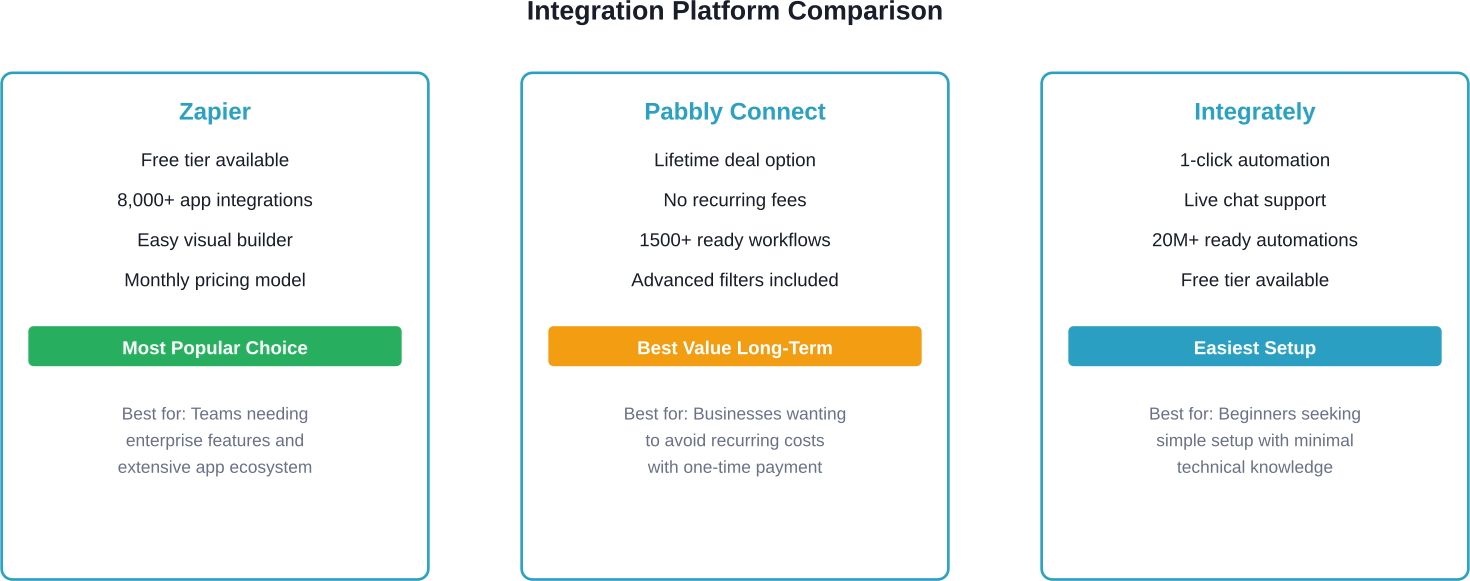
Zapier positions itself as the largest automation platform with over 8,000 app connections. The platform uses a trigger-action model where Facebook Lead Ads serve as the trigger and ClickFunnels contact creation becomes the action.
Setting up the connection requires no coding knowledge. The visual workflow builder guides users through selecting trigger events and corresponding actions.
Zapier offers SOC 2 compliance and GDPR-compliant data handling, making it suitable for businesses with strict data security requirements. The platform includes full audit trails showing when each lead transferred and whether the automation succeeded or encountered errors.
Pabbly Connect differentiates itself with a lifetime deal structure. Rather than recurring monthly fees, the platform offers one-time payment options that grant permanent access to the automation features.
The platform includes advanced filters and path routers. According to Pabbly's documentation, filters can specify conditions based on values coming through triggers and webhooks—for example, routing leads who spent more than $1,000 differently than lower-value prospects.
This pricing model appeals to cost-conscious businesses that want predictable expenses without ongoing subscription creep.
Integrately markets itself around one-click automation setup. The platform provides pre-built automation templates specifically for Facebook Lead Ads to ClickFunnels connections.
According to Integrately's website, the service offers live chat support and can even create custom automations at no extra cost for users who need specialized workflows beyond standard templates.
While specific steps vary slightly by platform, the core integration process follows a consistent pattern across Zapier, Pabbly, and Integrately.
Before beginning integration setup, confirm access to:
Having a test lead already submitted in Facebook helps verify the connection works during setup rather than waiting for a real prospect to submit.
The first step involves authorizing the automation platform to access Facebook Lead Ads data.
In Zapier's interface, this means selecting Facebook Lead Ads as the trigger app, then choosing "New Lead" as the specific trigger event. The platform prompts for Facebook account authentication, which requires signing in and granting permissions.
After authentication, select the specific Facebook Page and Lead Form that should trigger the automation. Some businesses run multiple lead forms simultaneously, so choosing the correct form matters for proper data routing.
The platform typically pulls a sample lead at this stage, allowing verification that data is flowing correctly from Facebook before proceeding to the ClickFunnels connection.
With the trigger configured, the next step involves setting up ClickFunnels as the action app.
Select ClickFunnels from the app list, then choose the action event. For most lead capture scenarios, "Create/Update Contact" works best because it handles both new contacts and updates to existing ones.
According to Zapier's documentation, the Create/Update Contact action only updates present fields that have non-empty values, preventing the automation from accidentally erasing existing contact data.
ClickFunnels authentication requires entering API credentials. These are found in the ClickFunnels account settings under the API section.
Field mapping determines which data from Facebook flows into which ClickFunnels contact fields. This step requires careful attention.
Email address is required because ClickFunnels uses it as the unique identifier. If a contact with the provided email already exists, the system updates that contact rather than creating a duplicate.
Custom questions from Facebook lead forms often need to map to ClickFunnels tags or custom fields for proper segmentation. For instance, if the Facebook form asks about budget range, mapping that to a ClickFunnels tag enables filtering contacts by budget later.
Setup completion doesn't guarantee the integration works correctly. Testing validates data flow, timing, and error handling.
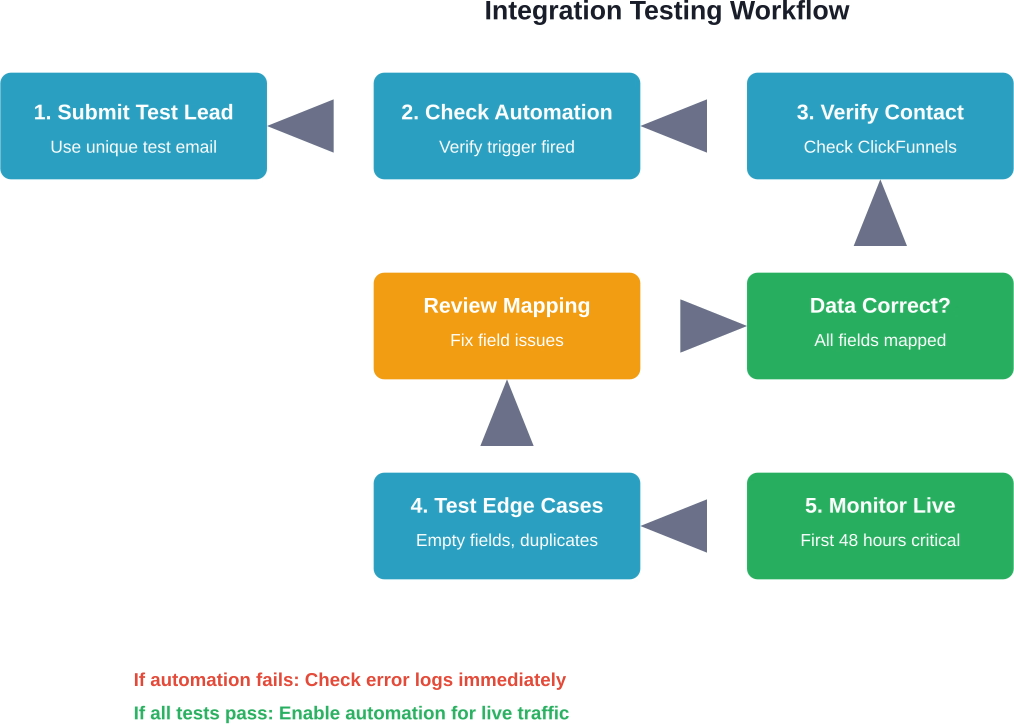
Submit a test lead through the actual Facebook Lead Ad form. Don't use the automation platform's test feature exclusively—real-world testing catches issues that simulated tests miss.
Use a unique email address that's easy to identify in ClickFunnels. Something like "test-facebook-integration-march17@yourdomain.com" makes the test contact obvious when reviewing ClickFunnels data.
Fill out every field in the Facebook form, including optional ones. This ensures all field mappings get tested, not just required fields.
After submitting the test lead, check three places:
First, verify the lead appears in Facebook Business Manager under the Lead Ads forms section. This confirms Facebook captured the submission.
Second, check the automation platform's task history or logs. The automation should show as triggered within seconds to minutes of the Facebook submission. If it doesn't appear after 5 minutes, something's wrong with the trigger setup.
Third, log into ClickFunnels and navigate to the contacts section. Search for the test email address. The contact should exist with all mapped fields populated correctly.
Compare the data in ClickFunnels against what was submitted in Facebook. Check each field individually:
Phone number formatting often causes issues. Facebook might capture "+1 (555) 123-4567" while ClickFunnels expects "5551234567". Most automation platforms offer formatting functions to clean phone numbers during transfer.
Standard test leads don't reveal how the integration handles unusual scenarios. Test these edge cases:
Speed matters for lead follow-up, but understanding actual transfer timing sets realistic expectations.
Submit a test lead and note the exact timestamp. Then check when it appears in ClickFunnels. Most integrations transfer data within 1-15 minutes, though Zapier's free tier may have longer delays than paid plans.
If the business model requires instant follow-up (like scheduled callback within 5 minutes), verify the integration meets that timing requirement consistently.
Even properly configured integrations can encounter errors. Knowing common failure points speeds up troubleshooting.
Facebook and ClickFunnels API tokens can expire, breaking previously functional automations. This typically happens after 60-90 days or when account passwords change.
Symptoms include automations that suddenly stop working despite no configuration changes. The automation platform usually sends error notifications about authentication failures.
The fix involves re-authenticating both Facebook and ClickFunnels connections within the automation platform. This refreshes API tokens and restores functionality.
When running high-volume ad campaigns, hundreds of leads might submit simultaneously. This can trigger rate limits on either Facebook's API or ClickFunnels' API.
Most automation platforms handle rate limiting automatically by queuing tasks and retrying failed transfers. However, during major promotional launches, some leads might experience delayed transfer.
Upgrading to higher-tier plans on the automation platform often increases rate limits and reduces throttling issues.
If Facebook lead form questions change but the automation field mapping isn't updated accordingly, data starts flowing into wrong ClickFunnels fields.
This happens when marketing teams update Facebook forms without coordinating with whoever manages the integration. The automation continues running but maps outdated fields.
Establishing a process where form changes trigger integration review prevents this issue. Some teams use a checklist that includes "update automation mappings" as a required step before launching revised lead forms.
While the Create/Update Contact action should prevent duplicates, edge cases can create multiple ClickFunnels contacts for the same person.
This often occurs when someone submits lead forms using different email addresses (personal vs. work email) or when email addresses have slight variations (john.smith@email.com vs. johnsmith@email.com).
Regular contact list auditing identifies duplicates for manual merging. Some businesses implement additional automation that checks for duplicate names and phone numbers even if emails differ.
Basic integration gets leads flowing, but optimization improves conversion rates and data quality.
When running multiple Facebook lead ads simultaneously, knowing which ad generated each lead helps optimize ad spend.
Most automation platforms can capture the specific form name or ad name from Facebook and pass it to ClickFunnels as a tag or custom field. This enables filtering contacts by source ad campaign.
Setting up separate automations for each lead form provides granular tracking. The downside is maintenance complexity with many automations to manage.
Alternatively, a single automation with dynamic field mapping can pull the form name and assign it automatically.
Not all Facebook leads have equal value. Advanced integrations can route leads differently based on their responses.
For example, if the Facebook form asks about budget and someone selects "$10,000+", the automation might add a "high-value-prospect" tag in ClickFunnels and trigger a different email sequence than leads who selected "$1,000-$5,000".
Pabbly Connect specifically mentions filters that route leads who spent more than $1,000 differently according to their documentation.
The integration can do more than just create a contact. Sophisticated automations trigger immediate actions based on lead submission.
Options include sending immediate notification emails to sales teams, creating tasks in CRM systems, or triggering SMS messages thanking the lead for their interest.
According to ClickFunnels' official blog content on lead generation, over 90% of people researching a product look for reviews and recommendations during decision-making. Immediate follow-up that provides social proof capitalizes on this behavior.
Beyond moving contact data, tracking pixel integration connects Facebook ad performance to ClickFunnels conversion metrics.
ClickFunnels supports Facebook tracking pixels through its tracking pixel settings. According to ClickFunnels' support documentation, pixels can be added at the funnel level or individual page level depending on tracking goals.
The pixel service provider indicates whether to place tracking code in the header or footer of pages due to how different browsers handle tracking scripts.
Proper pixel implementation allows Facebook's algorithm to optimize ad delivery toward people likely to convert, not just submit the initial lead form.
Browser-based pixels face increasing limitations from privacy features and ad blockers. Facebook's Conversion API provides server-side tracking that's more reliable.
According to AnyTrack's integration guide, connecting Facebook Ads with ClickFunnels through server-side tracking maximizes ad performance with rich customer data. Real-time sync accelerates algorithm learning and deduplication ensures each conversion is counted once.
This advanced integration requires additional setup beyond basic lead transfer automation but provides more accurate attribution and better ad optimization.
Integration automation costs money, so understanding ROI helps justify the investment.
These calculations assume manual CSV export/import takes approximately 2 minutes per lead including data verification. Actual time varies based on lead complexity and quality control requirements.
Beyond time savings, automation reduces human error. Manual data entry typically has 1-3% error rates, meaning 10-30 contacts per 1,000 might have wrong email addresses or misspelled names that prevent proper follow-up.
Businesses with complex funnels can extend basic integration into sophisticated lead management systems.
Combining Facebook Lead Ads data with ClickFunnels behavioral data creates comprehensive lead scoring.
The integration captures initial lead information from Facebook. Then ClickFunnels tracks which emails the contact opens, which pages they visit, and whether they attend webinars. This accumulated data feeds a lead score that helps sales teams prioritize follow-up.
Advanced automation platforms can update lead scores in real-time based on behavioral triggers across both platforms.
When running Facebook campaigns alongside Google Ads, organic content, and other channels, attribution becomes complex.
Smart integrations tag Facebook-sourced leads distinctly in ClickFunnels while preserving any previous interaction history. If someone previously visited through organic search, then later submitted a Facebook lead form, both touchpoints remain visible.
This multi-touch attribution reveals actual customer journeys rather than oversimplifying conversion credit to a single channel.
The moment a Facebook lead enters ClickFunnels, automated email sequences can begin. The official ClickFunnels website describes the Value Ladder sales funnel approach that grew the company to $10M+ in annual revenue using this system.
This methodology involves meeting prospects at different value points and ascending them toward higher-ticket offers. Integration automation enables this by immediately enrolling Facebook leads into appropriate sequences based on their indicated interests or budget.
Moving personal data between platforms carries legal obligations, especially regarding GDPR and privacy regulations.
Using automation platforms to transfer lead data makes those platforms data processors under GDPR. This requires proper Data Processing Agreements between the business and the automation provider.
Zapier specifically mentions SOC 2 and GDPR compliance in their service description. Businesses operating in Europe or handling European customer data should verify their chosen automation platform maintains appropriate compliance certifications.
Facebook lead forms should clearly disclose how submitted information will be used and which third parties will receive it.
If leads flow from Facebook into ClickFunnels email sequences, the Facebook form privacy policy should mention email marketing use. Failing to disclose this can violate consent requirements and damage brand trust.
Integration creates data copies across multiple platforms. When someone requests data deletion under GDPR's right to be forgotten, the deletion must occur in Facebook, ClickFunnels, and the automation platform.
Establishing procedures for cross-platform data deletion before issues arise prevents compliance violations later.
Facebook Lead Ads integration with ClickFunnels transforms disconnected marketing tools into a unified lead generation system. Automation eliminates manual data transfers, reduces errors, and accelerates follow-up timing that directly impacts conversion rates.
The technical setup requires choosing an automation platform (Zapier for enterprise features, Pabbly for cost efficiency, or Integrately for simplicity), configuring trigger and action events, mapping fields carefully, and testing thoroughly with real-world scenarios.
But setup is just the beginning. Ongoing monitoring catches authentication failures, regular testing verifies continued accuracy, and optimization based on lead source data and behavioral triggers maximizes ROI from both Facebook ad spend and ClickFunnels funnel infrastructure.
Testing remains critical throughout the integration lifecycle. Initial testing validates that data flows correctly. Edge case testing reveals how the system handles unusual inputs. Periodic testing after Facebook form changes or ClickFunnels updates confirms everything still works as expected.
According to ClickFunnels' official blog, Facebook Lead Ads with built-in forms outperform standard ads that drive to landing pages. Combining that lead capture efficiency with automated ClickFunnels funnel nurture creates a powerful revenue engine.
Start with basic integration to prove the concept and generate quick wins through time savings. Then layer in advanced features like lead scoring, conditional routing, and server-side tracking as the system matures and lead volume grows.
The integration investment pays for itself quickly—even small businesses processing 50 leads monthly save hours of manual work. Larger operations handling hundreds or thousands of leads monthly see dramatic efficiency gains and reduced error rates that translate directly to revenue impact.
Ready to connect Facebook Lead Ads to ClickFunnels? Choose an automation platform, follow the setup steps outlined above, and run comprehensive tests before enabling the integration for live traffic.


