Marketing Ideas for Property Management That Work in 2026
Discover proven property management marketing ideas for 2026. Attract owners, fill vacancies faster, and build brand authority with local SEO, referrals, and more.
May 26, 2026



The Meta Lead Ads Testing Tool is a free developer utility that allows marketers to send test leads through their Facebook and Instagram lead form integrations before launching campaigns. This tool helps verify that leads are flowing correctly to CRMs, email systems, and other third-party platforms, reducing the risk of lost leads and broken integrations.
Setting up Facebook lead ads can feel straightforward until you launch your campaign and realize leads aren't arriving where they should. That's where the Meta Lead Ads Testing Tool becomes essential.
This free diagnostic tool lives at developers.facebook.com/tools/lead-ads-testing and allows marketers to generate sample leads without spending ad budget. It's particularly valuable when setting up new integrations with CRMs like HubSpot, email platforms, or automation tools like Zapier and Make.
But here's the thing—the tool can be temperamental. Community discussions on platforms like Reddit reveal that users frequently encounter issues where the page loads but options to test leads or select Facebook pages simply don't appear. These glitches typically resolve within 24-48 hours.
According to Semrush's research on lower-funnel marketing tactics, conversion optimization at the bottom of the funnel requires precise execution. Facebook lead ads sit firmly in this category—they're designed to capture ready-to-buy prospects with minimal friction.
When lead forms fail to deliver data properly, the impact extends beyond lost contacts. Broken integrations create gaps in follow-up sequences, undermine sales team confidence in marketing systems, and ultimately waste ad spend on leads that never materialize in your database.
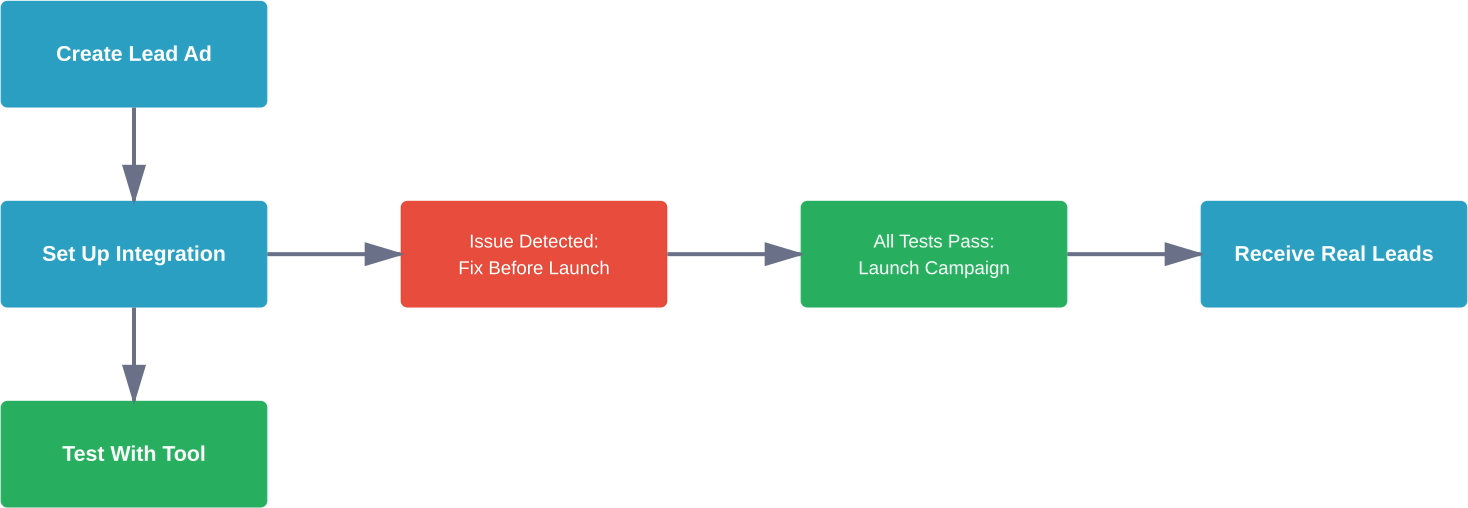
Testing before launch catches these issues early. It verifies that form fields map correctly to CRM properties, confirms that automation workflows trigger as expected, and ensures leads don't vanish into a digital void.

Before any ad test starts, there is still a basic question to answer: which creatives are worth putting into the mix at all. Extuitive predicts ad performance before launch. It uses AI models validated against live campaign results to help teams check ad creative before spending budget. That makes it useful when ads need to be checked before they go live.
Use Extuitive to:
👉 Book a demo with Extuitive to see how it predicts ad performance before launch.
The testing tool requires specific access permissions that catch many marketers off guard. Standard Facebook Ads Manager access isn't sufficient—testing capabilities live within the developer ecosystem.
To access the tool, navigate directly to developers.facebook.com/tools/lead-ads-testing. The account used must have admin or developer permissions on the Facebook page connected to the lead form. Without these elevated permissions, the interface may load but won't display available pages or forms for testing.
This permission requirement creates complications in agency settings where social media managers handle ads but lack developer access. Resolving this typically requires the business page owner to grant additional permissions through Business Manager settings.
Once access is confirmed, the testing process follows a straightforward sequence. Start by selecting the Facebook page connected to the lead ad campaign. The tool then displays all active lead forms associated with that page.
Choose the specific form requiring testing. The interface provides options to generate sample leads with either pre-populated data or custom information. Pre-populated data works well for quick integration checks, while custom data helps test specific field mapping scenarios.
Click the option to send a test lead. The tool submits this sample through the same pipeline that real leads will follow—through Meta's API to any connected integration platforms.
After sending a test lead, verification happens in the destination system rather than within Meta's interface. Check the connected CRM, email inbox, spreadsheet, or automation platform within 2-3 minutes. Most integrations deliver test leads nearly instantaneously, though some systems may take up to 5 minutes.
According to HubSpot's documentation on Facebook lead ads integrations, leads should appear in the contacts database with a clear indicator of their source. Field mapping errors become immediately apparent—a lead's phone number appearing in the email field signals misconfiguration that would affect all subsequent leads.
Even with proper setup, several issues frequently disrupt lead delivery. Understanding these patterns accelerates troubleshooting when test leads don't arrive as expected.
The most frustrating scenario involves leads that leave Meta's system but never arrive at their destination. This typically indicates a broken webhook or API connection rather than a Meta-side issue.
Platforms like LeadSync, Zapier, and Make serve as middleware between Meta and final destinations. When these connections break—often due to expired authentication tokens or service disruptions—leads queue temporarily or disappear entirely. Testing reveals these gaps before real prospects are affected.
If test leads aren't arriving within 5 minutes, the integration may have failed. Reconnect the integration, generate fresh API credentials, or contact the middleware platform's support team.
Basic testing confirms that leads flow from point A to point B. Advanced testing validates that automation sequences, lead scoring, and assignment rules work as designed.
For complex workflows, send multiple test leads with varying data profiles. One test lead might include all optional fields completed, while another submits only required information. This variation tests whether workflows handle incomplete data gracefully.
Many campaigns send leads to multiple destinations simultaneously—a CRM for sales teams, a spreadsheet for backup, and an email marketing platform for nurture sequences. Testing these parallel integrations requires sending separate test leads to each pathway.
The Meta testing tool doesn't distinguish between different integration endpoints. It simply submits the test lead through Meta's API. How that lead routes to various destinations depends on middleware configuration. Verify each endpoint independently rather than assuming that one successful delivery guarantees others.
The testing tool experiences periodic unavailability. User experiences shared across community discussions reveal recurring patterns where the interface loads incompletely or becomes temporarily unavailable.
When the page loads but doesn't display options to select pages or send test leads, first clear browser cache and cookies. Facebook's developer tools rely heavily on cached authentication data that can become stale.
If clearing cache doesn't resolve the issue, try accessing from a different browser or incognito mode. Chrome and Firefox typically offer the most stable experience with Meta's developer tools.
Still broken? The issue likely sits on Meta's end. These platform-level problems typically resolve within 24-48 hours without user intervention. Monitor the Reddit PPC community or Meta's developer status page for confirmation that others are experiencing similar issues.
When the official testing tool becomes unavailable, workarounds exist—though none offer the same convenience or accuracy.
Running a minimal budget campaign ($5-10) targeted to yourself or team members provides real-world testing. Create a custom audience including only internal email addresses or phone numbers. Launch the ad with this restricted targeting, submit leads personally, then verify delivery.
This approach costs money and requires additional campaign setup, but it tests the complete pathway including ad delivery, form rendering, and lead submission—not just the API connection.
Testing provides confidence, but it's not a guarantee that every lead will flow perfectly once campaigns go live. According to Semrush's research on lower-funnel marketing tactics, defining performance baselines before launch helps identify issues quickly when they emerge.
Document baseline metrics: How many leads did the test generate? How quickly did they arrive? What data appeared in each field? These benchmarks make it obvious when live campaign performance deviates from expectations.
Set up monitoring for the first 24-48 hours after launch. Check lead delivery multiple times daily during this critical window. The first few real leads confirm whether the integration handles live traffic as reliably as it processed test submissions.
Establish a backup plan. Despite thorough testing, integrations sometimes fail under live conditions. Having a secondary delivery method—even something as simple as email notifications for each lead—ensures that no prospect disappears during technical difficulties.
The Meta Lead Ads Testing Tool represents a small investment of time that prevents significant downstream problems. Master it before launch, not after discovering that three days of leads vanished into misconfigured integration settings.


