When Did Shopify Start: From Selling Snowboards to Building Shopify
Shopify started in 2006. Learn how it began, why it was created, and how a small idea turned into a global ecommerce platform.
Jan 26, 2026



Selling photos online sounds simple until you actually sit down to do it. Questions come fast. What exactly do you sell? Digital files or prints? How do people download images after paying? And is Shopify even the right place for photography?
The short answer is yes. Shopify works well for photographers, as long as you understand how to set it up and what to expect. This guide walks through the basics without hype or shortcuts. Just the practical steps and decisions that matter when you want to turn photos into something people can actually buy.
Shopify was not created specifically for photographers, and that is exactly why it works. Instead of locking you into a portfolio-style layout or a crowded marketplace, Shopify treats photography as a product-based business. You create items, price them, accept payments, and deliver what the customer buys. The system stays the same whether you are selling a digital file, a physical print, or a photography service.
That flexibility gives you control. You own the storefront, the pricing, and the customer relationship. There is no algorithm deciding whose work gets visibility. At the same time, Shopify does not promise traffic. You are responsible for bringing people to your store. For many photographers, that trade-off is worth it.
If you want a platform that handles the technical side while staying out of your creative decisions, Shopify fits that role well.
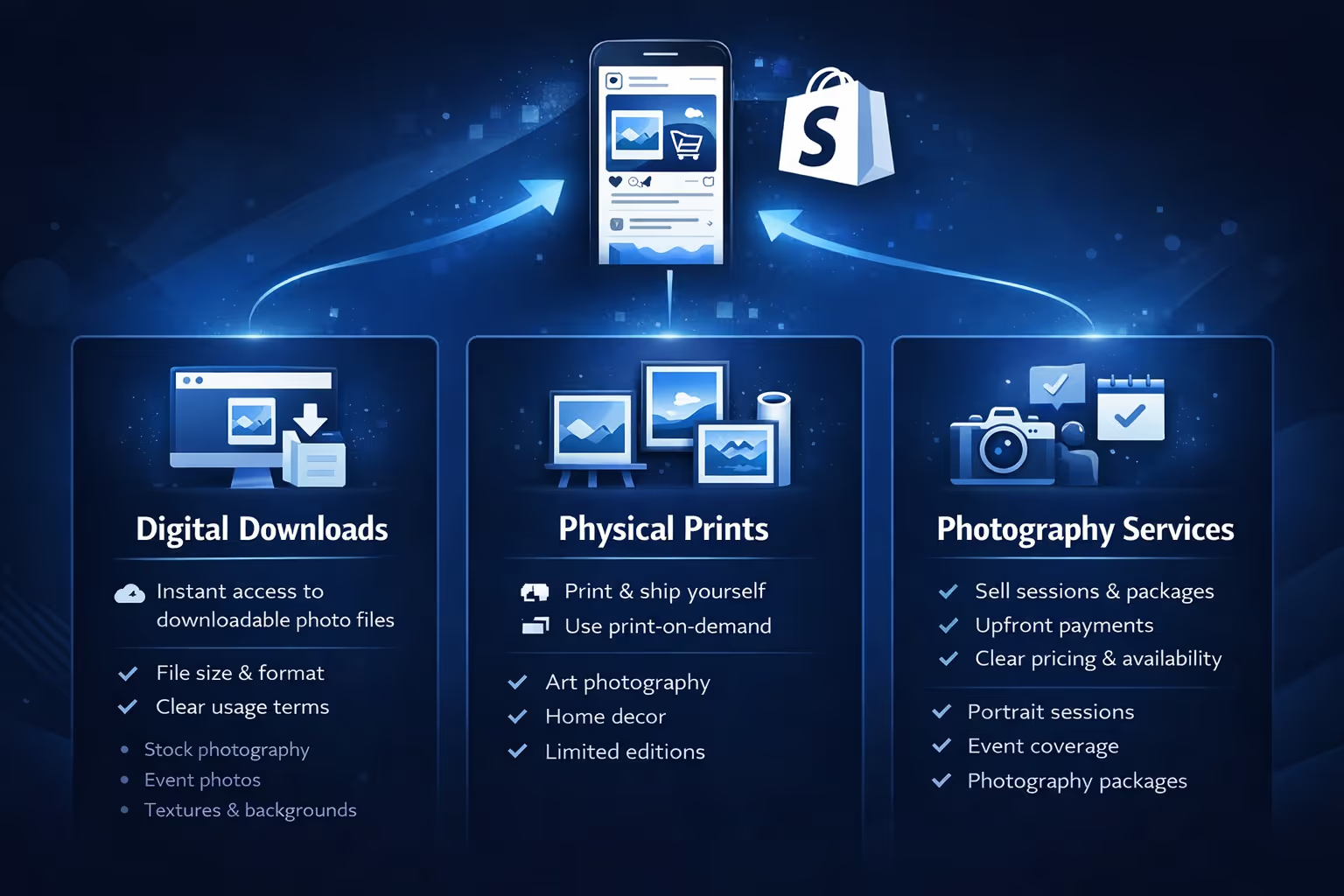
Before touching themes or apps, decide what form your photos will take. This choice affects everything else.
This is the simplest model. Customers pay, receive a download link, and get the image files.
Best for:
Things to think about:
Digital products have almost no overhead, but they do require clarity. Customers need to know exactly what they are buying and how they can use it.
This includes posters, canvases, framed prints, and other tangible formats.
Best for:
Here you need to decide whether you will:
Print-on-demand removes inventory and shipping headaches, but margins are usually lower. Doing it yourself gives control, but adds logistics.
Some photographers use Shopify to sell sessions, packages, or bookings.
This works well when:
You can list services as products with descriptions, availability notes, and follow-up scheduling. Many successful stores combine two or three of these. The key is to start with one and expand later.
Creating a Shopify account is quick. The onboarding process asks basic questions about your business and products. Answer them honestly. Shopify uses this information to suggest defaults for things like shipping and taxes, which saves time later.
When it comes to choosing a theme, photography benefits from restraint. Large images, generous spacing, and minimal distractions tend to work best. A clean layout lets your work speak for itself. Free themes are usually enough at the beginning, and they are often better optimized than heavily customized designs.
Customization should focus on brand consistency rather than perfection. Adjust colors, fonts, and layout to match your style, but avoid endless tweaking. If you find yourself redesigning instead of adding products, it is a sign to move on.
A common mistake photography stores make is assuming the images explain themselves. They rarely do.
Each product page should make it obvious what the buyer is getting. If it is a digital file, explain the format, resolution, and usage rights in plain language. If it is a print, describe the material, size options, and finish. If framing is included or excluded, say so clearly.
Descriptions do not need to sound poetic. They need to sound human. A short explanation of the subject, mood, or story behind the photo often works better than generic art language. Buyers want confidence, not mystery.
Organizing photos into collections also matters. Grouping work by theme, format, or intended use helps visitors browse without effort. Too many collections create friction. A few clear ones do the job.
Shopify does not natively deliver digital files, so you will need a digital downloads app. These apps attach files to products, generate secure download links, and send them to customers after purchase.
Once installed, take the time to test the experience. Buy one of your own products in test mode. Check the email. Download the file. See what the customer sees. Small issues here can quickly turn into support requests later.
Make sure customers know how long download links remain active and whether re-downloads are allowed. Transparency reduces confusion.
Payments are straightforward on Shopify. Enable the methods your audience expects and test them before launch. Nothing kills trust faster than a checkout that does not work.
Taxes require more attention. Shopify can calculate taxes, but it relies on the settings you provide. Tax obligations vary by location and product type, especially for digital goods. If sales grow beyond hobby level, professional advice is worth the cost.
Legal pages matter more than most photographers expect. Clear terms of service, a privacy policy, and a refund policy protect both you and the buyer. For digital products, be explicit about refunds and licensing. Ambiguity almost always leads to disputes.
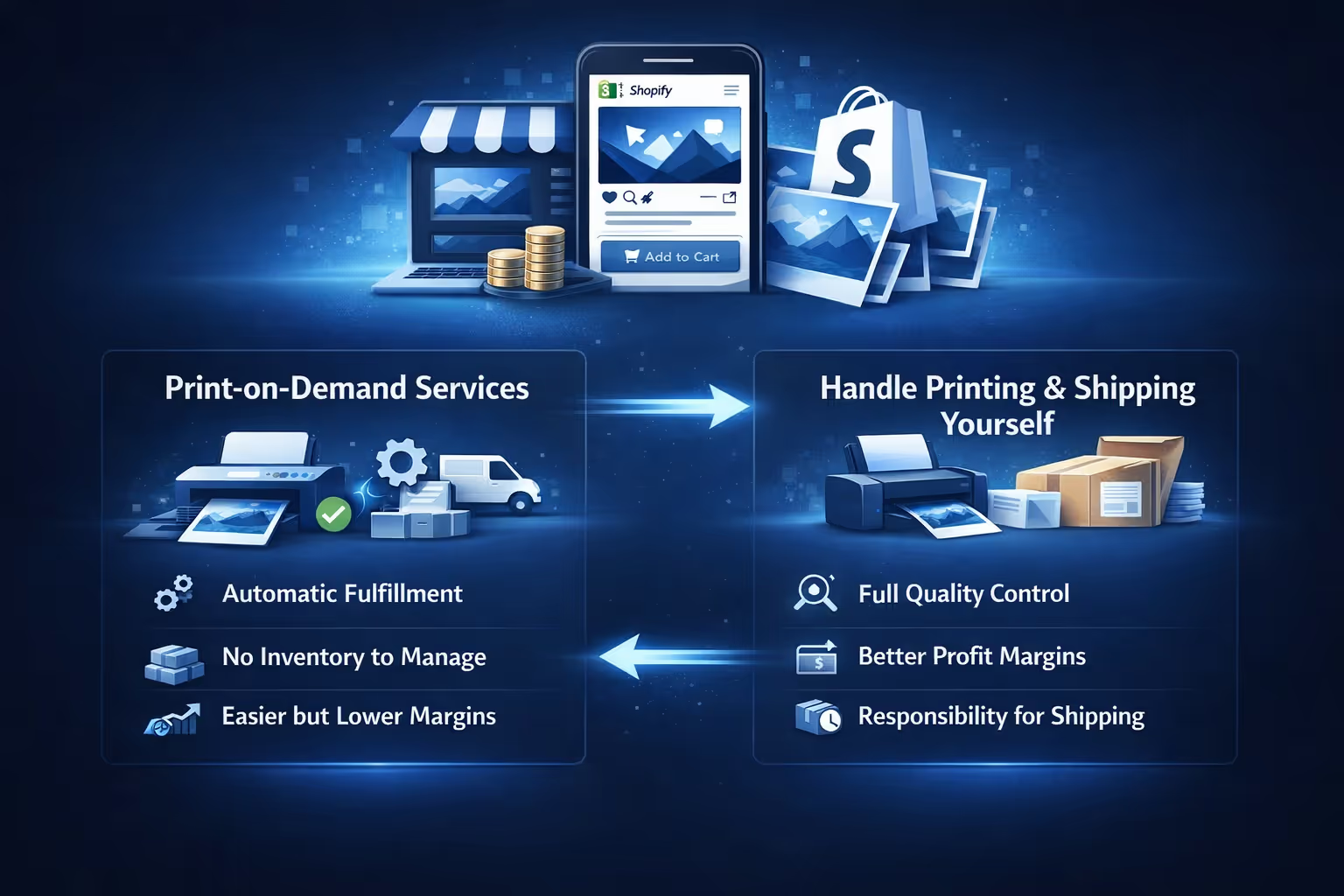
If you sell physical photo prints, delivery is no longer a background detail. It becomes part of the product itself. The way a print arrives, how long it takes, and how it is packaged all influence how buyers perceive your work. A beautiful image loses impact quickly if it shows up late or damaged.
Print-on-demand services are often the easiest way to start selling physical prints. You upload your photos, connect the service to your Shopify store, and every order is printed and shipped automatically. There is no inventory to manage and no manual fulfillment on your side.
This setup works especially well if you are testing demand, selling internationally, or offering multiple formats without upfront costs. The trade-off is margin and control. Print-on-demand providers take a cut, and print quality can vary depending on materials, production locations, and shipping partners.
Before selling publicly, ordering samples is essential. Look at color accuracy, paper quality, packaging, and delivery time. What looks fine on a product page can feel very different in someone’s hands.
Handling printing yourself gives you full control over quality, presentation, and branding. It also adds responsibility. Shipping settings need to be realistic, not optimistic. Customers are usually patient if expectations are clear, but they lose trust quickly when delivery promises are missed.
Packaging matters more than many photographers expect. Prints should arrive protected, clean, and clearly cared for. Creased corners, thin tubes, or inconsistent materials signal carelessness, even if the photo itself is strong.
If you choose this route, build shipping timelines that account for production time, not just transit. Photography buyers are not just purchasing an image. They are buying something personal, and they notice the details.
Basic SEO goes a long way. Clear product titles, natural descriptions, and descriptive image alt text help search engines understand your store. Avoid keyword stuffing. Write for people first.
Blogging can help, but only if you enjoy it. Sharing behind-the-scenes stories, project breakdowns, or explanations of your work adds depth to the store. Forced content rarely performs well.
Traffic usually comes from a mix of search, social media, and existing networks. Focus on channels you already use instead of trying everything at once.

Getting people to your Shopify store is only half the equation. The harder part is knowing which messages actually make them care enough to buy. That’s where we come in. At Extuitive, we help Shopify merchants validate ads before spending real budget, so growth feels intentional instead of experimental.
We use AI agents modeled on over 150,000 real consumer profiles to test ad concepts, visuals, and copy in minutes. Instead of guessing which photo, headline, or angle might resonate, we simulate how different audiences respond and predict purchase intent before an ad ever goes live. For photographers, this means you can test which images convert better, which framing of your work attracts buyers, and which audience segments actually respond to your style.
Once a concept is validated, we help generate and launch ads directly for Shopify stores, then track performance as traffic starts coming in. The process is fast, cost-efficient, and designed to replace slow, expensive consumer research. If you are running ads to sell photos, prints, or creative products, Extuitive lets you move forward with confidence, not guesswork.
Pricing is often the hardest part of selling photography because it feels personal. Your images represent time, skill, and creative judgment, so attaching a price can feel uncomfortable. Still, pricing works best when it stays practical. Instead of asking what the photo is worth emotionally, it helps to think about what went into creating it and what it costs to deliver it. Time spent shooting, editing, preparing files, printing, packaging, and maintaining the store all factor in, even if they are not immediately visible to the buyer.
Digital downloads usually sit at a lower price point, but lower does not mean cheap. Buyers are paying for convenience, clarity, and the right to use the image without friction. Pricing too low can quietly signal low value, even when the work itself is strong. Prints, on the other hand, justify higher prices through materials, production quality, and presentation. A well-made print that arrives carefully packaged feels like a finished product, not just an image.
Looking at similar work can help set expectations, but pricing does not need to be perfect on day one. Starting with reasonable prices gives you room to adjust based on real demand. Raising prices as your audience grows or as certain images sell consistently is normal. Undervaluing your work early on is harder to undo, and it often attracts the wrong expectations from buyers.
Concerns about image misuse stop many photographers from selling online altogether. While the risk is real, complete protection is not. The goal is to reduce obvious misuse without making the buying experience uncomfortable or restrictive for legitimate customers. A balance works better than a defensive setup that assumes bad intent from everyone.
Clear licensing terms help set expectations. Buyers should understand how they are allowed to use the image and what is not permitted, especially for digital downloads. This does not require legal language on every product page. Simple explanations are often enough. Preview images should show quality clearly, but not replace the product itself. Subtle watermarks can help in some cases, as long as they do not distract from the image.
Most people who buy photos are not looking to steal them. They want a clean purchase, quick access, and confidence that they are doing things correctly. Overprotecting your work often creates friction for the wrong audience. Selling photography online always involves a level of trust, and focusing on customers who value your work usually leads to better results than trying to eliminate every possible risk.
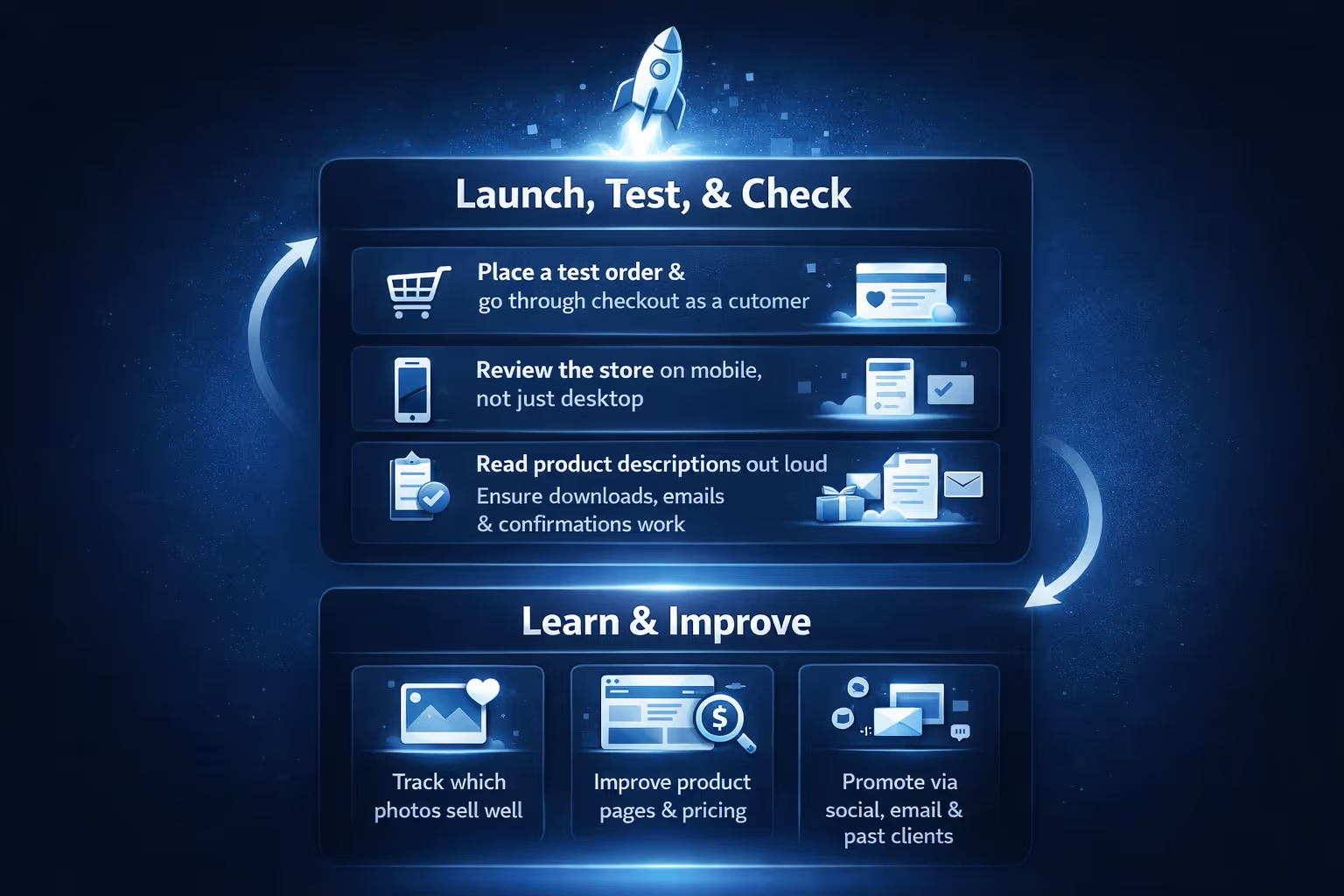
At some point, the store needs to go live. Waiting for everything to feel finished usually means waiting too long. A first version only needs to work well enough for real people to use it.
Before launching, it helps to slow down and check a few practical things:
Once the store is live, share it through the channels you already have, whether that is social media, email, or past client contacts. Early feedback is part of the process, not a sign something went wrong.
Real growth comes from small, focused improvements. Pay attention to which photos sell, which pages get attention, and where people hesitate. Refine product pages, adjust pricing or presentation, and expand only when it solves a clear problem. Constant rebuilding slows progress. Steady iteration moves it forward.
Selling photos on Shopify does not need to be complicated. The platform handles the infrastructure. Your role is to make the work clear, accessible, and worth buying.
Start simple. Launch sooner than you think. Let the store evolve based on real use, not endless planning.
That is how photography businesses actually get off the ground.


