Top AI Agents for Sales Teams Right Now
Explore top AI agents for sales that help teams predict outcomes, qualify leads, and close deals faster without adding extra workload.
Apr 12, 2026



Connecting Shopify to Amazon sounds simpler than it is. On paper, it’s just “multichannel selling.” In real life, it’s accounts, approvals, apps, and a few rules Amazon takes very seriously.
The good news is that it does work, and thousands of sellers run both platforms side by side every day. The trick is understanding what’s actually possible today, what changed in recent years, and how to set things up so inventory, orders, and listings don’t turn into a mess. This guide walks through the connection in a clear, practical way, without pretending it’s a one-click switch.
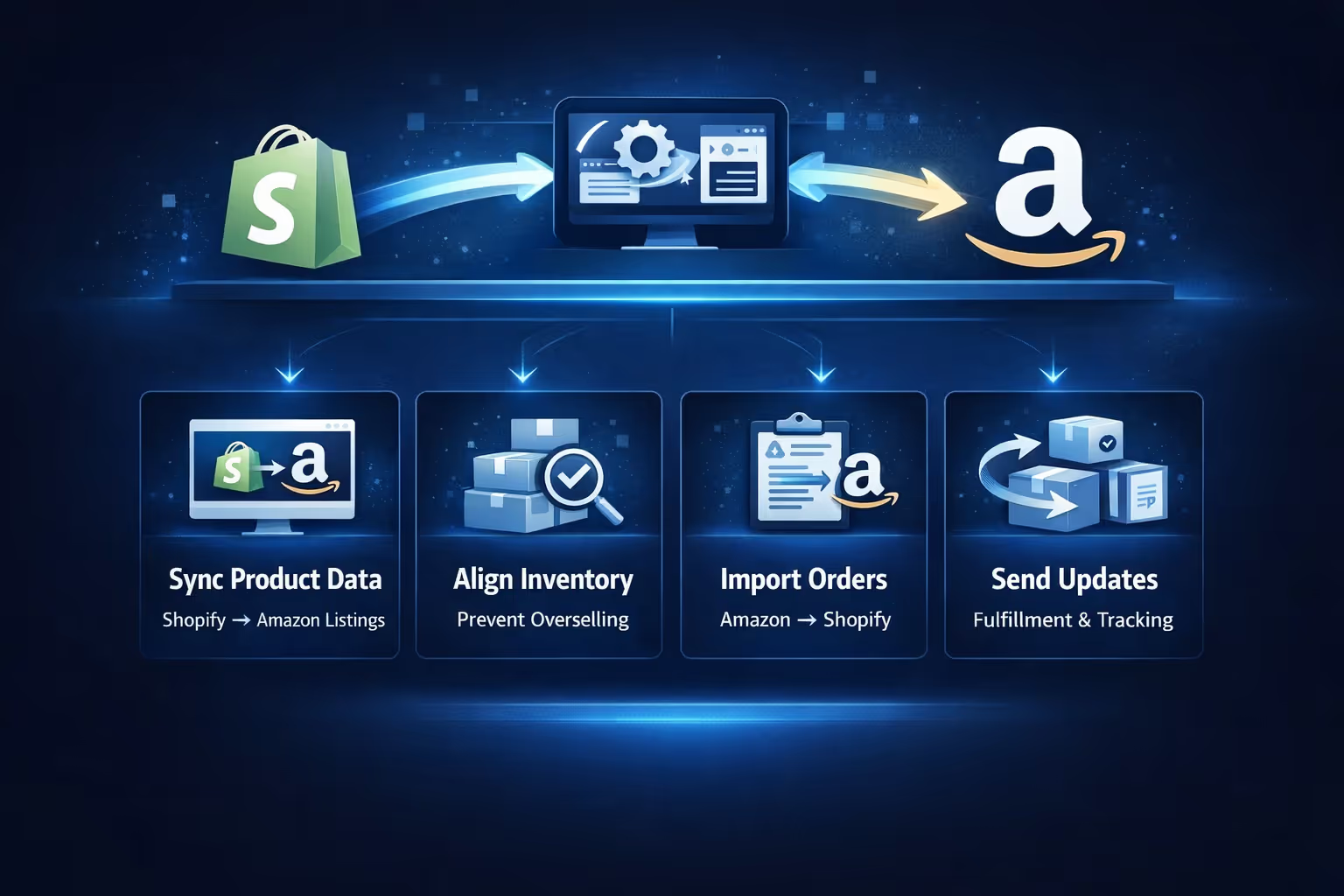
Before touching any tools or settings, it helps to be clear about terminology. There is no direct, built-in Amazon button inside Shopify anymore. That option was discontinued, and pretending otherwise leads to confusion fast.
Connecting Shopify to Amazon now means using a supported third-party integration app that acts as a bridge between the two platforms. That bridge handles a few specific jobs:
It does not merge the platforms. Amazon remains Amazon. Shopify remains Shopify. Each has its own rules, fees, and account health requirements.
Understanding this separation is important, because most problems come from expecting the integration to behave like a single unified store. It never does.
A smooth setup starts before any app is installed. Skipping these checks usually means backtracking later, often after listings are already live.
You need an active Shopify store with products that are actually ready to sell. That means finalized titles, images, pricing, variants, and inventory counts. Half-finished product pages cause mapping issues once Amazon enters the picture, and those issues compound quickly when syncing begins.
An Amazon Professional Seller account is required. Personal seller accounts do not support the tools needed for proper integration. The monthly fee is unavoidable, but it unlocks bulk listing tools, inventory syncing, and reporting features that make managing Amazon through Shopify realistic.
Your product identifiers must be in order. Amazon relies on UPCs, EANs, or GTINs to match products to its catalog. If you are selling branded products, identifiers need to be legitimate and consistent across all listings. Using recycled or unofficial codes is one of the fastest ways to trigger listing removals or account warnings.
Your currency and region settings must align. If your Shopify store sells in USD, your Amazon marketplace must also support USD. Mismatches here can silently block listings, payments, or order imports without obvious error messages.
Finally, review Amazon’s category approval rules. Some categories require prior approval, and attempting to list without it can stall the entire process. It is much easier to resolve approvals before syncing products than after listings start failing.
Since there is no native Amazon channel anymore, the app you choose matters more than most sellers expect. All apps promise syncing, but they differ in how much control they give you.
At a minimum, the app should support:
More advanced apps allow pricing rules, inventory buffers, attribute mapping, and selective syncing. These features become important once you scale beyond a handful of products.
One practical rule: avoid apps that try to automate everything by default. Amazon is strict, and automation without oversight is risky. The best setups give you control first, automation second.
Many guides jump straight into listing steps, but store preparation deserves attention. Amazon customers may never see your Shopify storefront, but Amazon still evaluates seller quality indirectly.
Start by reviewing product content. Amazon has its own formatting rules, and overly promotional copy or unsupported claims can get listings suppressed. Clean, factual descriptions convert better and cause fewer issues.
Images matter too. Shopify allows creative freedom. Amazon does not. Make sure your main images meet Amazon’s background and resolution requirements before syncing anything.
Inventory accuracy is critical. If Shopify shows ten units and Amazon shows five, overselling is only a matter of time. Set realistic stock levels and consider using inventory buffers so Amazon never sees your last few units.
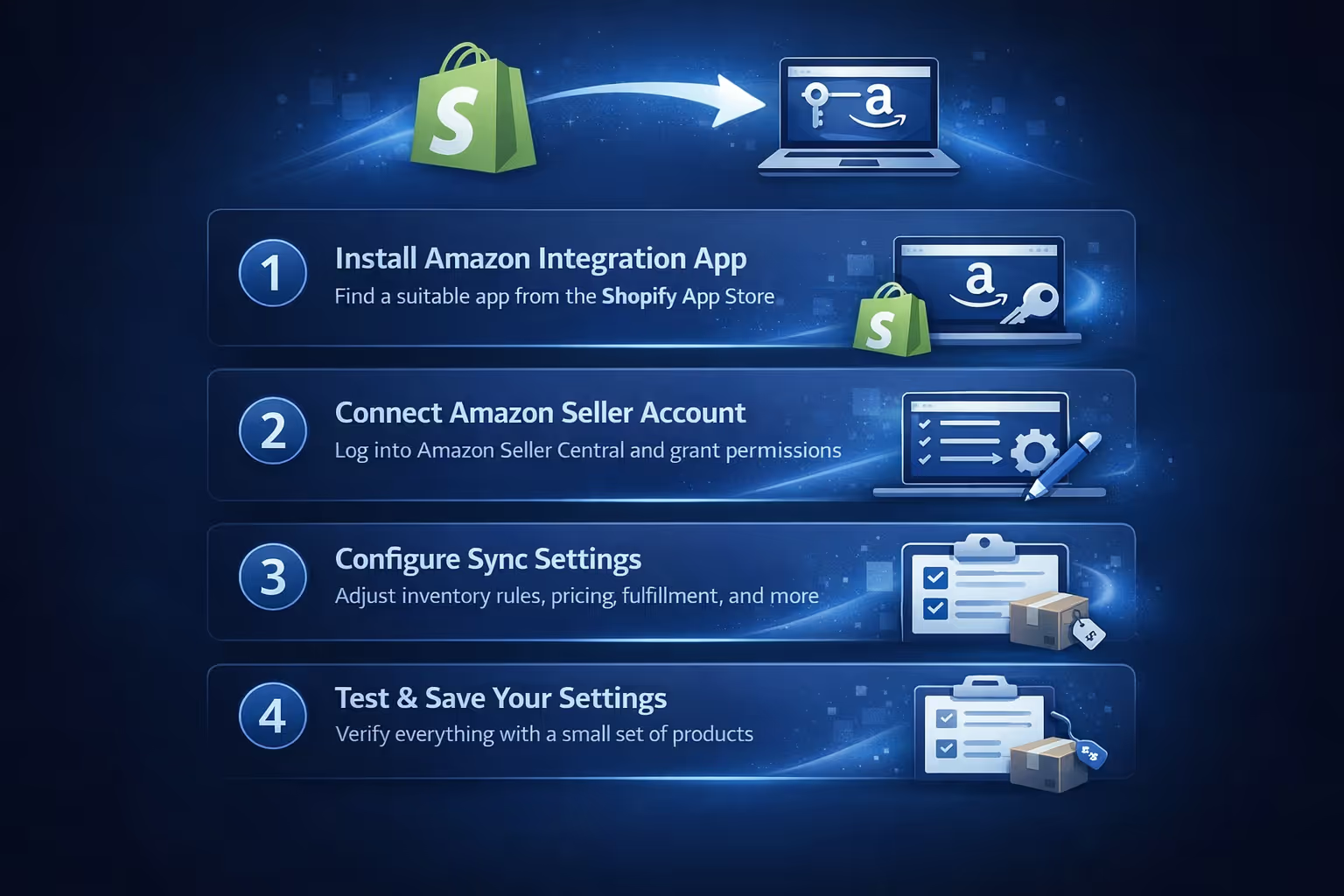
Once the groundwork is done, the technical connection begins inside your Shopify admin.
Take your time here. These settings affect every product you sync later. A rushed configuration is the number one cause of surprise pricing changes or missing orders.
At this stage, you decide how your products appear on Amazon.
If you are new to Amazon, you will create new listings based on your Shopify products. This requires mapping Shopify attributes to Amazon’s required fields. Categories, product types, and identifiers must match exactly.
If you already sell on Amazon, you can link existing listings to Shopify products. This process matches ASINs or SKUs so inventory and orders sync correctly.
Do not bulk link without reviewing matches. A single incorrect mapping can attach the wrong inventory to the wrong listing, and fixing it later is tedious.
Take a few products, test the process, confirm syncing behavior, and only then scale up.
Inventory syncing sounds simple but is often misunderstood.
Most integration apps treat Shopify as the source of truth. When an item sells on Amazon, the app reduces inventory in Shopify, which then updates Amazon again. This loop works well until edge cases appear.
Common causes of sync issues include:
The safest approach is consistency. Manage inventory in one place, avoid manual overrides, and review sync logs regularly. If something looks off, pause listings before customers notice.
When configured correctly, Amazon orders flow into Shopify like any other order. They appear with clear channel labels and include customer and shipping information.
What changes is fulfillment responsibility.
If you use Fulfilled by Amazon, the order is sent to Amazon automatically, and Amazon handles packing, shipping, and delivery. Shopify receives status updates but does not touch the shipment.
If you fulfill orders yourself, Shopify becomes the control center. You generate labels, ship the order, and confirm fulfillment. The integration app sends tracking details back to Amazon to keep your metrics healthy.
Accuracy matters here. Late confirmations or missing tracking numbers hurt Amazon account performance.
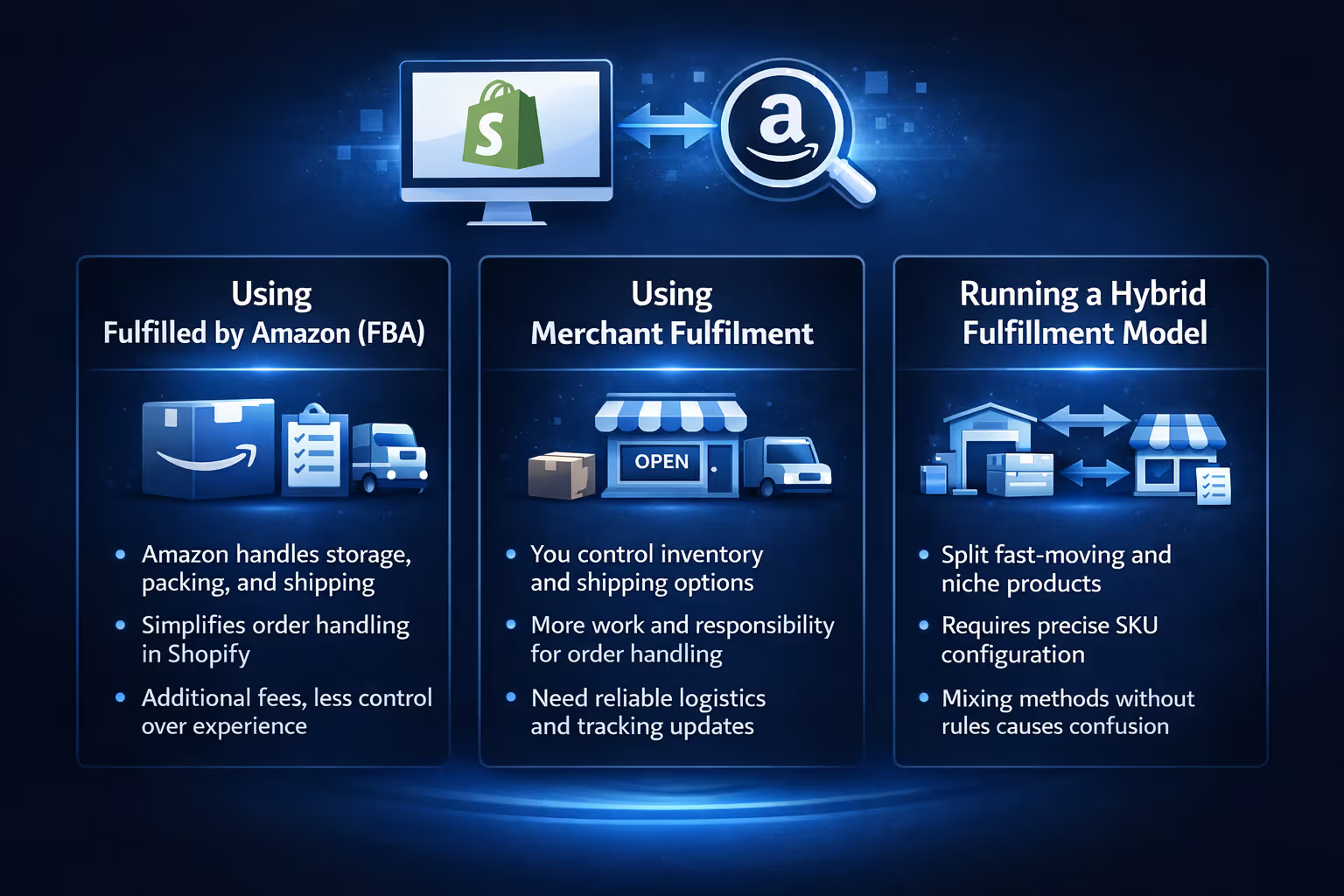
Choosing between FBA and merchant fulfillment is not just a logistics decision. It affects how smooth the integration feels day to day.
FBA reduces operational load by handing storage, packing, shipping, and delivery to Amazon. It simplifies order handling inside Shopify, but it comes with additional fees and less flexibility over customer experience and inventory placement.
Merchant fulfillment gives you more control over inventory, branding, and shipping decisions. The tradeoff is responsibility. You need disciplined order handling, reliable carriers, and consistent tracking updates to meet Amazon’s performance expectations.
Many sellers use a hybrid approach, sending fast-moving items to FBA while fulfilling niche or custom products themselves. Most integration apps support this setup, but each SKU must be configured correctly. Mixing fulfillment methods without clear rules is a recipe for confusion.
Once listings are live and orders flow, the work shifts to monitoring.
Amazon provides its own dashboards for sales, account health, and customer feedback. Shopify offers order, inventory, and revenue reports. The integration app sits in between, showing sync status and errors.
Review all three regularly. Problems rarely show up in only one place.
Watch for inventory mismatches, listing errors, delayed order imports, and customer messages that require fast responses. Amazon buyers expect speed, even if the order originated elsewhere.

At Extuitive, we come into the picture after the technical side is handled. Once Shopify is connected to Amazon and listings are ready to scale, the real question becomes what to promote, how to position it, and which messages are worth paying to put in front of new buyers. That is where guesswork usually creeps back in.
We built Extuitive to remove that uncertainty at the creative and messaging level. Instead of burning budget testing ads live, we let brands generate and validate ad concepts using AI agents modeled on more than 150,000 real consumer profiles. That means product imagery, copy, and positioning can be tested against predicted purchase intent before a single dollar is spent on Amazon or Shopify ads.
For sellers running both platforms, this often translates into faster launches and fewer false starts. Ads that resonate on Shopify tend to carry over more cleanly to Amazon, and vice versa, because the core messaging has already been validated. We do not replace ad platforms or manage integrations. We help make sure the ads you launch after connecting Shopify to Amazon are built with confidence, not trial and error.
Most integration problems are avoidable. The same mistakes appear again and again.
Slow, deliberate setup always beats quick fixes.
For most sellers, yes. But only if expectations are realistic.
The connection does not eliminate work. It shifts it. You trade single-channel simplicity for reach and resilience. If one platform slows down or changes rules, the other keeps revenue moving.
Sellers who benefit most treat Shopify as their operational backbone and Amazon as a powerful distribution channel. They respect Amazon’s rules, invest in clean data, and review their setup regularly.
Those who expect a one-click solution usually burn out fast.
Connecting Shopify to Amazon is less about technical steps and more about mindset. It works best when approached as a system, not a shortcut.
When done right, it gives you reach without losing control. When done carelessly, it creates noise, errors, and stress.
Take the time to set it up properly. Test before scaling. Keep ownership of your data and inventory logic. The headaches people complain about are not inevitable. They are usually the result of skipping steps that seemed optional at the time.
If you treat the connection as part of your core infrastructure, not a quick add-on, it becomes one of the most stable ways to grow an ecommerce business today.


