Best Dropshipping Courses Worth Exploring This Year
Explore a curated list of dropshipping courses in 2026. Compare options, formats, and styles to find what fits your learning pace.
Apr 15, 2026



Setting up an online store sounds like something you’d need a computer for, right? Well, think again. With Shopify’s mobile app, you can build, customize, and manage your store entirely from your phone. Whether you’re on the go or just prefer using your mobile device, it’s easier than you might think. Let’s break down how you can get your Shopify store up and running from your phone.
Shopify didn’t treat mobile as an afterthought. The platform has spent years adapting to the reality that many merchants don’t work from a desk. Some are running stores between shifts. Others travel. Many simply prefer using their phone.
The Shopify mobile app is designed as a full management tool, not just a stats viewer. You can create a store from scratch, add products, manage inventory, process orders, handle customer messages, and track performance. For a surprising number of use cases, that’s enough.
What makes Shopify different from older ecommerce platforms is that the core system already handles hosting, checkout, security, and payments. You’re not building a site piece by piece. You’re configuring a system. That structure translates well to mobile.
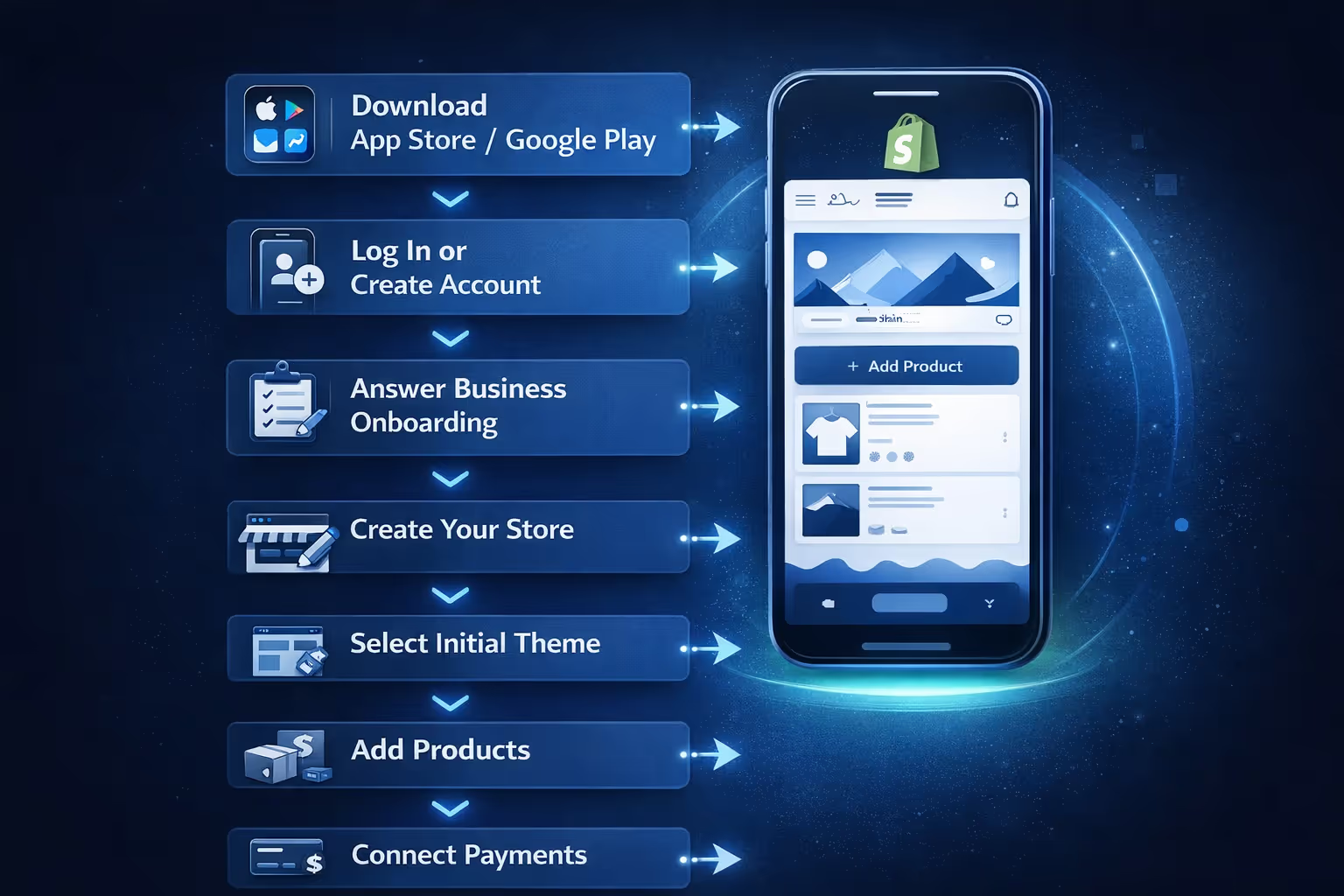
If you’ve never used Shopify before, the mobile setup process is straightforward and intentionally guided. The app walks you through the essentials without assuming prior experience or technical knowledge.
Here’s what the process looks like in practice:
Once these steps are complete, your store is live. You’re not working in a preview or a restricted mode. You’re inside the same Shopify backend desktop users access, just adapted for a smaller screen.
This is usually the moment people pause and realize something important. The store you’ve created on your phone isn’t temporary or limited. It’s a fully functional Shopify store, ready to accept orders the moment you decide to open it to customers.
Product creation is one of the strongest parts of the mobile experience.
You can add product titles, descriptions, images, pricing, variants, inventory tracking, and shipping details directly from your phone. Taking photos and uploading them is often faster on mobile than desktop, especially for print-on-demand products or physical items you already have.
Editing product descriptions on a phone keyboard isn’t ideal for long-form copy, but it’s completely workable. Many merchants start with simple descriptions and refine them later.
For stores with a small product catalog, phone-based product setup feels efficient. For large catalogs or complex variant structures, it becomes more time-consuming but still possible.
Once your store is live, the real question is how much of it you can realistically manage from a phone. Shopify’s mobile app covers more ground than most people expect, but it’s not identical to working on a computer. Some tasks feel smooth and even easier on mobile, while others take more patience or benefit from a larger screen. Understanding where mobile works well and where it slows you down helps you avoid frustration and plan your workflow more realistically.
This is where expectations need to be managed.
You can create collections, assign products, and control whether they’re automated or manual. You can also manage menus and basic navigation from the app.
However, fine-grained navigation design takes longer on mobile. Creating multiple menus, nested links, or carefully structured category pages is doable but slower and easier to mess up with a small screen.
If your store structure is simple, such as a few collections and a basic menu, mobile works well. If your store relies heavily on detailed navigation logic, desktop will eventually feel more comfortable.
Shopify themes are customizable, but not equally so on mobile.
From your phone, you can change themes, edit colors, update logos, swap fonts, and adjust basic layout sections. You can edit homepage sections, rearrange blocks, and update images and text.
What you can’t do easily on mobile is detailed layout tweaking. Things like spacing adjustments, advanced section logic, or heavy visual experimentation are simply harder to manage on a small screen.
This doesn’t mean you can’t make your store look good. Many successful stores rely on clean, simple themes that require minimal tweaking. But if design is central to your brand, you’ll likely want to revisit it later on desktop.
Setting up payments on mobile is straightforward.
You can activate Shopify Payments, connect PayPal, Apple Pay, and other providers directly from the app. Identity verification, banking details, and payout tracking all work fine on phone.
Shipping setup is also fully supported. You can create shipping zones, set rates, and manage fulfillment settings. Tax configuration is available as well, though complex tax scenarios may require more attention and patience on mobile.
The key point is this: all operational essentials are accessible. There’s no artificial lock that forces you to switch to desktop just to get paid.
This is where mobile shines.
Order notifications, fulfillment updates, refunds, and customer messages are easy to handle on the go. The app is designed around daily operations, not just setup.
You can see order timelines, print shipping labels (with compatible printers), issue refunds, and contact customers directly. For many store owners, this becomes the primary way they run the business once the store is live.
If your goal is to monitor and maintain a store, mobile is not a compromise. It’s often more convenient than desktop.
Shopify’s built-in marketing tools are available on mobile, including discount creation, basic email campaigns, and social integrations.
You can create discount codes, run promotions, and share products directly to social platforms. Shopify Email campaigns can be drafted and sent from the app, although writing long campaigns is easier on desktop.
SEO settings for products and pages are accessible, including meta titles and descriptions. You won’t have the same overview as desktop, but the functionality is there.
For early-stage stores, this level of marketing control is usually enough.
You can browse and install apps from the Shopify App Store on your phone, but managing them is less comfortable than on desktop.
Installing an app is easy. Configuring it depends on the app itself. Some third-party apps are mobile-friendly, others assume desktop use.
If your store relies heavily on advanced apps, you may eventually need desktop access. But for basic functionality, mobile works.
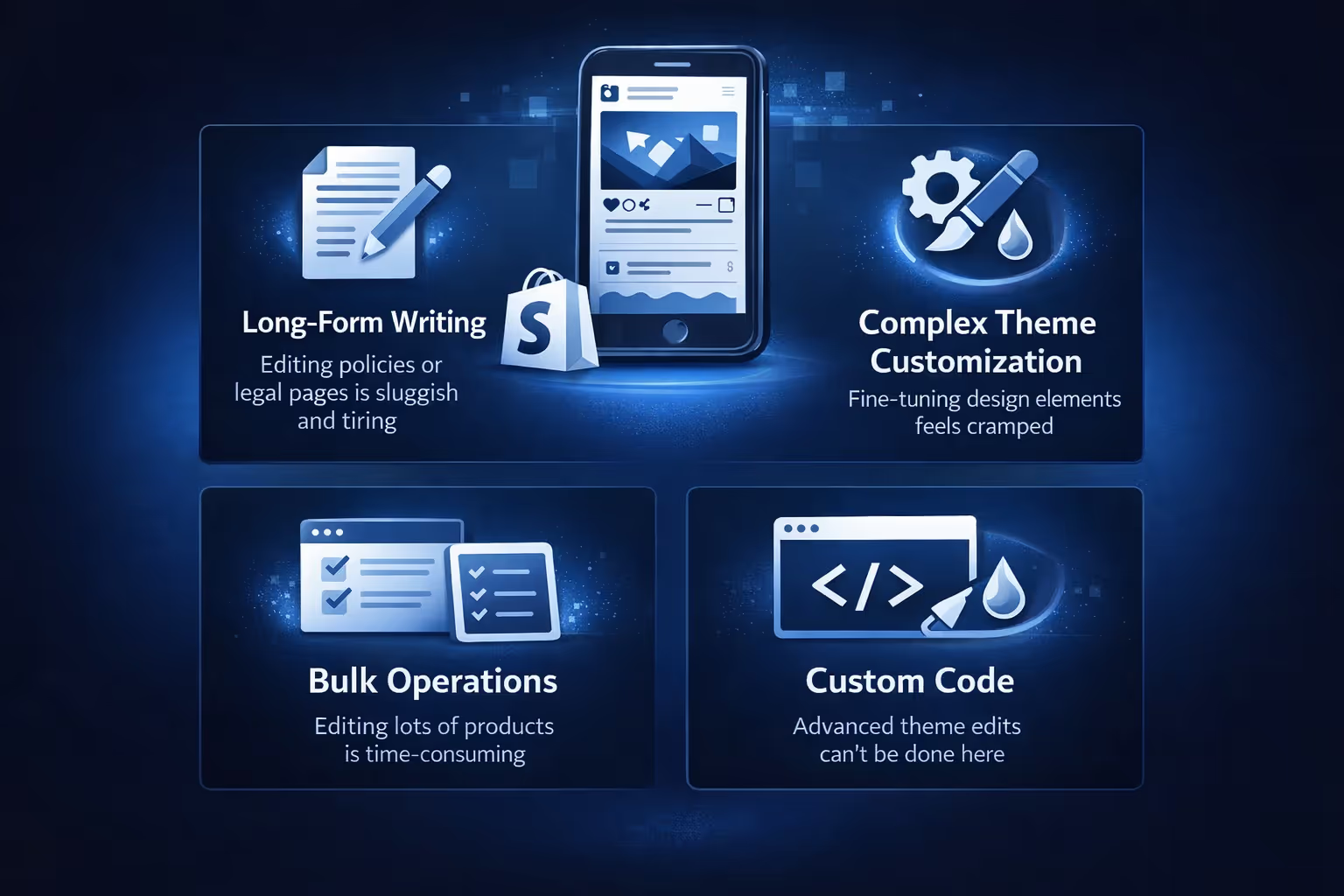
Being honest about limitations matters. Mobile setup works, but it has clear boundaries that are worth knowing upfront.
None of these limits make mobile unusable. They simply define where a phone works best and where switching to desktop saves time and frustration.
For some sellers, the answer is genuinely yes. If you run a small to medium-sized store, sell a focused range of products, and rely mostly on Shopify’s built-in tools, a phone can handle the day-to-day work just fine. Orders, payments, customer messages, inventory updates, and basic marketing can all be managed from the mobile app without much friction.
That said, most long-term store owners don’t treat it as an all-or-nothing choice. Many use their phone as the primary control center and only open a laptop when something truly calls for it, like deeper design changes or larger updates. Others start entirely on mobile, prove the business works, and then shift parts of their workflow to desktop later. Shopify is built to support both approaches, which is what makes the mobile-first option realistic rather than limiting.
Some store owners confuse the Shopify admin app with having a shopping app for customers. These are not the same thing.
The Shopify app is for you, the merchant. Customers still shop through your website unless you build a separate mobile app.
Turning your Shopify store into a customer-facing mobile app is a different decision entirely. It involves wrappers, app builders, or custom development, and it only makes sense once you have enough traffic and repeat buyers.
For launching a store, a mobile-optimized website is usually more than enough.

Launching a Shopify store from your phone is about speed and momentum. That’s exactly where we come in.
At Extuitive, we help Shopify brands create, validate, and launch high-performing ads in minutes, not weeks. Once your store is live, even if it started on mobile, you can connect it to our platform using your store URL and immediately begin generating ad creatives and messaging tailored to your actual audience. No guesswork, no long research cycles, and no need to burn budget just to see what might work.
Our AI agents are modeled after more than 150,000 real consumer personas. We use them to test ad concepts, visuals, and copy before you spend a dollar on media. That means you can see which ads are likely to convert, which messages resonate, and which audiences respond best, all before launch. For Shopify store owners who move fast and iterate often, this removes one of the biggest bottlenecks in early growth.
We’re built for teams that don’t want complexity. You don’t need to be an AI expert or a seasoned marketer. With a few clicks, we generate ad creatives, validate them against real consumer simulations, and help you launch campaigns with confidence. It’s especially useful when you’ve just launched a store and want traction quickly, without trial-and-error ad spend slowing you down.
If you’re starting your Shopify journey on mobile and want your marketing to keep pace with that speed, Extuitive is designed to meet you exactly where you are.
This way, it’s clear that mobile setup isn’t a one-size-fits-all solution. It works best as a fast, flexible starting point, not necessarily as the final setup for every store.
Many successful store owners follow a simple, repeatable pattern when they start on Shopify, especially if they’re using a phone. They don’t aim for a perfect store on day one. Instead, they focus on getting something real online as quickly as possible. Products come first, followed by payments, shipping, and a basic brand look that feels clear and trustworthy. Once those pieces are in place, they start selling and learning from real customer behavior.
Only after the store proves it can attract orders do they slow down and refine things. That’s when design tweaks, better product descriptions, improved navigation, and deeper content start to matter. Some of that work still happens on mobile, but many owners choose to switch to a desktop for those more detailed tasks. This approach fits naturally with how Shopify is built. The platform makes it easy to launch fast and improve over time, rewarding momentum and real-world testing rather than waiting for everything to be polished upfront.
Yes, with the right expectations.
You can make a Shopify store on your phone. You can launch it, run it, and even grow it. You won’t get the same level of comfort or precision as desktop for everything, but you also won’t be blocked from selling.
For many people, mobile setup removes friction. It makes starting feel possible instead of intimidating. And that matters more than having a perfectly polished store on day one.
If your phone is what you have, Shopify meets you there.


