Top Facebook Ads Agencies in New York Worth Your Attention
Looking for Facebook ads agencies in New York? Here’s a curated list of top NYC agencies brands trust for Meta advertising results.
Mar 24, 2026



If you’ve ever logged into Shopify and been asked for a six-digit code after entering your password, you’ve already encountered Shopify authentication in action. It can feel slightly inconvenient at first, but there’s a good reason it exists.
The Shopify authentication app is part of Shopify’s two-step authentication system. It’s designed to protect your store from unauthorized access, even if someone gets hold of your password. Instead of relying on a single login credential, Shopify asks for a second confirmation generated on a device you control.
In this article, we’ll break down what the Shopify authentication app actually is, how it works behind the scenes, and why Shopify doesn’t offer a single “official” app of its own. No security jargon, no scare tactics. Just a clear explanation of how it fits into running a Shopify store safely.
Let’s clear up one common point of confusion right away.
Shopify does not have a single, official authentication app that you download from the App Store or Google Play. When people say “Shopify authentication app,” they are usually referring to third-party authenticator apps that work with Shopify’s two-step authentication system.
Shopify supports standard time-based authentication apps that generate short-lived security codes. These apps live on your phone or device and create a new code every 30 seconds. During login, Shopify checks that code in addition to your password.
This setup follows a widely used security standard called TOTP, which is why Shopify can support multiple apps instead of forcing everyone into one proprietary solution.
In practical terms, the Shopify authentication app is not a Shopify product. It is a security method that Shopify integrates with.
Passwords used to be the default way to protect accounts. They are still important, but on their own, they are no longer reliable.
Here is why.
Passwords get reused across services. They are phished through fake emails. They leak through unrelated data breaches. Sometimes they are simply guessed or shared by mistake.
If someone gets access to your Shopify password, they get full entry to your store admin. That includes orders, payouts, customer data, apps, and sometimes even domain settings.
Two-step authentication changes that equation.
Even if a password is compromised, the attacker still needs access to a second factor. That second factor is the authentication app on your device. Without it, the login stops.
This is the core reason Shopify strongly encourages authentication apps for store owners and staff.
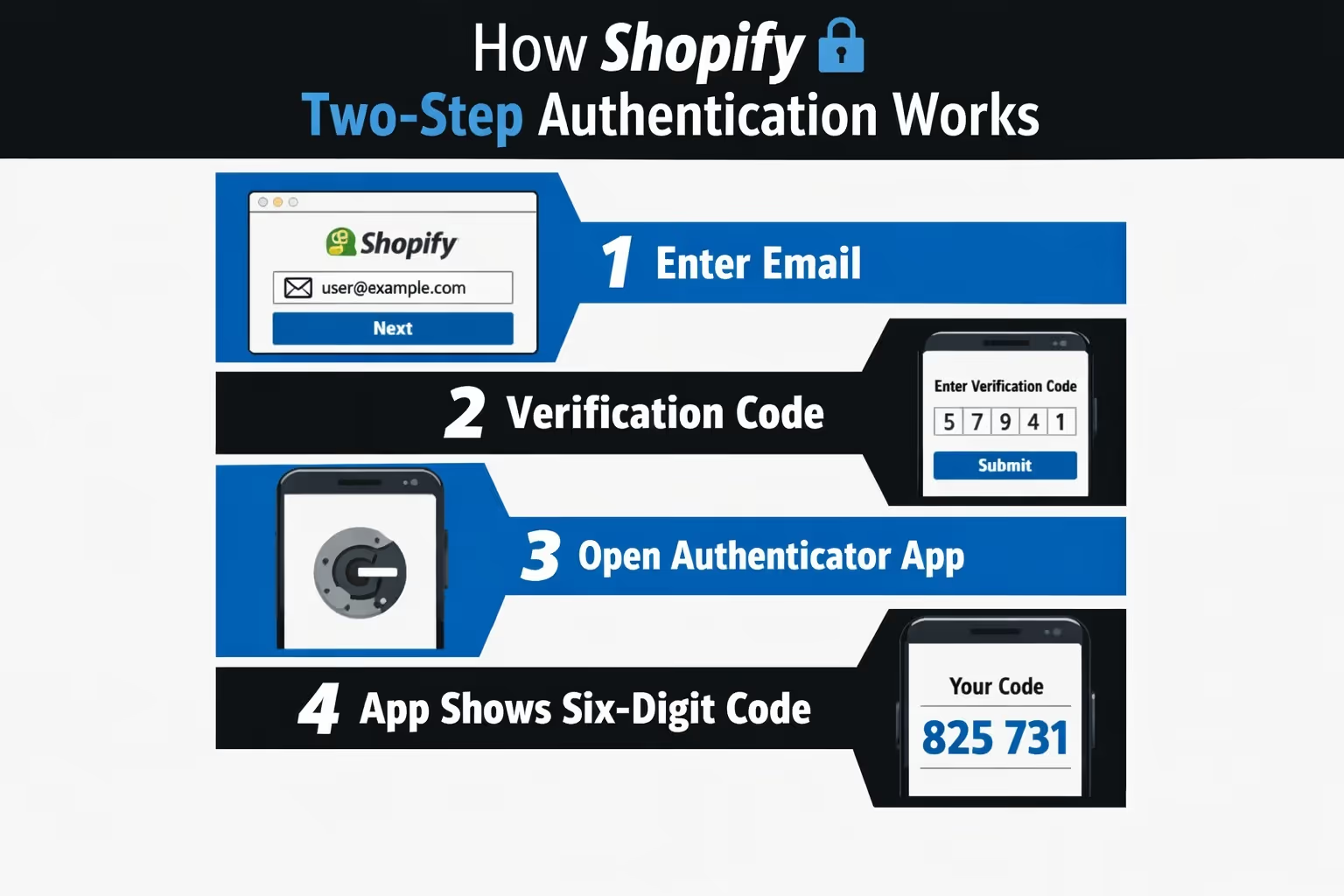
Shopify’s authentication system is straightforward by design. It adds friction where it matters, but avoids unnecessary complexity.
Here is what happens during a typical login when two-step authentication is enabled:
The key detail is that the code is generated locally on your device. It does not require an internet connection once set up. Shopify and your app are synchronized through a shared secret created during setup.
That shared secret never appears again. Shopify shows it once, during setup, usually as a QR code.
Because Shopify uses a standard authentication method, it supports several well-known apps instead of locking merchants into one option.
Commonly supported authenticator apps include:
All of these apps do the same basic job. They generate time-based codes linked to your Shopify account.
The differences are mostly about convenience. Some apps support cloud backups or multi-device syncing. Others keep everything local to one phone. Shopify does not require one over another.
This flexibility matters, especially for teams and long-term store owners.
The setup process is intentionally simple, but it is also a one-time moment where mistakes can cause future problems if you rush.
Here is the high-level flow:
After that, Shopify generates recovery codes.
Those recovery codes are not optional. They are your fallback if you lose access to your phone. Ignoring them is one of the most common mistakes store owners make.
Recovery codes are easy to ignore because they feel like something you will never need. Until the day you do. Phones get lost, apps get deleted, devices break, and sometimes people simply forget to move their authenticator app when switching to a new phone.
When that happens and recovery codes are missing, getting back into a Shopify account can turn into a slow and stressful process. That is why Shopify strongly recommends saving recovery codes in more than one secure place. Many store owners keep them in a password manager, alongside other sensitive credentials. Others save an encrypted copy locally or store them in secure cloud storage. Some even keep a printed copy offline, separate from their devices.
Recovery codes are not a backup feature you hope never to touch. They are a last-resort access key. Each one works only once and bypasses the authentication app entirely. Treat them with the same care you would give to physical keys, not as an optional extra.
Shopify also allows SMS-based authentication. It sends a code to your phone via text message.
While SMS is better than nothing, it is weaker than an authenticator app.
SMS codes can be intercepted through SIM swapping. They rely on mobile network availability. They can fail while traveling or roaming.
Authenticator apps generate codes offline and cannot be intercepted remotely. This is why Shopify recommends them as the primary method and suggests SMS only as a backup.
If security matters to you, the authenticator app should always be your first choice.
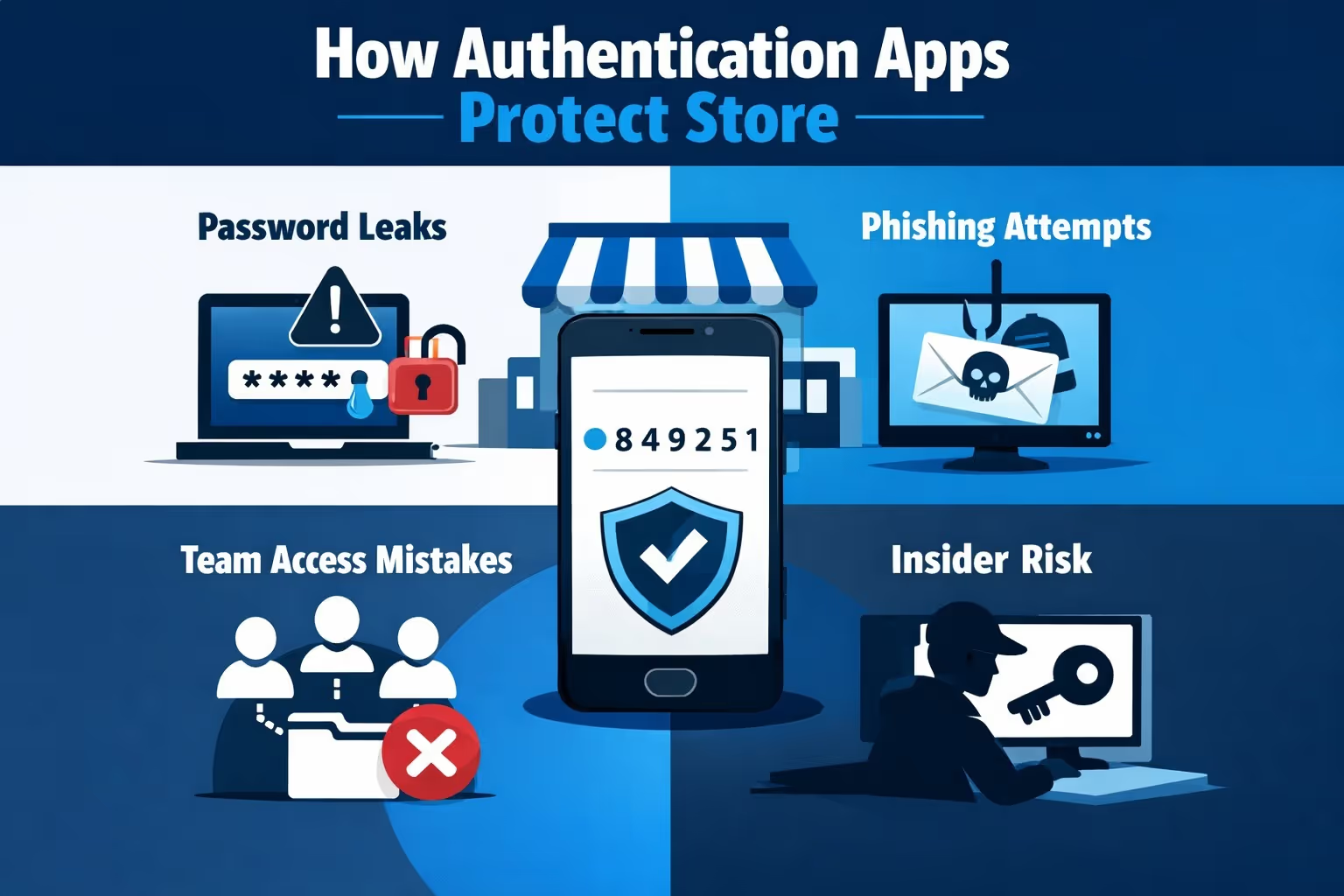
It is easy to talk about security in abstract terms. What matters more is how this actually helps in real situations.
Here are a few common scenarios where authentication apps make a difference.
If your password appears in a breach from another service, attackers may try it on Shopify. Without two-step authentication, that attempt could succeed.
With an authentication app enabled, the login fails immediately.
Even careful users sometimes fall for convincing phishing emails. An attacker may get your password, but they still cannot complete the login without the second factor.
If a staff account password is reused or shared improperly, two-step authentication limits the damage.
Authentication apps also protect against accidental or unauthorized access from inside a team, especially in stores with multiple admins.
In all of these cases, the authentication app does not prevent mistakes. It limits how far those mistakes can go.
Shopify authentication is not only relevant for store owners. Any staff member with admin access should have their own individual account and their own authentication setup. Sharing logins might seem convenient, but it completely undermines basic security controls and makes accountability impossible.
For teams, individual authentication matters in very practical ways. Access can be removed immediately when someone leaves the company, without disrupting anyone else. Login activity is tied to specific users, which makes it easier to trace changes and spot unusual behavior. Most importantly, if one account is compromised, it does not automatically expose the entire store.
If you manage a Shopify team, requiring two-step authentication for all admin users is one of the simplest and most effective security measures you can put in place.
Issues with authenticator apps do happen from time to time. Codes may stop syncing, apps can glitch, or logins suddenly fail without an obvious reason. In most cases, the cause is surprisingly simple.
Authenticator apps depend on accurate time settings. If your phone’s clock is out of sync, even by a small margin, the generated codes will not match what Shopify expects. Setting the device time to automatic usually fixes the issue. Keeping the authenticator app up to date also helps prevent compatibility problems. If those steps do not work, disabling two-step authentication and setting it up again by re-scanning the QR code often resolves the problem.
In situations where access is completely lost, recovery codes remain the fastest and most reliable way to regain entry to your Shopify account.
Once two-step authentication is enabled, it is easy to forget about it until something goes wrong. The goal is to treat it like a seatbelt: not a dramatic security project, just a normal habit that keeps you out of trouble. A few simple routines make the whole setup reliable, especially if you run a store with staff access or switch devices often.
Security works best when it becomes part of routine operations, not a one-time setup task.
Some platforms build their own authenticator apps. Shopify chose not to.
That decision gives merchants flexibility. You can choose an app that fits your workflow, your device ecosystem, and your backup preferences.
It also avoids vendor lock-in. If you stop using Shopify, your authenticator app still works elsewhere.
This approach aligns with Shopify’s broader philosophy of integrating with existing tools rather than forcing proprietary solutions.

If you are already running Shopify the right way and taking access seriously, the next bottleneck usually shows up somewhere else. Ads. More specifically, wasted spend on creatives and audiences that never convert.
That is exactly the problem we built Extuitive to solve. We help Shopify brands predict how ads will perform before they go live. Instead of launching campaigns, waiting days or weeks, and then killing underperformers, our platform forecasts real-world ad performance upfront using AI models trained and validated on live campaign data. The goal is simple: stop testing losers and focus your budget on ads that actually have a chance to win.
With Extuitive, we do not just score creatives in isolation. We look at performance in context. You can see predicted CTR and ROAS compared to your own historical averages and best-performing ads, so decisions are grounded in your data, not generic benchmarks. That makes it much easier to decide what to scale and what to drop before money leaves your account.
Audience selection is another area where teams often guess. We use AI-driven insights to help you identify which audiences are most likely to convert, so you are not blindly pushing ads into broad segments and hoping for the best. And because testing one creative at a time does not scale, we built Extuitive to analyze large volumes of ads at once, making it realistic to evaluate dozens or hundreds of variations before launch.
If you are already operating Shopify securely and professionally, Extuitive fits naturally into that mindset. You lock down access. You control risk. And when it comes to growth, you rely on prediction instead of trial and error.
The Shopify authentication app is not a flashy feature. It does not increase conversion rates or improve checkout design. But it quietly protects the foundation your store runs on.
It turns a single point of failure into a layered system. It limits damage when mistakes happen. And it gives store owners more control over who can access what, and when.
If you run a Shopify store and have not enabled an authentication app yet, you are leaving an important door unlocked. The setup takes minutes. The protection lasts as long as your business does.
And in an environment where access equals control, that extra step is worth it.


