Marketing Ideas for Motorcycle Business: 2026 Guide
Discover proven marketing ideas for motorcycle businesses in 2026. From digital campaigns to community events, learn strategies that drive sales and loyalty.
Jun 8, 2026



If you ask ten people how much a Shopify website costs, you’ll probably get ten different answers. Some will say it’s cheap and you can launch for almost nothing. Others will warn you that it quickly turns into a money pit. The truth sits somewhere in between.
A Shopify site can cost very little or quite a lot, depending on how you build it, what you need it to do, and how fast you want to grow. Monthly plans are only part of the picture. Themes, apps, custom work, and ongoing expenses all add up in ways that aren’t always obvious at the start.
This article breaks down the real costs of a Shopify website in a practical way. No scare tactics, no unrealistic promises. Just a clear look at what you’ll likely spend, why those costs exist, and how to think about your budget before you commit.
The cost of a Shopify website depends on three very concrete factors:
A small catalog store selling a handful of products can run cheaply for years. A fast-growing brand with subscriptions, international shipping, advanced analytics, and custom workflows will spend significantly more. Neither path is unusual.
Problems usually start when people plan for one scenario and accidentally drift into another.

Shopify’s subscription plans are the most visible part of the cost structure, and they are fairly stable going into 2026.
Once the introductory period ends, you move onto standard pricing. At this point, Shopify becomes a paid tool in the traditional sense. Every plan includes hosting, security, access to the Shopify admin, checkout and payment integration, core ecommerce functionality, and customer support. The differences are not about whether you can sell, but about how comfortably you can operate and scale as the business grows.
The Basic plan is designed for solo founders and small businesses that need a fully functional online store without extra complexity. It supports unlimited products, multichannel selling, and a reliable checkout, which makes it enough for many early-stage stores. The limitations mainly show up around staff access and advanced reporting, but for merchants who are still validating products or demand, this plan often covers everything that matters.
The Grow plan is aimed at stores that have moved past the one-person stage and need more flexibility behind the scenes. It allows additional staff access, offers more detailed reporting, and slightly improves transaction economics. The storefront itself does not change much, but day-to-day operations feel less tight, especially when sales volume increases or responsibilities are shared across a small team.
The Advanced plan targets stores operating at higher volume or across multiple markets. It focuses on deeper analytics, better performance handling during traffic spikes, and more control over international selling. This plan usually makes sense only once decisions become more data-driven and operational complexity starts to grow, which is why it tends to be unnecessary for smaller or newer stores.
Shopify Plus and enterprise-level plans sit outside the standard upgrade path and are built for large, established businesses. These plans offer extensive customization, advanced automation, and dedicated support, turning Shopify into a core commerce system rather than just a store platform. For most merchants, this level is not relevant early on and only becomes part of the conversation once scale demands it.
Every serious store should use a custom domain.
Most domains cost between $10 and $30 per year. Buying directly through Shopify is slightly more expensive than some registrars, but it simplifies setup and includes privacy protection.
This is not an area where saving a few dollars is worth the tradeoff. A clean domain improves trust immediately, especially for first-time visitors.
Design is where Shopify costs start to diverge quickly.
Free themes cost nothing upfront and are maintained by Shopify. They are reliable, fast, and perfectly usable for launching or validating a business idea.
The limitation is flexibility. Many stores share the same layouts, and deeper customization usually requires code changes.
Premium themes typically cost between $140 and $400 as a one-time purchase.
For most growing stores, this is the sweet spot. Premium themes offer better layout options, built-in features, and more control without requiring custom development. Many app subscriptions can be avoided simply by choosing a stronger theme upfront.
Custom theme development ranges from a few thousand dollars to six figures for enterprise brands.
Custom themes make sense when branding, conversion optimization, or unique workflows are central to the business. What often gets overlooked is maintenance. Once a theme is customized at the code level, automatic updates stop. Ongoing upkeep becomes your responsibility.
A realistic rule of thumb is to reserve 15 to 25 percent of the original build cost each year for maintenance and updates.
Almost every Shopify store relies on apps.
Common app categories include:
Many apps start free or low-cost, then scale pricing based on usage. A store that begins with $20 per month in apps can easily reach $150 to $300 per month as order volume increases.
For most small to mid-sized stores, a realistic app budget in 2026 is $50 to $200 per month. Enterprise stores often spend far more, sometimes more on apps than on the Shopify plan itself.
Regular app audits are one of the easiest ways to control costs.

Transaction fees are one of the most misunderstood parts of Shopify pricing because they do not feel expensive at the beginning. When sales are low, the numbers look small. As revenue grows, these fees quietly become one of the largest ongoing costs.
Online card payments typically cost between 2.4% and 2.9% per transaction, plus a fixed fee per order. In-person payments through Shopify POS are usually slightly cheaper, which is one reason many retailers prefer POS for physical locations.
These fees apply to every order, regardless of your Shopify plan. The difference is that higher plans offer lower rates, which only starts to matter once order volume increases.
If you use third-party payment gateways instead of Shopify’s native payments, Shopify adds an additional platform fee on top of standard processing costs. The exact percentage depends on your plan, but even a small extra fee can add up quickly.
For stores doing steady volume, this often becomes a tipping point where switching payment providers or upgrading plans makes financial sense.
At higher revenue levels, transaction fees often surpass fixed costs like themes, apps, or even the Shopify subscription itself. A difference of half a percent may not sound meaningful, but on hundreds of thousands of dollars in annual sales, it translates into real money.
This is why payment fees should be part of long-term planning, not just an afterthought during setup. Choosing the right plan and payment setup early can prevent unnecessary costs later, especially once growth accelerates.
This is where Shopify costs diverge sharply.
If you are comfortable learning tools and solving problems as they come up, you can build a Shopify store yourself.
DIY costs usually include:
The hidden cost is time. Many store owners spend months refining a site before it is ready to sell consistently.
Professional setup and development reduce mistakes and speed up launch.
Typical 2026 ranges:
The real decision is not just cost, but opportunity. Launching earlier often offsets the upfront expense.
Product descriptions, imagery, videos, and brand copy all take effort.
You can create content yourself, use AI tools with editing, or hire professionals. Each approach works if quality stays high.
Rough cost ranges:
Weak content hurts conversion more than many technical issues. This is an area where modest investment often pays back quickly.
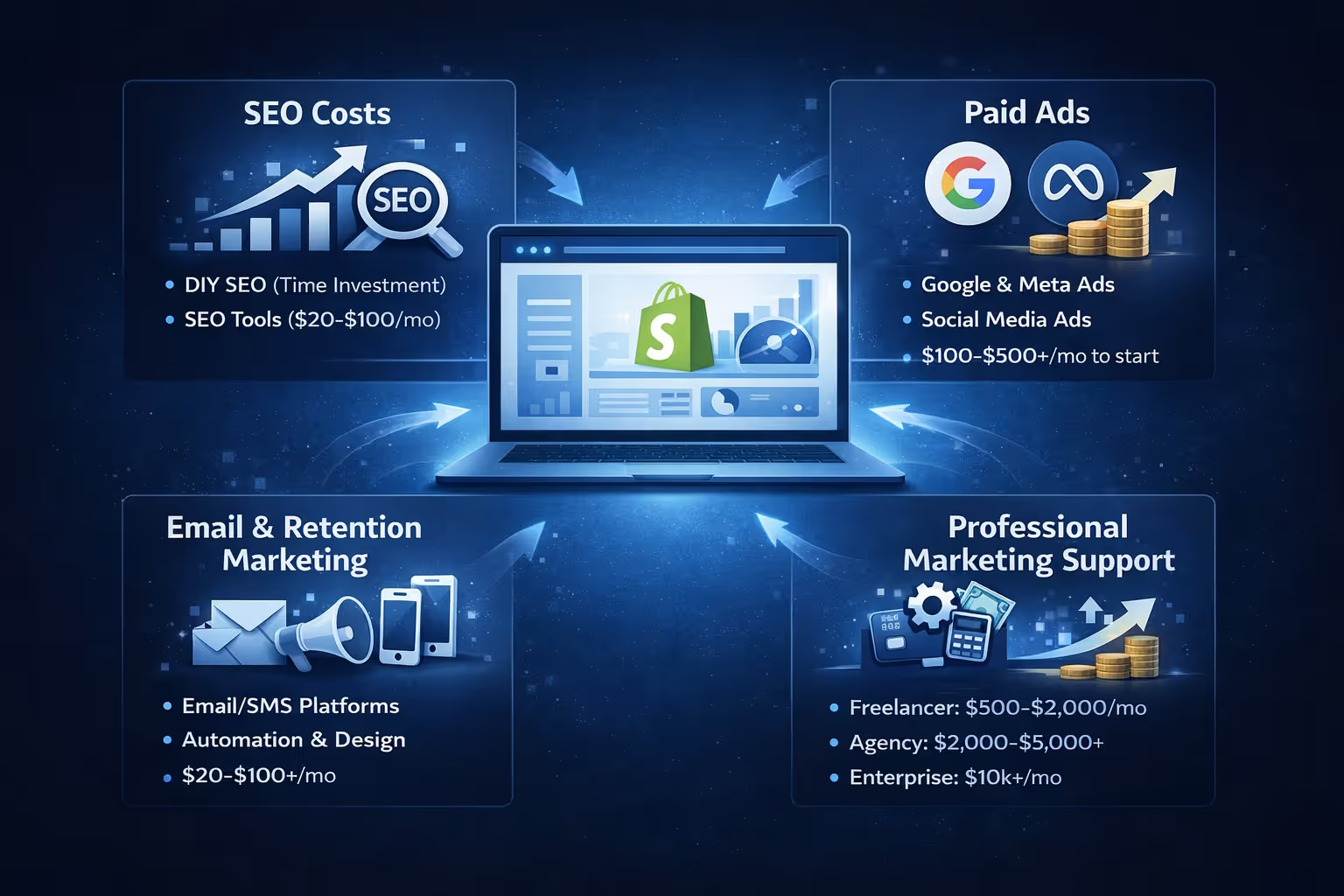
A Shopify store without traffic does not generate revenue. This sounds obvious, yet it is one of the most common blind spots in cost planning. Many merchants budget carefully for the website itself, then treat marketing as something to “figure out later.” In practice, marketing is not a later expense. It is a constant one.
SEO, paid ads, email marketing, and social media all require either money, time, or both. Even conservative strategies have ongoing costs, and those costs tend to grow as the store grows.
Search engine optimization is often described as “free traffic,” but that is only true if your time has no value.
DIY SEO usually involves:
You can do this without spending money, but it costs time and consistency. For many store owners, that time competes directly with product development, customer support, or operations.
Once tools enter the picture, costs rise modestly. Entry-level SEO tools typically add $20 to $100 per month, while more advanced platforms can cost more. The tradeoff is speed, better insights, and fewer blind spots.
Paid ads are often the fastest way to drive traffic, but also the easiest way to burn money.
Common channels include:
Entry-level ad testing usually starts around $100 to $500 per month. This level is enough to learn, but not enough to scale aggressively. As soon as ads start working, budgets tend to grow quickly.
The challenge is that paid ads require constant testing. New creatives, new audiences, and new offers all cost money to validate. Without discipline, ad spend can increase faster than revenue.
Email and SMS marketing are often more cost-effective than ads, but they are not free either.
Typical costs include:
For small stores, this might mean $20 to $100 per month. For larger brands with advanced segmentation and automation, it can reach hundreds or thousands per month.
Retention marketing does not replace acquisition, but it reduces pressure on paid ads by increasing the value of existing customers.
Hiring professionals shifts the cost from tools and time to expertise.
Monthly ranges in 2026 typically look like this:
The benefit is not just execution, but decision-making. Knowing what not to test often saves more money than any single campaign earns.
One of the most common patterns is delaying marketing until sales appear organically. Unfortunately, sales rarely appear without exposure.
Small, consistent testing budgets usually outperform large, sporadic spends. Even modest monthly budgets help you learn what converts, which channels matter, and where your margins actually hold.
Marketing should be treated as a controlled experiment, not a gamble. The earlier those experiments start, the cheaper the lessons tend to be.

Testing ads is one of the most expensive parts of growing a Shopify store. Too often, teams spend thousands learning which creatives and audiences fail. We built Extuitive to remove that guesswork by predicting ad performance before launch.
Our AI analyzes your creatives against real campaign data to forecast which ads are likely to win and which ones will waste budget. Instead of running endless tests, Shopify brands use our predictions to launch stronger ads, focus spend on what converts, and cut underperforming ideas early.
By improving targeting, CTR, and ROAS upfront, Extuitive helps turn paid marketing into a more controlled and scalable growth channel. When ads are an ongoing cost, knowing what will work before you spend becomes a real competitive advantage.
Shopify includes SSL certificates and strong platform-level security by default, which covers the basics for most stores. That said, many businesses choose to add extra layers of protection as they grow and start handling more data, orders, and customer information.
Additional costs often come from backup solutions, fraud prevention tools, and tax or compliance software. These services help protect against data loss, chargebacks, and regulatory issues that can become expensive if ignored.
In most cases, these tools add between $5 and $50 per month to operating costs. While they may seem optional early on, they often prevent far larger losses later and provide peace of mind as the store scales.
A live Shopify store still needs regular attention. Launching the site is only the beginning, and ongoing maintenance plays a big role in keeping everything running smoothly.
Maintenance usually involves updating themes and apps, fixing bugs as they appear, improving performance, and refreshing content over time. Some of this work is routine, while other tasks surface unexpectedly when the platform changes or new features are added.
For DIY stores, maintenance mainly costs time and focus. Stores that rely on professional support often work with monthly retainers that range from a few hundred to several thousand dollars. As businesses grow, maintenance typically becomes part of daily operations rather than a separate or occasional expense.

Typical total: $100 to $300 per month
Typical total: $500 to $1,500 per month
Typical total: $2,000 to $5,000+ per month
Typical total: $20,000 to $100,000+ per month
None of these budgets are inherently good or bad. They simply reflect different stages of growth.
A Shopify website can be affordable, expensive, or anywhere in between. The platform itself is only one part of the equation. Themes, apps, development, marketing, and maintenance shape the real cost over time.
When you treat Shopify as a long-term business platform rather than a quick setup tool, budgeting becomes clearer. Costs stop feeling random and start aligning with growth decisions.
Spend intentionally, review often, and align your budget with where your store actually is today. That approach keeps Shopify predictable, flexible, and sustainable as you scale.


